
Participant
August 30, 2024
Answered

Video Transition Settings Missing

  • August 30, 2024
  • 1 reply
  • 787 views

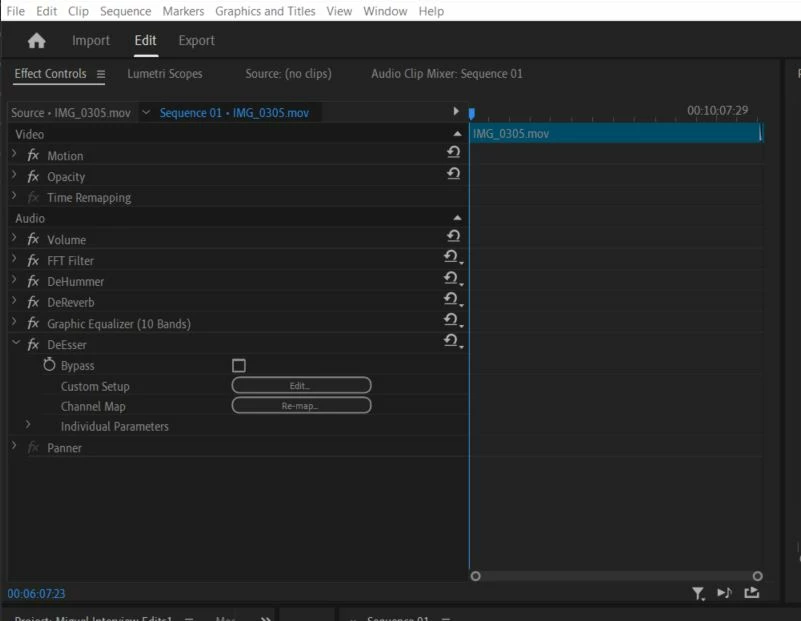
I'm new to Premier Pro and I'm working on my first project.  I'm trying to add some smooth transitions in between takes and it's only allowing me to use the default transitions.  I've searched for help and watched youtube videos, but I do not have a Transitions settings option anywhere.  I updated my software, closed it, and restarted it.  Still, no option to change the transition settings. 
Correct answer Peru Bob

You have the Effect Controls Panel open.

You need to open the Effects Panel to see the transitions.


See here:

https://www.agitraining.com/adobe/premiere-pro/tutorials/understanding-the-workspace#:~:text=You%20will%20perform%20most%20of,performed%2C%20is%20also%20a%20panel.

and here ( scroll down to Apply transitions between two clips)::

https://helpx.adobe.com/premiere-pro/using/transition-overview-applying-transitions.html

1 reply

Peru Bob
Community Expert
Peru BobCommunity ExpertCorrect answer
Community Expert
August 31, 2024

You have the Effect Controls Panel open.

You need to open the Effects Panel to see the transitions.


See here:

https://www.agitraining.com/adobe/premiere-pro/tutorials/understanding-the-workspace#:~:text=You%20will%20perform%20most%20of,performed%2C%20is%20also%20a%20panel.

and here ( scroll down to Apply transitions between two clips)::

https://helpx.adobe.com/premiere-pro/using/transition-overview-applying-transitions.html