
Participant
November 21, 2018
Answered

video visual static/glitches/disturbance/interference on playback

  • November 21, 2018
  • 2 replies
  • 1107 views

Hi there,

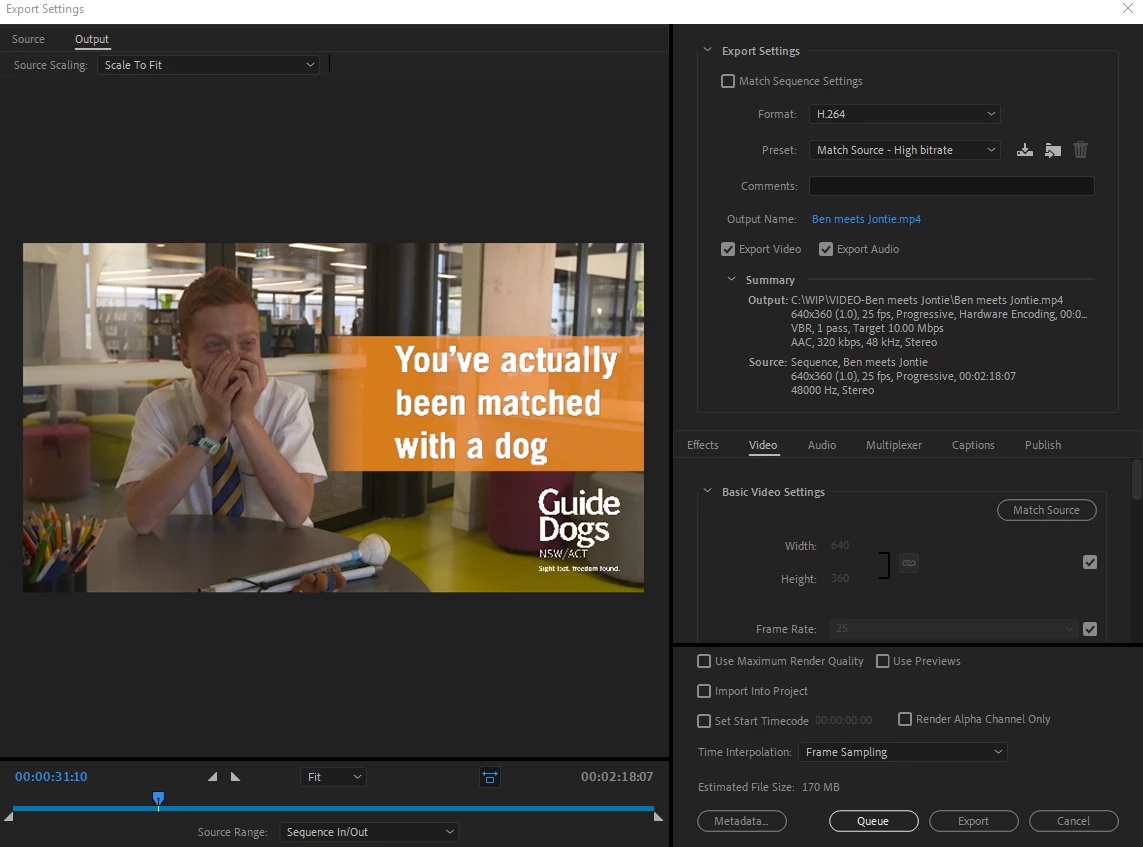
I have a short 2 minute video, which I edited in Premiere Pro 13.0 and is fine within the programme, but once exported (see settings below) it has a couple of areas at the start of the video where it has visual disturbance/interference/static. I'm a relative newby, so go easy on me

I can't capture the glitch on a screen grab - but here is the link to the video https://youtu.be/NUYY9h_H-JI

It's 2-3 times within the first 20-25 secs

Please help!
    This topic has been closed for replies.
    Correct answer R Neil Haugen

    One thought is to try "Match Source ... Adaptive High Bitrate" as that has worked better for a couple other users.

    Neil

    2 replies

    Participating Frequently
    November 22, 2018

    Why is your sequence such a low resolution?

    Participant
    November 22, 2018

    I'm not sure! where can you see that?

    Participating Frequently
    November 22, 2018

    In your screen grab - Source: Sequence 640x360. Your sequence should generally match your camera resolution and frame rate ie 1920x1080 25fps

    R Neil Haugen
    R Neil HaugenCorrect answer
    Legend
    November 22, 2018

    One thought is to try "Match Source ... Adaptive High Bitrate" as that has worked better for a couple other users.

    Neil

    Everyone's mileage always varies ...
    Participant
    November 22, 2018

    Thanks so much that worked!