
MattWithAHat
Participant
July 14, 2018
Answered

Video without audio track in Premiere Pro

  • July 14, 2018
  • 1 reply
  • 15319 views

Hello,

I am having troubles in importing a video to Premiere Pro. The problem is, that I don't get an audio track after importing. It's missing somehow!

I recorded the video with Icecream Screen Recorder in mp4. I know that Premiere Pro has its troubles with this format, so I used a video converter and converted it to MPEG-2. Still no luck.

Here are the details about the codec it has now:
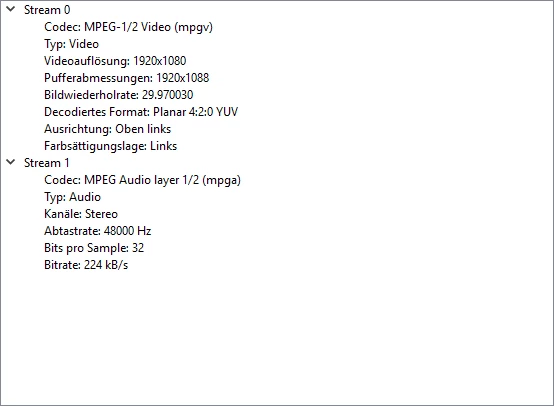
What might be wring with it? Do I need to convert it in a different way?

The original file does have audio.
This topic has been closed for replies.
Correct answer Ann Bens

No audio track on import or audio on import but no audiotrack in the timeline.

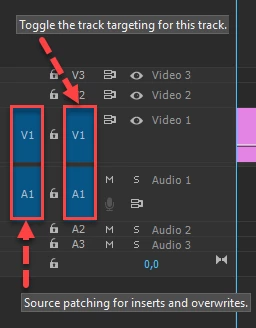
If its the latter make sure you source patch the track:

1 reply

Ann Bens
Community Expert
Ann BensCommunity ExpertCorrect answer
Community Expert
July 14, 2018

No audio track on import or audio on import but no audiotrack in the timeline.

If its the latter make sure you source patch the track:

MattWithAHat
Participant
July 14, 2018

Thank you, that was actually the solution!

The difference between the MP4 file and the MPEG file really was that with the MP4 I didn't have any sound at all after import, while with the MPEG I could play the sound with the source file, but didn't have the audio track. Source patching the track solved that!