
Answered
Videomaterial lässt sich nicht in die Timeline ziehen!
Guten Tag,
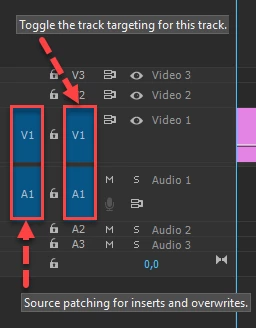
leider habe ich das Problem, dass ich in Premiere Pro kein Videomaterial in die Timeline ziehen kann zum bearbeiten. Wenn ich die App einmal schließe und neu öffne kann ich einen Clip rüber ziehen, danach nimmt er nur noch die Audio, aber nicht das Video!
Wo ist das Problem? Hatte ich vorher noch nie gehabt.
Ich hänge einmal ein Video an auf dem man es erkennt. Wie man sehen kann ist es egal was für ein Video ich nehme. Habe es mit Clips von einer Actioncam probiert in Full Hd mit 60 frames und mit den Videos vom Iphone. Beides leider ohne Erfolg.
Lg Chris
 AdChoices