

Videos are not imported in full length and not in sync
I worked with adobe before and first time I have the issue. The video is
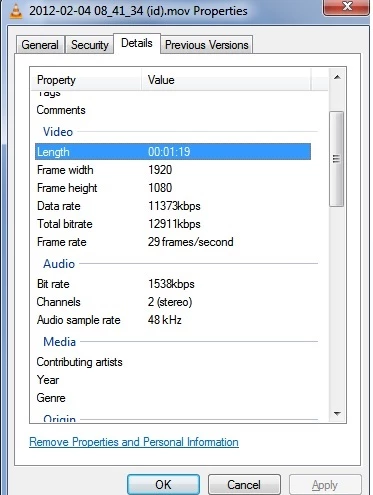
Video properties after right click in Windows explorer
Length 1:19
1920x1080
29 FPS
data rate 11373 kbps
bit rate 12911 kbps
size 122 MB
type mov
audio
1538 kbps
audio sample rate 48 khz
Video properties after importing to adobe
Type: MPEG Movie
File Size: 122.03 MB
Image Size: 1920 x 1080
Frame Rate: 29.97
Source Audio Format: 48000 Hz - 16 bit - Stereo
Project Audio Format: 48000 Hz - 32 bit floating point - Stereo
Total Duration: 00:00:39:15
Pixel Aspect Ratio: 1.0
VR Projection: None
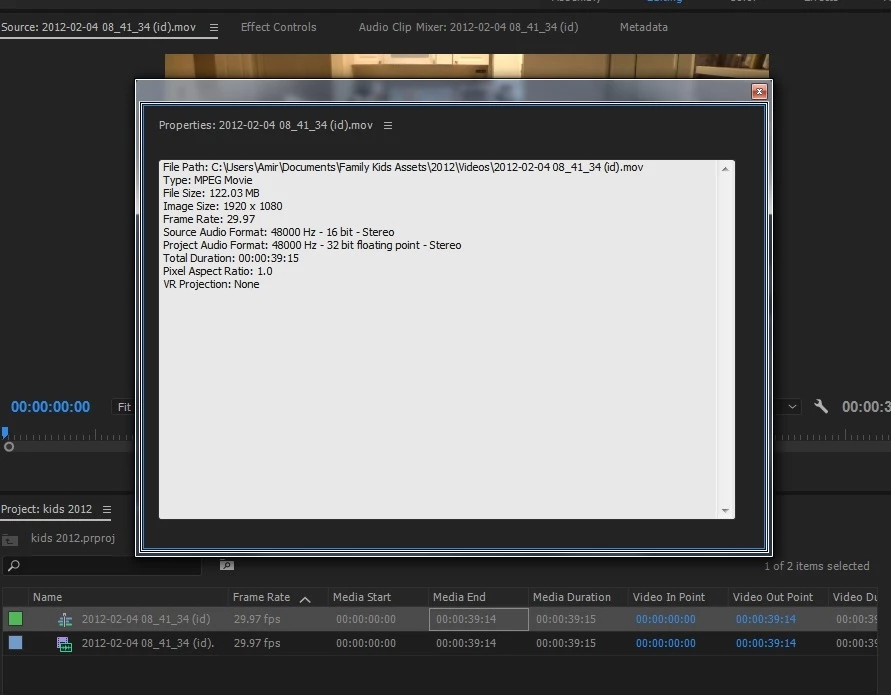
Although the duration is 1:19 (one minute 19 seconds) when importing to adobe it shows 39 seconds. The video and the audio are also not in sync. The issue happens both with adobe premier pro 2017 and premier elements 15 (which both are installed on my PC). Another strange thing is when I pause the playback it shows a different picture than the one it was on. However the playback ends after 39 seconds and not 1:19 as the actual duration is.
This is not an issue with the movie or the computer power.
When I import the same movie to windows live movie maker it imports the full length on the movie 1:19 and there are no sync issues between video and audio.
The only thing I can think about is that I installed premier elements 15 while the premier pro 2017 was already installed. Could it have caused some issue? If not, what can be the problem?
Thank you,
Amir
 AdChoices