Sir_Jimothy_III
Participant
February 10, 2017
Answered

Videos with multiple audio tracks? Simple yes or no really....

  • February 10, 2017
  • 4 replies
  • 15974 views

Forgive me if this has been answered but i have tried searching the web and these forums and not found an answer.  Maybe its because I dont really know what I'm talking about and dont know the technical stuff but heres the question:

So I have some videos where there is sound coming from multiple sources, a game capture card, chat recording and my microphone recording.  I am using OBS to record this, with the game audio on track 1, chat on track 2, and mic on track 3. 

When the video is imported into adobe premiere pro cc does it create a video layer and 3 layers of audio, one for each track?

I dont currently have the latest version of Premiere and don't really want to buy it if it can't do this.  I have got CS5.5, however this cannot handle multi track audio videos.

Many thanks

James
This topic has been closed for replies.
Correct answer Mo Alani

- Download premiere pro cc 2017 trail version

- import the video into premiere

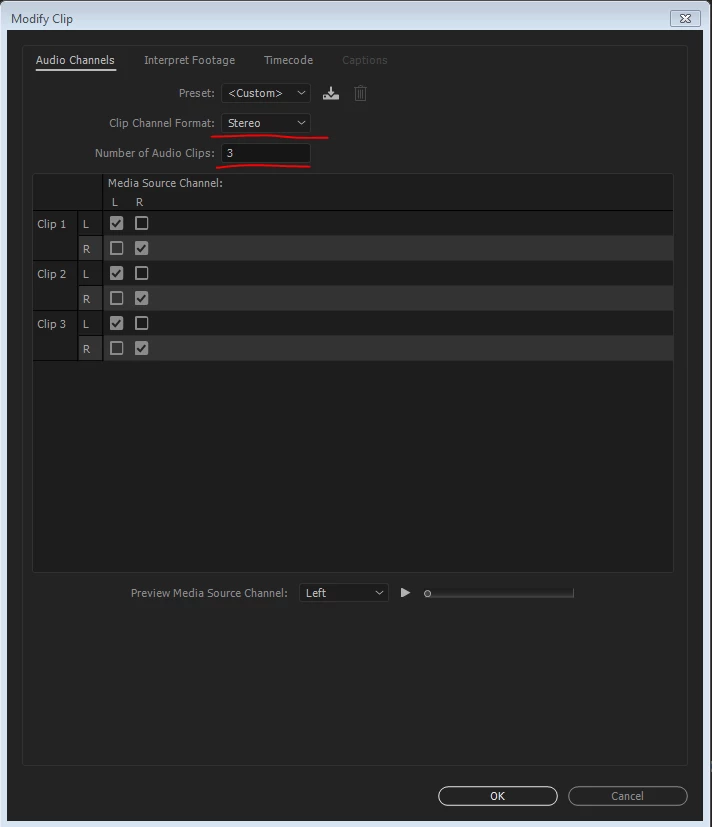
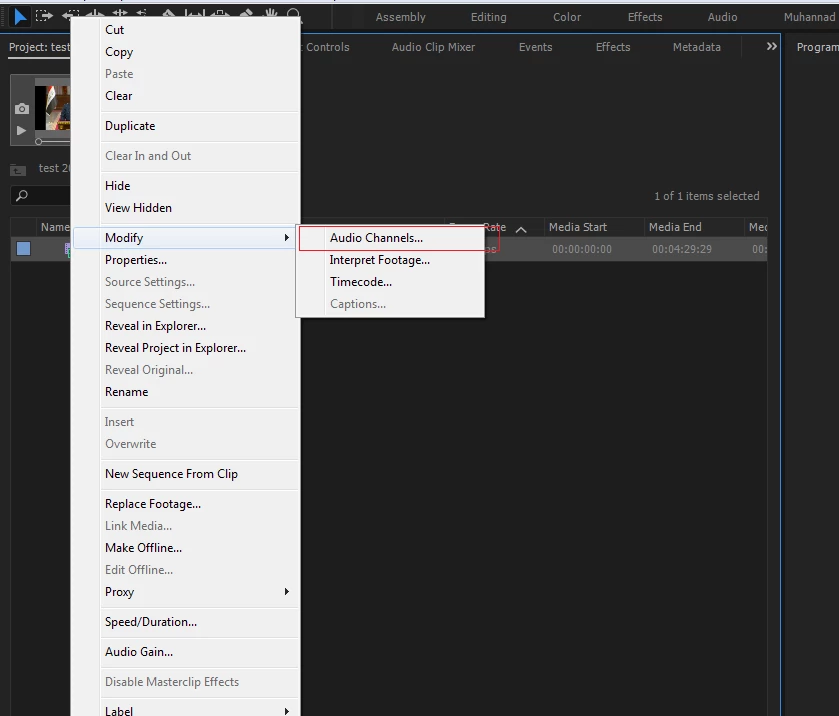
- in the project bin, Right click on the footage you imported and choose Modify> Audio channels

- change the Clip channel as requested and the Number of clips

Now when yu place the footage on the Timeline, you will have 3 layer of audio and 1 layer of video

Muhannad Alani

4 replies

Sir_Jimothy_III
Participant
February 10, 2017

Thanks.  Thats just what I wanted to know.  Im going to get cc2017 but I didn't want to buy it without knowing this can be done.

also I've not seen the option for a trial of it???  Maybe I wasn't looking hard enough

anyway thanks a lot

james

Peru Bob
Community Expert
Community Expert
February 10, 2017

Sir Jimothy III wrote:

I've not seen the option for a trial of it???

Click on "Free Trial."

Buy Adobe Premiere Pro CC | Download video editing software free trial

Just be aware that the trial is only 7 days.

Mo Alani
Community Expert
Mo AlaniCommunity ExpertCorrect answer
Community Expert
February 10, 2017

- Download premiere pro cc 2017 trail version

- import the video into premiere

- in the project bin, Right click on the footage you imported and choose Modify> Audio channels

- change the Clip channel as requested and the Number of clips

Now when yu place the footage on the Timeline, you will have 3 layer of audio and 1 layer of video

Muhannad Alani

Participant
July 24, 2019

how about to set default for that?

Peru Bob
Community Expert
Community Expert
July 24, 2019

You can't change the default.

Legend
February 10, 2017
Ann Bens
Community Expert
Community Expert
February 10, 2017

CS5.5 is ancient.

Download the Pr2017 and see how it will work for you.