Participant
May 24, 2024
Question

videos won't play

  • May 24, 2024
  • 4 replies
  • 439 views

premiere pro does not play the clip and sequence. How can I fix this?
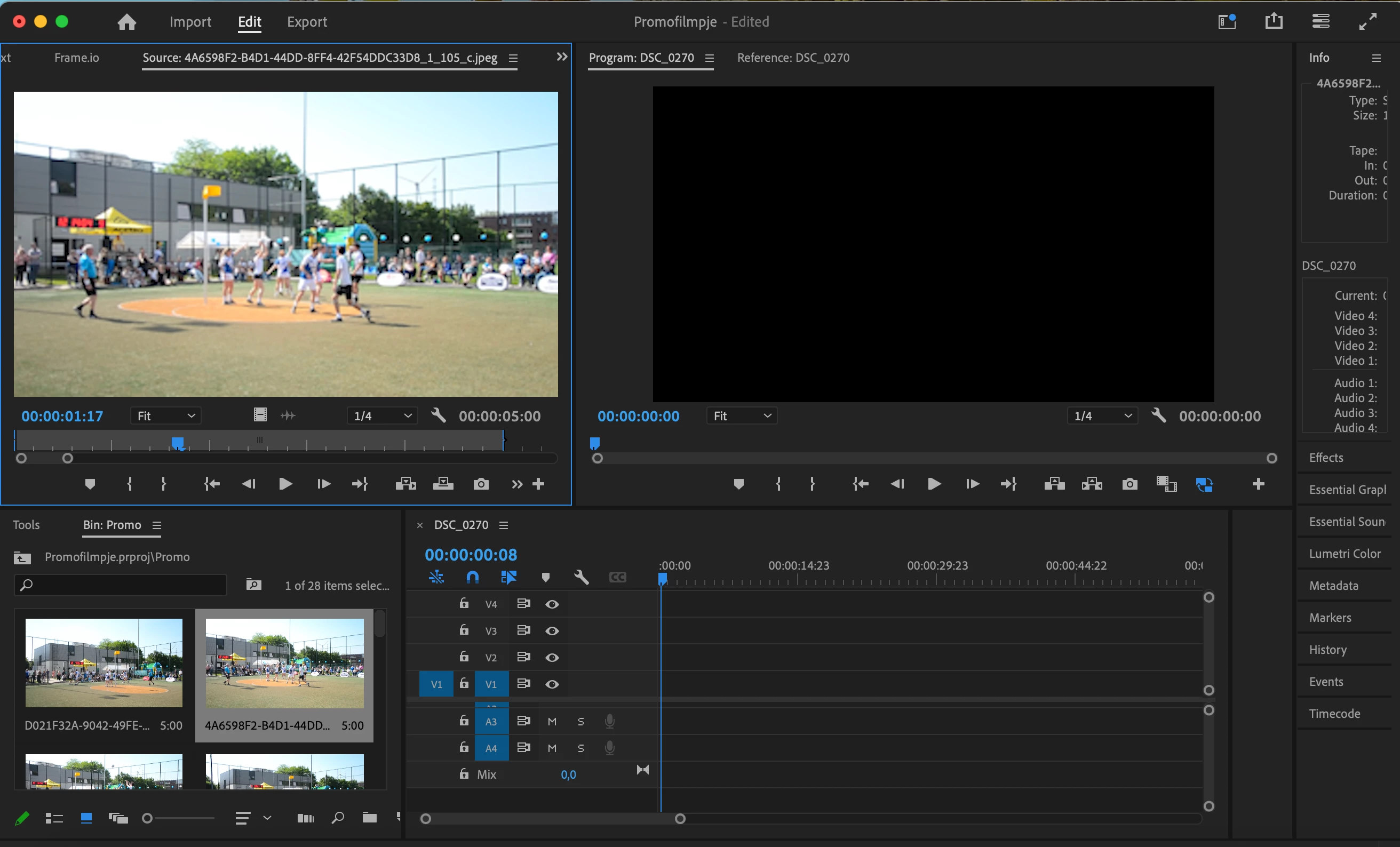
This topic has been closed for replies.

4 replies

Community Expert
May 27, 2024

It looks like your screenshot shows an attempt to play a JPEG image. Since JPEGs are still images, there will be no motion when you try to play them. Make sure to use a video file if you expect to see motion. If you need further assistance, feel free to ask!

Participant
May 27, 2024

Hi, thank you for the answer. On the screenshot i had sent i indeed see that it is a jpeg file, indeed that was not going to work, but i also have it with the right video files that they don't want to play. 

Community Expert
May 27, 2024

Make sure your Audio Hardware settings are correct.

MarekMularczyk
Community Expert
Community Expert
May 24, 2024

Are you saying it doesn't play the clip you have in the Source Monitor?


Adobe Community ExpertAdobe Certified Professional
Participant
May 27, 2024
Yes, when I want to play them in the source monitor they won't play and also when I put them on a sequence and want to play them they also don't play.
Ann Bens
Community Expert
Community Expert
May 24, 2024

There is nothing on the timeline to play.
