Inspiring
October 6, 2021
Answered

Visual export problem

  • October 6, 2021
  • 4 replies
  • 692 views

Hello, I am exporting a finished edit.

Original file format: 1920 x 1080 55.13 fps MP4

Exported format: 1920 x 1080 60 fps H.264


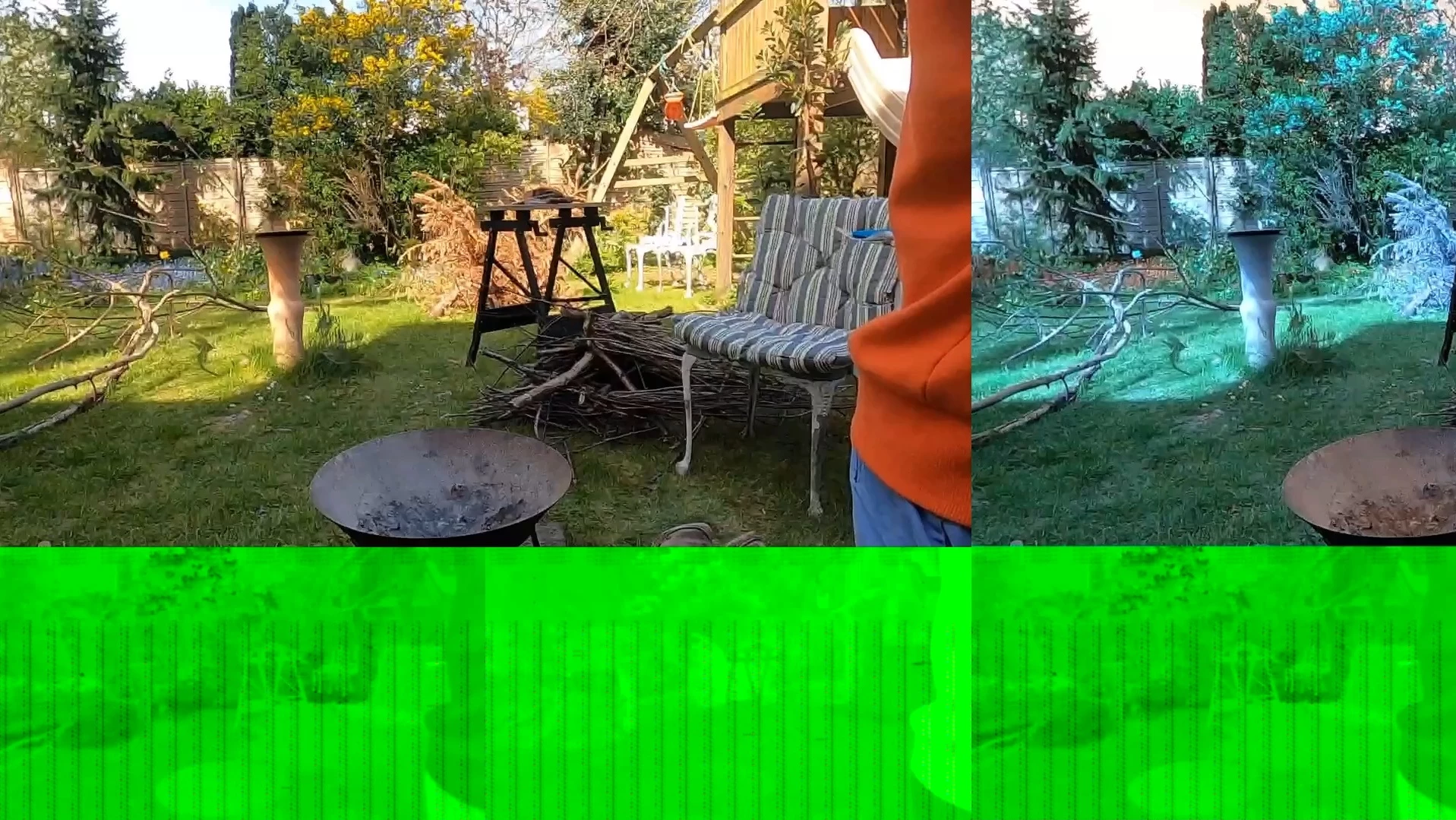
I have also attempted exporting at various different frame rates and formats, I've also run it through Media Encoder to no avail. This is a frame from the export, the issue continues throughout the entire film.


Any ideas?

This topic has been closed for replies.
Correct answer R Neil Haugen

That sort of result is normally a GPU problem, most commonly a driver needing update.


What's your GPU? And if Nvidia, have you tried going to their support page and downloading and installing the latest Studio driver? PrPro tends not to get along too well with the "game-ready" drivers.


Also, looking at your first comment ... 55.13fps is not a normal camera frame-rate. So this is probably a phone or device capture, undoutedly "VFR" or variable frame rate. The camera records a constantly changing number of video frames per second as it sees a need (due to motion or other factors) against a constant audio rate. PrPro sometimes struggles with VFR media.


So at times, conveting the media to constant frame rate via either HandBrake or 

ShutterEncoder (both free utility apps) before importing into PrPro can fix issues due to VFR.


Neil

4 replies

Inspiring
November 2, 2021

Update: I still have this issue, here are a few other things I've noticed that might maybe give us a clue as to what's happening. 

- When I set rendering to Software Only the un-rendered timeline looks normal but any rendered parts show the visual errors. 
- The problem occurs regardless of which renderer I use.
- Updating my studio and other drivers hasn't changed the export. 
- Changing the original file to a constant framerate hasn't changed the export

- I'm not sure which renderer I was using at the time of these errors but I have attached two images of problems I've run into trying to solve this. 

nishu_kush
Community Manager
Community Manager
October 9, 2021

Hi there,


Is there an onboard GPU? If so, try updating its driver. Here's a community discussion around similar issue: https://community.adobe.com/t5/premiere-pro-discussions/random-bars-appear-green-gray-black-in-preview-and-export-pp-2021/td-p/12346939

Let us know if it helps.


Thanks,

Nishu

Inspiring
November 2, 2021

Hi Nihsu, Yes there is an onboard GPU, I've updated the drivers again but unfortunately the problem still persists. 

Community Manager
October 8, 2021

Hi there,


Sorry to hear about this. Have you tried switching the Renderer to Mercury Playback Engine Software Only & checked if it's exporting properly?


Thanks,

Sumeet

Inspiring
November 2, 2021

Hi Sumeet, sorry for the delayed response, it was a good idea and I tried switching the renderer but unfortunately the export still has the visual problem. 


Something of note is that the visual error even appears in the export settings window before I've actually exported the footage.  

R Neil Haugen
R Neil HaugenCorrect answer
Legend
October 6, 2021

That sort of result is normally a GPU problem, most commonly a driver needing update.


What's your GPU? And if Nvidia, have you tried going to their support page and downloading and installing the latest Studio driver? PrPro tends not to get along too well with the "game-ready" drivers.


Also, looking at your first comment ... 55.13fps is not a normal camera frame-rate. So this is probably a phone or device capture, undoutedly "VFR" or variable frame rate. The camera records a constantly changing number of video frames per second as it sees a need (due to motion or other factors) against a constant audio rate. PrPro sometimes struggles with VFR media.


So at times, conveting the media to constant frame rate via either HandBrake or 

ShutterEncoder (both free utility apps) before importing into PrPro can fix issues due to VFR.


Neil
Everyone's mileage always varies ...
Inspiring
October 6, 2021

Thank you for the speedy response Neil, my GPU is a Nvidia GeForce GTX 1080 Ti. It did not have the latest studio drivers so I installed those, I also ran the latest update for PrPro which I accidently missed. Unfortunately the export result did not change. 


I will try and convert the media to a constant framerate and get back to you asap.