
Known Participant
March 22, 2019
Answered

Vobulator Error 322

  • March 22, 2019
  • 2 replies
  • 1490 views

I've scoured old discussions for solutions but haven't had any luck. I make DVD's every month. They are pretty simple. A top menu, and then 4-5 sub menus. The sub menu's have 4 links to videos that I upload as timelines. This month, I encountered the Vobulator/TitlePlanner/CVOBUPlanner.ccp, line 322 error for the first time.

I've tried to move the chapter marker away from the beginning
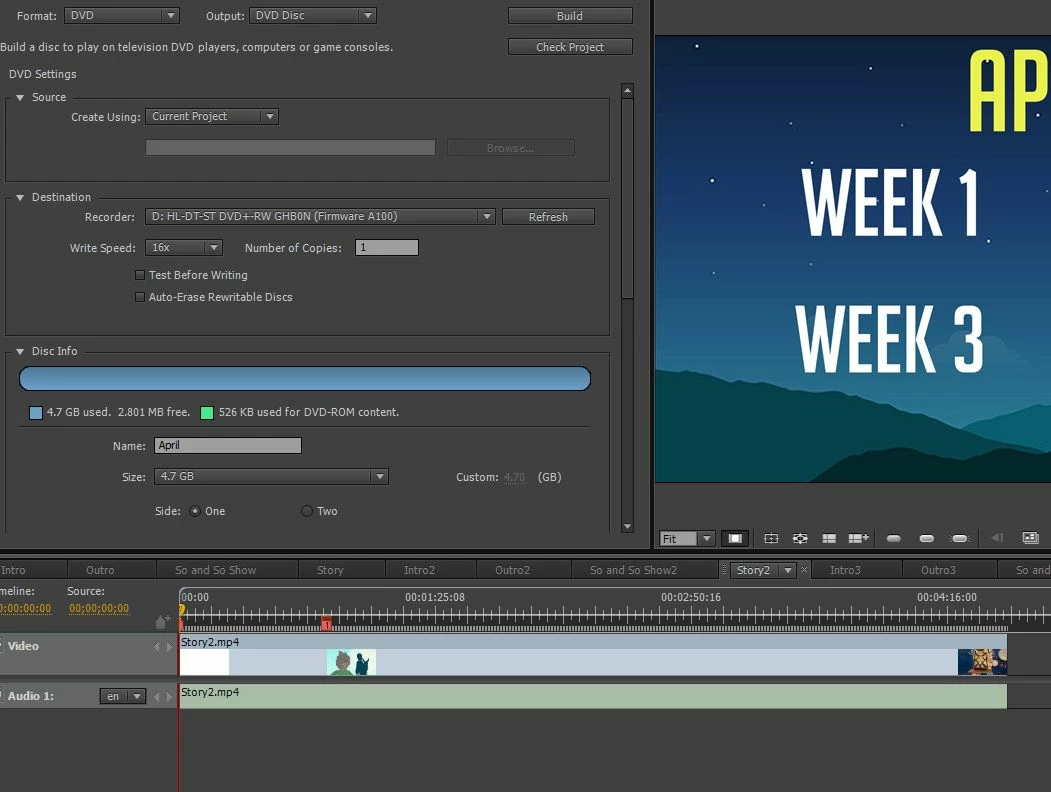
I still have the problem. I only have one video on each timeline. They are the same format, mp4, that the other videos I've used for DVD's are.

I figured I'd try to start a new thread to see if I could find a solution.

This topic has been closed for replies.
Correct answer Stan Jones

Yes, you are reporting the right kinds of characteristics!

Are you sure your error is line 322 and not line 332?

The marker issues can be a couple marker on top of each other anywhere on a timeline.

Since it usually works for you, I doubt it is the source of the problem, but be aware that using mp4's means that Encore is re-transcoding your material.

2 replies

Known Participant
March 26, 2019

Well it looks like the mp4's were some sort of the problem... Converting them to mpeg2 files solved the problem. I'd been using mp4's before, but maybe the latest videos had something else causing it to give me the error code. Also, builds are much quicker when I use mpeg2's, so that's a win! Thanks for your help.

Stan Jones
Community Expert
Stan JonesCommunity ExpertCorrect answer
Community Expert
March 22, 2019

Yes, you are reporting the right kinds of characteristics!

Are you sure your error is line 322 and not line 332?

The marker issues can be a couple marker on top of each other anywhere on a timeline.

Since it usually works for you, I doubt it is the source of the problem, but be aware that using mp4's means that Encore is re-transcoding your material.

neil wilkes
Legend
March 25, 2019

I think Stan has hit the nail on the head here - I can see what looks like the dreaded yellow warning on the marker at the head of the video.

Remember you do not need to add marker 1 - this is automatic - and marker 2 has to be a minimum distance from it (although the exact frame count escapes my memory at this point - will look it up)

Also a good idea not to use MP4 as source material, because as Stan says it will be transcoded.

Known Participant
March 25, 2019

The yellow marker is just the playhead right? I haven't added any markers. I tried to drag the one marker away, and it just moves a square box , but it looks like a a triangle chapter marker stays at the beginning. It won't let me delete either.

I guess it could be the MP4 thing, it's just weird because this is my 7th DVD and I had no issues on the first 6 with the same type of files and same process.