
Inspiring
May 21, 2020
Answered

Voice over only recording for 1 ear?

  • May 21, 2020
  • 3 replies
  • 9820 views

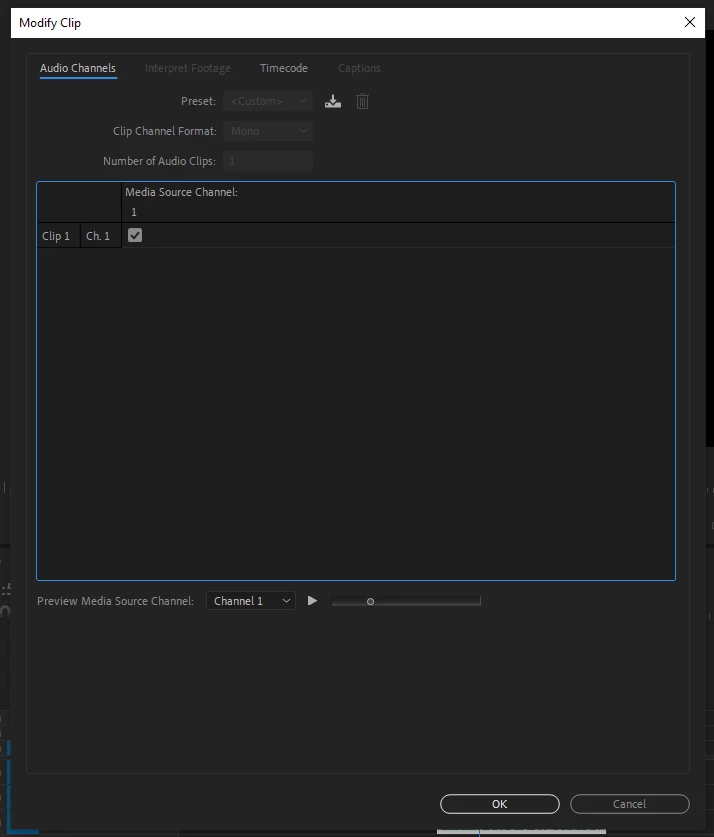
When I attempt to record a voice-over in premiere pro, it only records for my left ear, there is no sound for my right ear, I've attempted to troubleshoot on my own, but everything I've found hasn't been quite the same problem... here is a photo of what is displayed within the audio channels menu of my voice of clip, not sure if it's helpful at all.
This topic has been closed for replies.
Correct answer UhhSean

Its pretty ridiculous that theres not an answer for this. I have a scarlet solo and sm7b that I have to maualy change the audio for ever time I use it. 

3 replies

Participant
October 7, 2023

WHY IS THIS SO CONFUSING AND NOT DEFAULT. WHY IS THERE NOT A MONO TRACK ALREADY THERE. WHY ARE THESE ANSWERS GIVEN BY PEOPLE WHO PAY ADOBE, AND NOT ADOBE SUPPORT THEMSELVES...

UhhSeanCorrect answer
Participant
November 6, 2023

Its pretty ridiculous that theres not an answer for this. I have a scarlet solo and sm7b that I have to maualy change the audio for ever time I use it. 

Participant
May 2, 2023

Just faced the same problem. The solution I found is very simple, and it works:
1. create a new sequence
2. Copy cut/edited (whatever you've done) footage to new sequence.
3. Record your voice-over using "voice-over mic" button. And you will get 2 channel voice-over sound.
Yeah, that's crazy.....

Inspiring
May 21, 2020

Right click on an audio track in the space next to the microphone icon, from the drop down menu choose Add Track:

When the Add Tracks Pane opens, add a mono audio track:

record your vo on that mono track.

MtD