Alek!
Participant
January 3, 2023
Answered

Weird annoying Issue. Samsung Note20 footage refuses to render properly. Any Ideas?

  • January 3, 2023
  • 1 reply
  • 167 views

 A quick 5 minute slice up turned into a headache.. I've tried many different output options, changing LUTS and Lumetri settings, etc. 
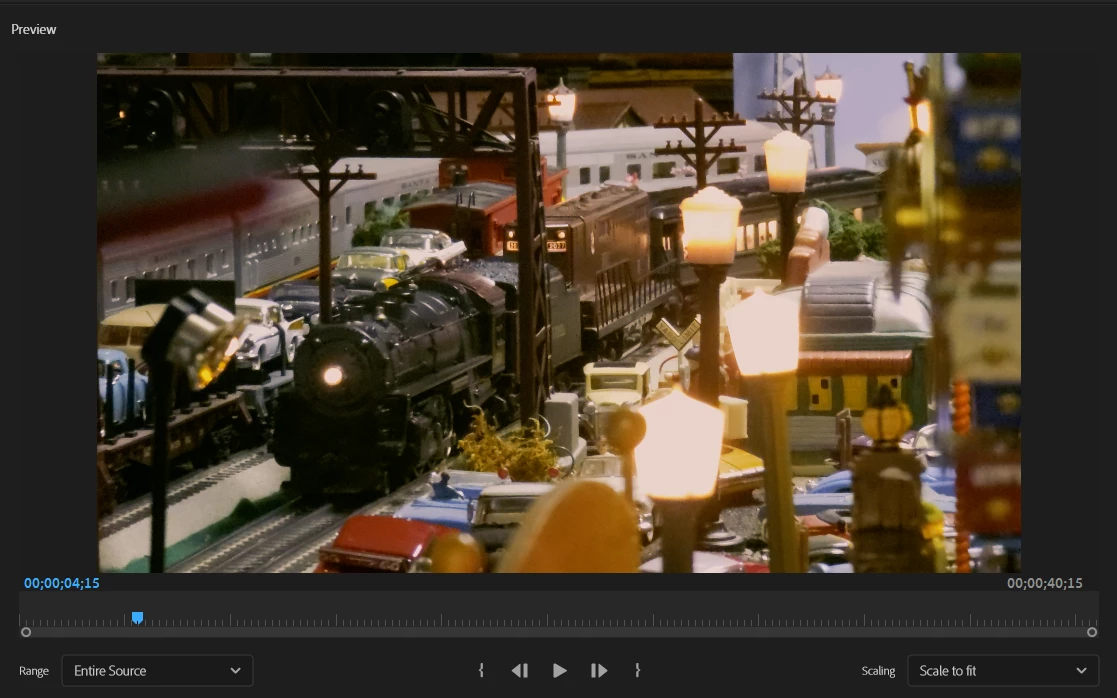
 

As a test, I placed random footage from my DLSR on the timeline, rendered it, and only the phone footage would not render properly as shown above. Any reasons for this or possible solutions?


My only current fix is to use OBS to screen record the preview, which is obviously not ideal. 

Thanks


This topic has been closed for replies.
Correct answer R Neil Haugen

That looks like HLG color space clip placed on a Rec.709 sequence. So ... in the Project panel, check the clip Properties ... and if it's color space is shown as HLG, then right-click/Modify/Interpret Footage, set the Override-to color management option to Rec.709.


Then make sure your sequence is also using a working color space of Rec.709 in the Sequence Settings.


And ... probably turn that phone back to shooting SDR/Rec.709 video ... save the hassles.


Neil

1 reply

R Neil Haugen
R Neil HaugenCorrect answer
Legend
January 3, 2023

That looks like HLG color space clip placed on a Rec.709 sequence. So ... in the Project panel, check the clip Properties ... and if it's color space is shown as HLG, then right-click/Modify/Interpret Footage, set the Override-to color management option to Rec.709.


Then make sure your sequence is also using a working color space of Rec.709 in the Sequence Settings.


And ... probably turn that phone back to shooting SDR/Rec.709 video ... save the hassles.


Neil

Everyone's mileage always varies ...
Alek!
Alek!Author
Participant
January 3, 2023

Those settings fixed the issue perfectly, thank you!