
Participant
August 3, 2017
Answered

Weird motion blur that I can't fix.

  • August 3, 2017
  • 1 reply
  • 758 views

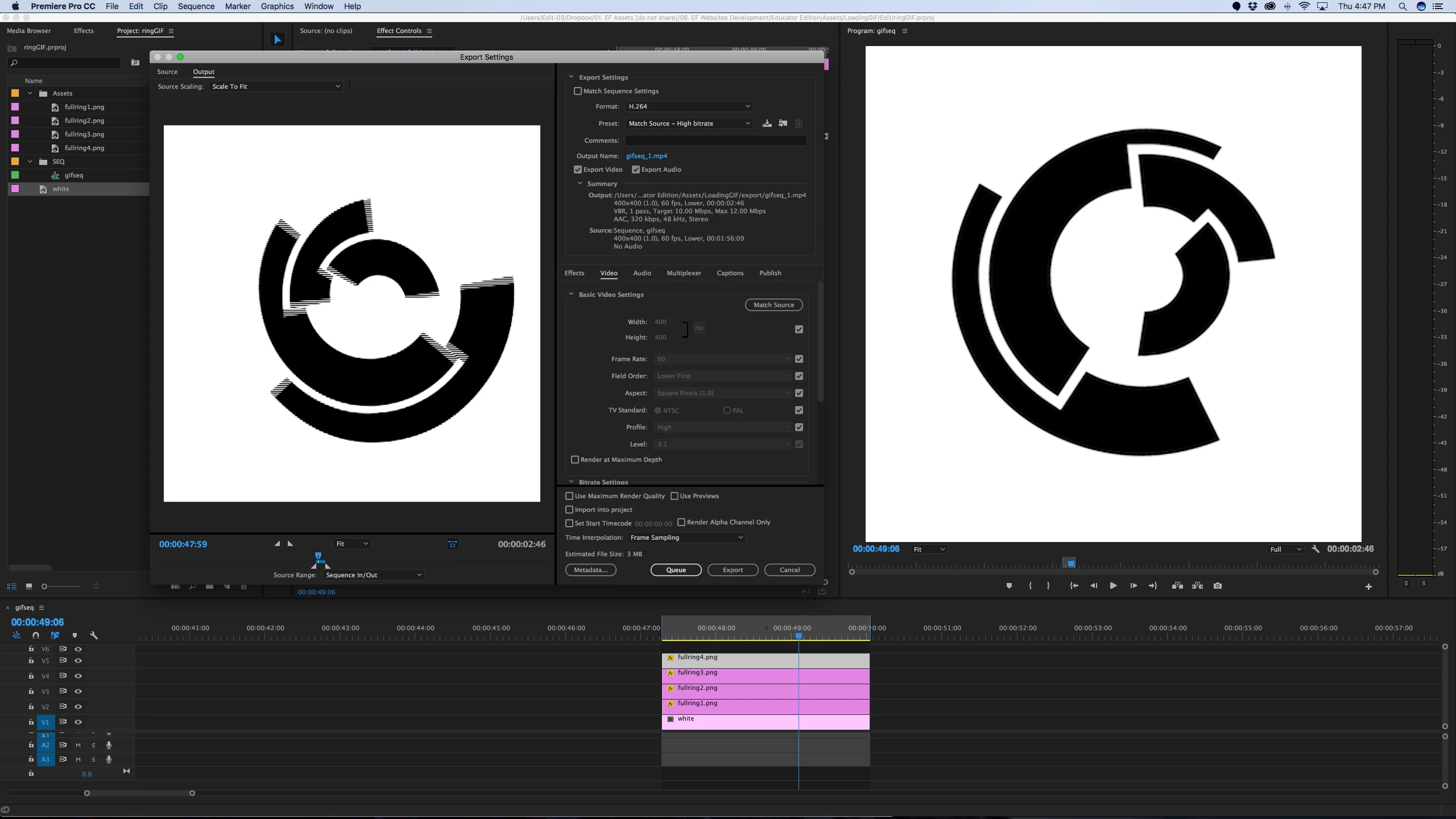
I am doing a simple animation in premiere and when I export the file I get extra motion blur that I don't want.

Preview is fine, file is a square 400-400 pixels 60FPS

Does anyone have a fix or an idea as to what I am doing wrong?
    This topic has been closed for replies.
    Correct answer Ann Bens

    You are not seeing motion blur but interlaced artifacts (fields).

    Your sequence is set to lower field which means it is set to interlaced:hence the stripes.

    Set the fields of the sequence and export to progressive to get rid of the stripes.

    1 reply

    Ann Bens
    Community Expert
    Ann BensCommunity ExpertCorrect answer
    Community Expert
    August 3, 2017

    You are not seeing motion blur but interlaced artifacts (fields).

    Your sequence is set to lower field which means it is set to interlaced:hence the stripes.

    Set the fields of the sequence and export to progressive to get rid of the stripes.