
Participant
March 23, 2018
Question

Weird white glitch at the right side of my render

  • March 23, 2018
  • 3 replies
  • 3719 views

Hi, i'm having a strange problem with my Premiere Pro. When i edit in sequence 1080 x 1080 and want to render my video a white glitch appears on the right side of the video ( check screenshot below ). Does someone had this problem before? What could it be?
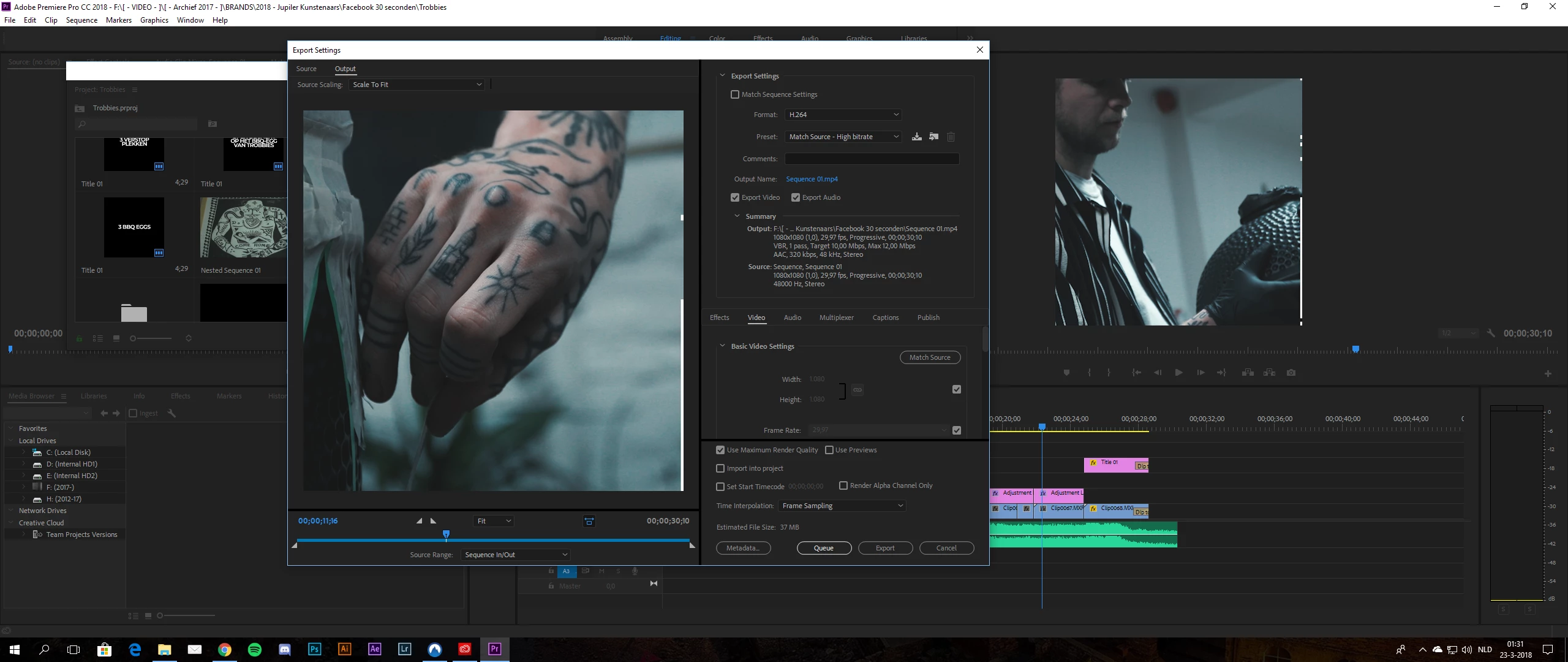
This topic has been closed for replies.

3 replies

Legend
March 23, 2018

Uncheck Maximum Render Quality, bot in the Export Settings and in the Sequence Settings.

If you have GPU processing turned on, you'll get that benefit automatically.  That check box forces the processing onto the much slower CPU.

Ann Bens
Community Expert
Community Expert
March 23, 2018

Might want to read this:

White line flickering on the edge

And file a Bug Report Form

Vishu_Aggarwal
Participating Frequently
March 23, 2018

I have test the same sequence setting you have used(as per screen shot) in premiere pro cc 2018 and I didn't had any issues in the

preview or export

Did you try disable the adjustment layer if not try once with disable adjustment layer because may be effect you have used may be causing the issue.

Also try by unchecking the Maximum render Quality in the Sequence setting and in the export.

If all this does not resolve the issue than try reseting premiere pro preferences , to do so follow  the link - FAQ: How to reset preferences in Premiere Pro?

Give us more information about the media your using like ( format & original size of the media) & effects used on clip & adjustment layer, I will recheck again with similar clip & effects.

Vishu AggarwalAdobe Certified Instructor, Professional and Expert