Legend
June 21, 2022
Frage

Welcome to Adobe Premiere Pro 22.5!
  • June 21, 2022
  • 16 Antworten
  • 19543 Ansichten


Welcome to Adobe Premiere Pro 22.5!

Hello and welcome to the June release of Premiere Pro! Premiere Pro 22.5 is now available for download from the Creative Cloud desktop app. The new features include:

  • Essentials workspace & Vertical Video workspace
  • Proxy improvements:
    • Proxy badges in the Project panel and Timeline
    • Burn-in option for watermarking proxies
  • Gradients for strokes and shadows
  • Improved H264/HEVC Encoding on Apple M1 systems
  • GPU acceleration for the following effects: Magnify, Replicate, Spherize, and Warp Wave
  • Support for RED V-RAPTOR
  • Paste to same track keyboard shortcuts


This update is recommended for all users. 


If you are experiencing any issues, please create a new post explaining your problem rather than placing it here so that we can help. If you have a bug to report or any complaint, please do that on User Voice. 


New Features in Premiere Pro 22.5


New workspaces
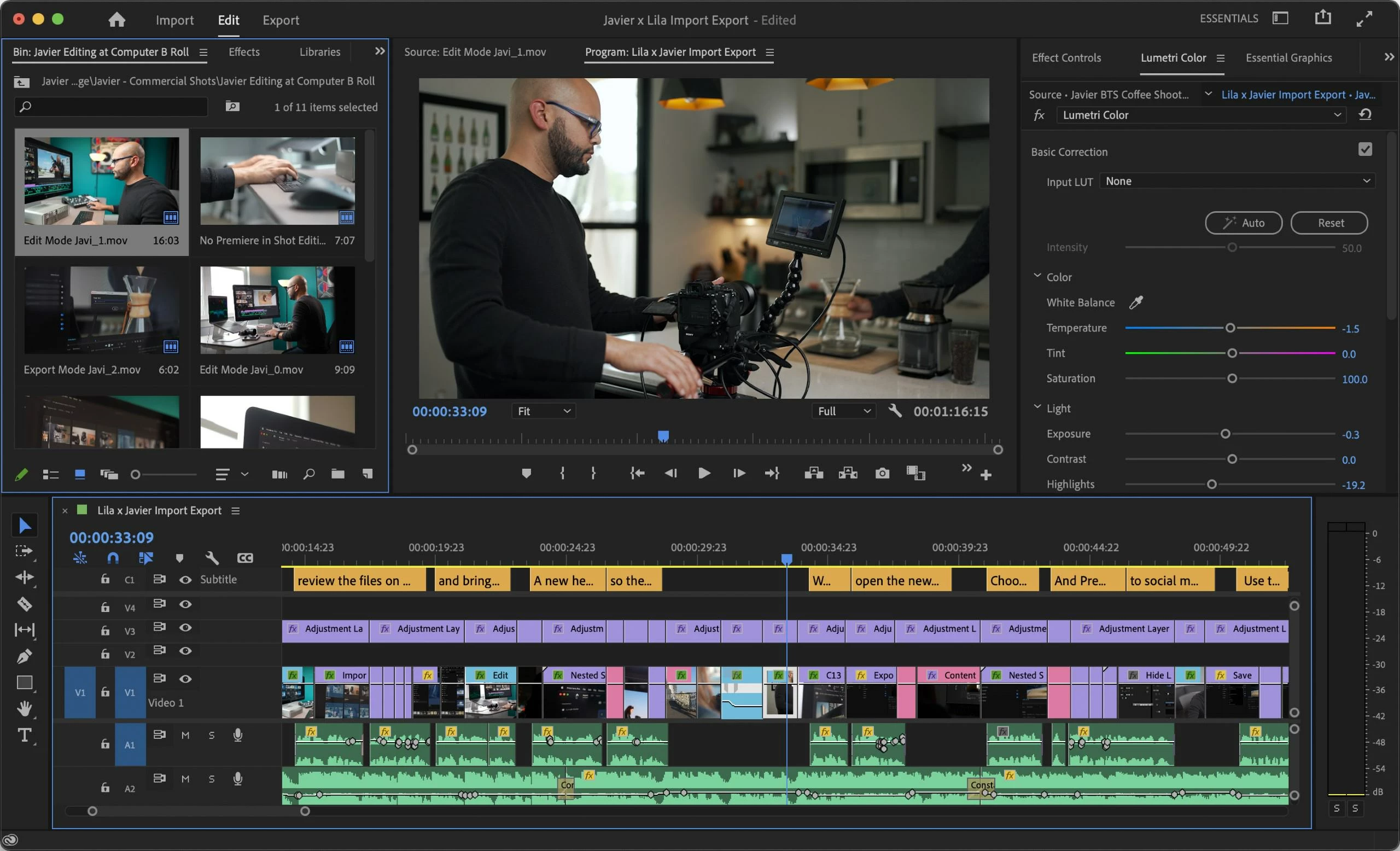
 

Premiere Pro now supports two new workspaces: Essentials and Vertical Video. 

  • Essentials: Provides only the essential panels needed for basic editing.
  • Vertical Video: Provides the ideal layout for working with Vertical Video.


For more information, see:

New Essentials workspace
New Vertical Video workspace


Proxy improvements
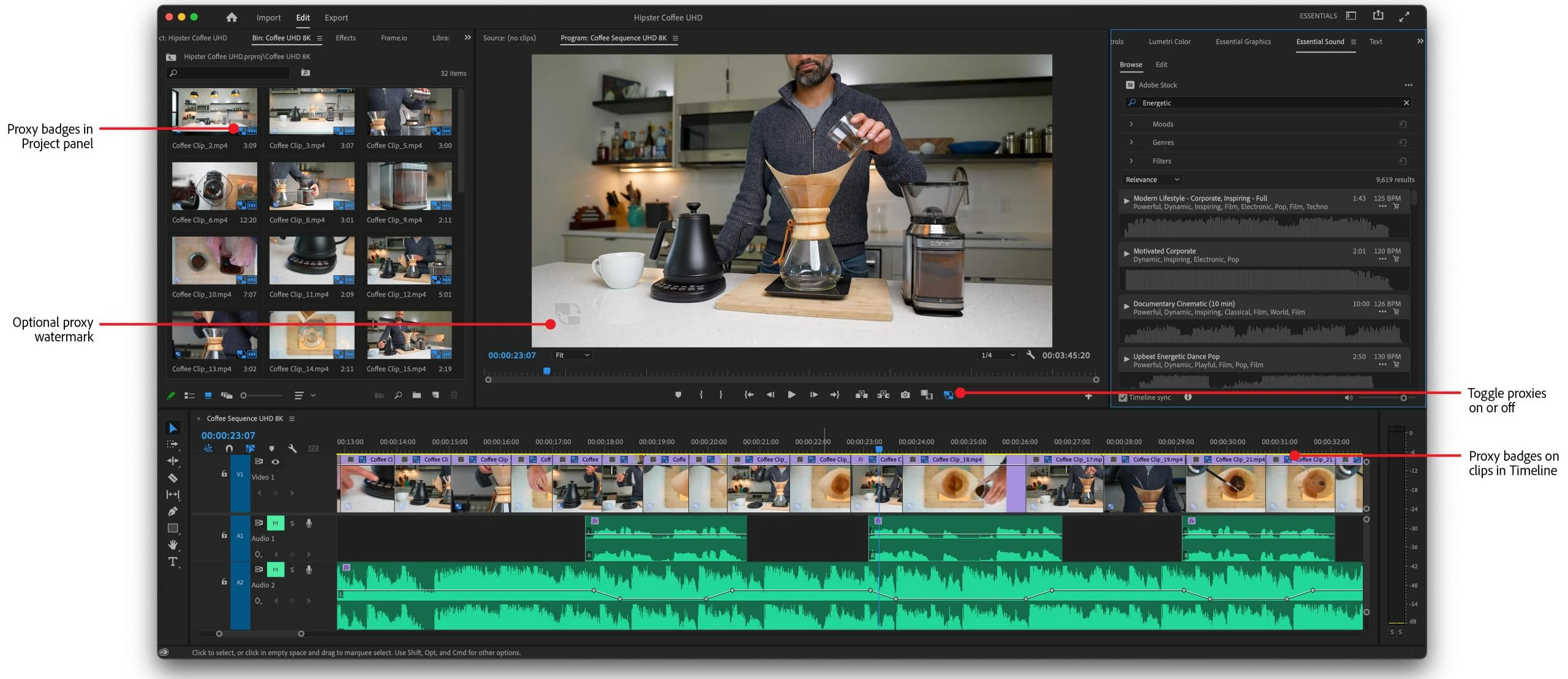
 

Premiere Pro 22.5 has a few new features related to proxies of note: proxy badges and watermarks. These features assist you with visual cues as to whether you have proxies enabled or not. 

  • Proxy badges in the Project panel and Timeline: Proxy badges in the Project panel and the Timeline show you a quick visual cue if proxies are enabled in the UI.
  • Burn-in option for watermarking proxies: You can now automatically add a burned-in watermark for proxies. You no longer have to customize an encoding preset to add a simple watermark. The watermark is seen onscreen in the Program Monitor if proxies are enabled.


For more information, see:

Proxy Workflow improvements


Gradients for strokes and shadows


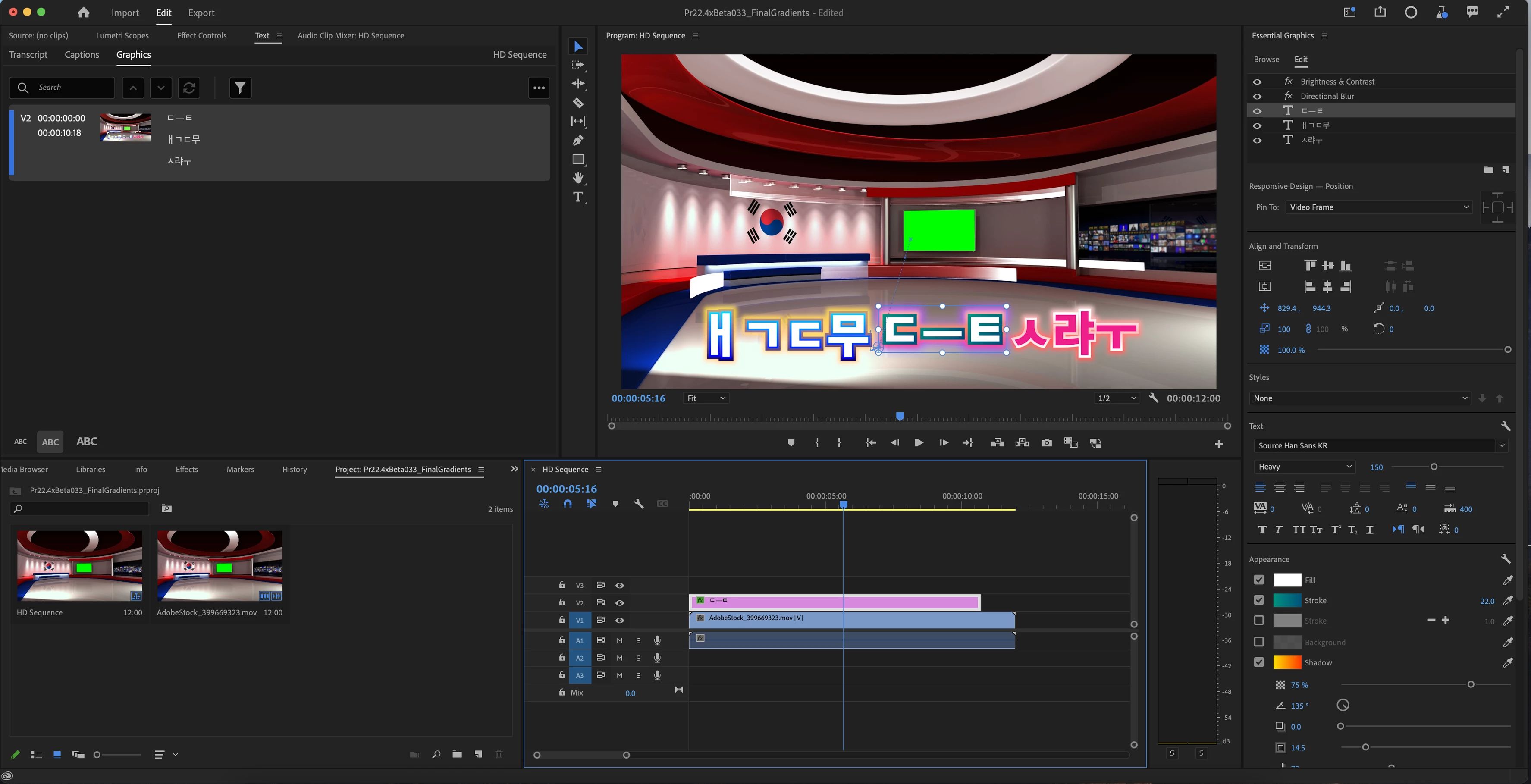
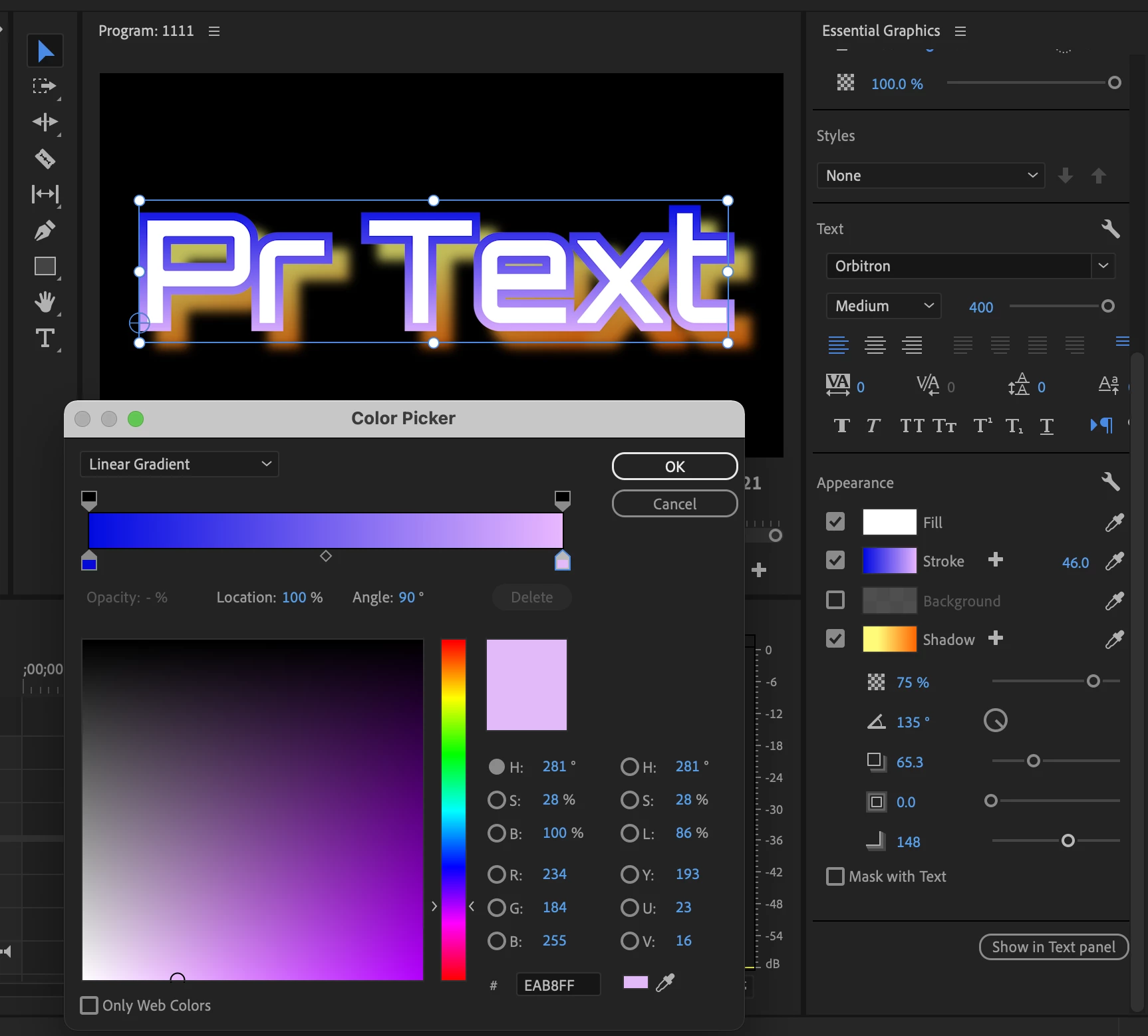
There are now choices for gradients in strokes and shadows so that you can create even more custom looks for text and shapes.


The following are now available:

  • Color Radial Gradient
  • Color Linear Gradient
  • Opacity Radial Gradient
  • Opacity Linear Gradient


Select Shadow or Stroke in the Essential Graphics panel and click the color chip. Then use Color Picker to customize the color for shadows and strokes.


For more information, see:

Gradients for Strokes and Shadows 
Apply Gradients to Text and Shapes


Improved H264/HEVC Encoding on Apple M1 systems

Premiere Pro now has improved the quality of H264/HEVC files encoded on Apple M1 systems.
For more information, refer to this link.


New GPU acceleration for effects

GPU acceleration has been added for the following effects:

  • Magnify, Replicate, Spherize, and Warp Wave

For more information, refer to this link.


Support for RED V-RAPTOR camera

Premiere Pro now offers support for RED V-RAPTOR cameras.


Paste to same track keyboard shortcuts
When copying and pasting assets in a timeline, Premiere Pro now defaults to pasting items to the same track instead of always pasting according to track targeting.  This new functionality can be accessed via four new assignable keyboard shortcuts.

  • Paste to Same Track

  • Paste Insert to Same Track

  • Paste to Target Track

  • Paste Insert to Target Track

For more information, refer to this link.


Premiere Pro Beta

Your feedback and involvement make Premiere Pro a better application. I wanted to thank all of you for contributing to providing input for the Premiere Pro Beta on the forums and User Voice. Thank you!
Go here to learn more about the new features discussed in the Premiere Pro Beta community.


Complete documentation for Premiere Pro 22.5 features

New Features

Fixed Issues

Known issues

16 Antworten

Participant
June 27, 2022

Any update of premiere come with a problem, issue or bug... now i have a pack of transitions of Kyller Holland, before update all transitions work perfect now... its a disaster! please help me or do somthing to fix... its disgusting... adobe make harderd witch any upgrade...''


Moderator note: please avoid profanity, even if implied with initals. We have minors reading here. Thanks.

Legend
June 28, 2022

You need to go to the publisher of the plug-in to see if and when they plan to update the plug in.  Can't realistically expect Adobe to check the compatability of 3rd party plugins with an update...  In the meantime, you can revert to the previous version of premiere in which the plug-in functioned properly.  

Dan@CPV
Participating Frequently
June 28, 2022
Reverted back to previous version. No third party plug in used, simple grades in Lumetri. Source is MXF file from Canon C300 Mark lll, timeline is 23.976 @1080. Thanks for the reply.

[cid:2f37073a-a7c7-4966-9336-19453be6d512]
Kevin-Monahan
Community Manager
Community Manager
June 26, 2022

Hello community,

I found a couple of issues related to certain panels. Performance issues if the Libary panel is open. Stability issues when editing captions when the text panel is open. Closing these two panels remedies these issues for me. I'm on macOS Catalina and 22.5.


I hope you are all well. I am officially on leave right now, so editing more in my spare time. 🙂


Thanks,
Kevin

Kevin Monahan - Sr. Community and Engagement Strategist – Adobe Pro Video and Audio
Legend
June 26, 2022

Good to hear, Kevin. So other Mac users will be aware of this problem. You need to solve it right away, so as not to throw it from update to update.

Kevin-Monahan
Community Manager
Community Manager
June 27, 2022

I let the team know. 


Thank You,
Kevin

Kevin Monahan - Sr. Community and Engagement Strategist – Adobe Pro Video and Audio
Kevin-Monahan
Community Manager
Community Manager
June 24, 2022

Thanks for posting, Sumeet!


Kevin

Kevin Monahan - Sr. Community and Engagement Strategist – Adobe Pro Video and Audio
Participant
August 30, 2022

Still have the same issues with MXF files and Frame substitution recursion attempt aborting after multiple attempts on file. Was this addressed in this update?


Inspiring
June 23, 2022

One small (minor) gripe:

It'd be great if updates didn't wipe out our "Edit Workspaces" menu (ie. what we have placed in "Menu" or "Do Not Show" and their listed order).


I'm assuming this might just be a one-off as new default workspaces were added in 22.5, but it's a bit of a pain to have to drag the now 14 default workspaces into place just so I can restore my menu bar the way I had it before.


Thanks!

Serhii Onyshchenko
Participating Frequently
June 23, 2022

I have a problem with this version. Half of the video project created in version 22.4 stops working in version 22.5, I had to install the old version and then attach the video files because they were out of sync. I have Windows 11, 32 RAM, GTX 1050 ti , Intel(R) Core(TM) i7-8750H CPU @ 2.20GHz 2.21 GHz, Windows 11 Pro 21H2 22000.739

Legend
June 22, 2022

In this update, I finally started loading Pr/AE normally quickly. In version 22.4, I waited for applications to load for about 1 minute, clocked by the hands of the clock. Funny of course. But, thank you for eliminating this oversight. Now I am mounting in the new Essential workspace, everything is good. However, I still don't understand why they did it, since Premiere allows you to customize the areas for yourself. I generally vote for hard workspaces. Each step in creating a product should lie in its own area, without the possibility of change. Once we have made Essential, let the developers make a workspace for working with metadata. The very initial area where you can filter the material, give the media status, group by data and immediately mark them with color. There will be an idea: in which location, on which camera and on what day it was filmed.

Legend
June 22, 2022

Thanks separately to the developers for the long-awaited and very important fix for playing Playheads on the timeline at double speed and higher. After five updates, the stuttering disappeared. Keep it up, guys. A new update is dedicated to everyone who suffered )