
Known Participant
October 23, 2024
Answered

Were horizontal / vertical graphic alignment buttons removed by the latest update?

  • October 23, 2024
  • 2 replies
  • 802 views

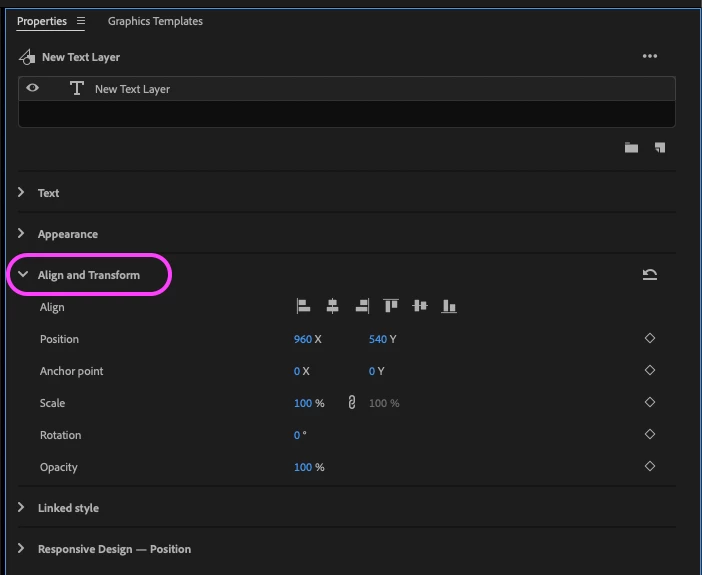
Since updating to Premiere 25, I cannot find the graphic alignment buttons anywhere. (The ones which you can press to align a graphic, usually text, to horizontal and vertical centers and/or edges.)


I used these buttons all the time for my job, and I don't know if they've simply been moved elsewhere in the new interface, or if there's a new method I'm supposed to use to align text & graphics in frame now. I've resorted to eyeballing the position of text & graphics using the safe margins overlay, but this is obviously vastly less efficient than just clicking two buttons to align to horizontal and vertical centers like I could before.


Surely there's something I'm missing? Any help is very appreciated!


Windows 11, Premiere Pro version 25.0. 
Correct answer Annika Koenig

Perhaps you are thrown off by the reordering of the sections? Align and Transfrom and been moved slightly down in favor of moving Appearance up

2 replies

KC Jones Sarasota
Participating Frequently
December 21, 2024

I select the text layer and my graphic later with a box in it.  I can't find the Align and Transform.  It's not in properties and it's grayed out in the graphics.  I am so frustrated. WHY does Adobe feel the need to move things we use often.  IT doesn't make life better, it makes it worse.

Adobe Employee
January 7, 2025

Can you share a screenshot?

Annika KoenigCorrect answer
Adobe Employee
October 23, 2024

Perhaps you are thrown off by the reordering of the sections? Align and Transfrom and been moved slightly down in favor of moving Appearance up

Known Participant
October 23, 2024

Hi Annika, I realized from your screenshot that I wasn't in the new "Properties" menu for the graphics; I was using "Effect Controls." I was confused because all the other tools, like font, size, position, stroke, shadow, etc. were all in Effect Controls now, but align specifically was not. I've added the Properties menu to my ribbon now. Thanks for your help!

Adobe Employee
January 7, 2025

Great! I agree that the duplication of some but not all controls in the Effect Controls panel can be confusing! Reason is that Alignment cannot be keyframed, so we did not add it to the Effects Controls.