Inspiring
July 12, 2024
Answered

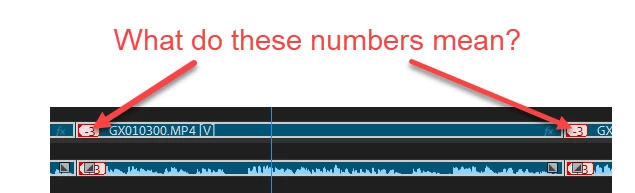
What do these numbers mean?

  • July 12, 2024
  • 3 replies
  • 641 views

These numbers just appeared in my clips.  Just wondering what I did to cause them.

This topic has been closed for replies.
Correct answer MyerPj

You don't need to unlink them, with nothing selected, alt-click the audio or video track you want to move, and then alt-left or right arrow to nudge the clip into sync. Also, if you right-click the out of sync marker you can select one of the options to put it back into sync.

3 replies

MyerPj
Community Expert
MyerPjCommunity ExpertCorrect answer
Community Expert
July 12, 2024

You don't need to unlink them, with nothing selected, alt-click the audio or video track you want to move, and then alt-left or right arrow to nudge the clip into sync. Also, if you right-click the out of sync marker you can select one of the options to put it back into sync.

JohnnyAirAuthor
Inspiring
July 13, 2024

Thank you.  Just need to do a bit more learning to get my head around Move into sync versus Slip into sync

MyerPj
Community Expert
Community Expert
July 12, 2024

Those are out-of-sync markers, if you alt-click to select either audio or video and then nudge the clip, it will go out of sync with it's linked counter-part.

R Neil Haugen
Legend
July 12, 2024

It thinks the video and audio are "off" by that amount.

Everyone's mileage always varies ...
JohnnyAirAuthor
Inspiring
July 12, 2024

Thank you.  I fixed it manually by unlinking the clips and dragging them to synchronise. Is there another way to do this other than manually?