
Participant
February 16, 2018
Question

What does "Makes the color broadcast safe" mean specifically

  • February 16, 2018
  • 1 reply
  • 14462 views

When making a Color Matte, I've noticed that if you try to pick certain colors, Premiere Pro will throw up a little warning exclamation mark with a suggestion to use a different color. When you hover your mouse over it you get the info "Makes the color broadcast safe". Below is a picture of that.
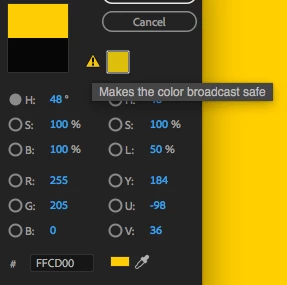
As a bit of an explanation of how I got here, the organization I work for has specific brand guidelines for which colors to use and my department has noticed that when we use their suggested colors for graphics/ text, some of those colors shift after exporting. I looked further into those colors and in the vectorscope some of those color appear outside of the rec709 color space hexagon thing. And of course with those colors Premiere Pro throws up that warning about changing the colors to be "broadcast safe".

So, on to my question. When Premiere Pro is suggesting "broadcast safe" colors, how is it coming to the conclusion that the color it's suggesting is the closest broadcast safe color? Like, is it picking a value that the closest color within rec709 and with luminance values between 0 and 255, or perhaps it's suggesting a color that is the closest color within rec709 and also clamps luminance values between 20 and 235?

Also, for the orange color with hex code #FC8900, which is one of our branding colors and is outside of the rec709 color space according to the lumetri vector scope (image below)
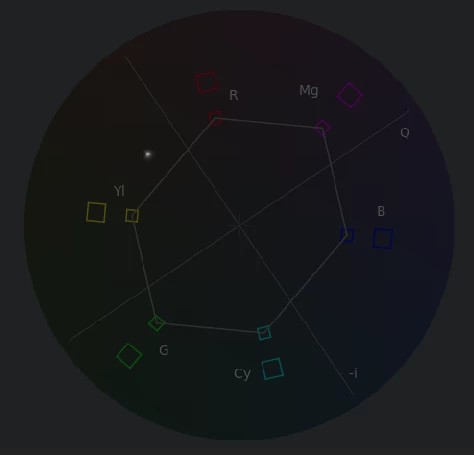
Premiere Pro recommends the hex code E58601 instead (both of which have the same RGB values of 252, 137, 0 oddly enough). But when you look at the vectorscope for this orange color that Premiere Pro says is "broadcast safe" you can see that the color is outside of the rec709 hexagon pictured below).
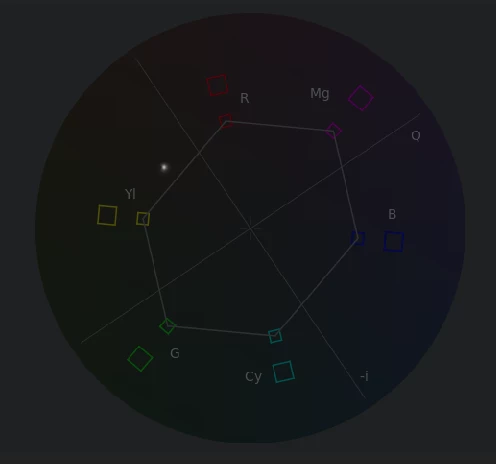
So is this orange actually broadcast safe? Is that hexagon merely a suggestion to keep your colors close to it instead of being a rule to not pass it?

Thanks for reading this!

This topic has been closed for replies.

1 reply

chrisw44157881
Inspiring
February 16, 2018

you can't use the vectorscope exclusively. it only shows chroma, not luma. chroma should not go past 204 and luma 16-235.

how does it look when you use this broadcast safe preset?

CreativeCOW

Participant
February 20, 2018

Got it, I didn't understand that the vectorscope YUV only shows chroma, but that does make a lot of sense. Is that the same with the Vectorscope HSL?

I tried that preset, but it looks like it just roughly clamps the chroma and luma values of everything it's applied to regardless of if it needs it or not.

Also, I tried rendering out an H.264 MP4 with all of the colors I'm testing, since that's rec709, and weirdly enough all of those colors that Premiere says are not broadcast safe seem to look fine. I'm not sure why that seems to be the case as I would think that some of those colors should clip out of rec709, but I guess that's good news!

R Neil Haugen
Legend
February 21, 2018

That "broadcast safe" thing is a warning that the color is typically by saturation (chroma) though also by brightness (luma) perhaps outside "broadcast safe" limits as would be seen by a QC checking rig at a broadcast facility. If you're not going to be using a regular television style broadcast, you can go past it typically ... maybe ... sort of. Depending, you know? (Yea, it's that murky.)

So it depends on the intended use ... what will you be delivering this for? Web general web use, their website, b-cast, movie theatre ads, what?

If you are going to be delivering this for television/cable/satellite broadcast, that trace sitting out there is rather problematic. Of course, if you are going to be worrying about b-cast, I would definitely get the spec sheet from the service that's b-casting it, and if possible ... get a test of all your questionable bits NOW rather than delivering and hoping to pass QC. So ... uploading a short test segment with the various out-of-safe appearing elements in quick sequence, you'll probably find any that need correcting.

I have some colorist friends, who of course deal with branded colors all the time ... and roll their eyes about the marketing person that comes in for a client-attended grading session who wants to be sure a specific color is accurate whether it's in mids, highlights, or shadows ... and good gravy, that hue is so far outside saturation limits it will NEVER pass QC ... but the marketing person insists on the exact pantone sample color showing sampled from the screen.

Um ... Houston, we have a problem here ...  lol

Neil

Everyone's mileage always varies ...