
Legend
November 9, 2019
Answered

What exactly does "obsolete effect" mean?

  • November 9, 2019
  • 1 reply
  • 6683 views

I'm new to PPro, and only used 2019 for a few months before updating to 2020 recently. I really appreciated the Shadow/Highligh effect before, but now suddenly in 2020 it's labeled as an "obsolete effect". It appears to still work, so I'm not clear on what that means exactly? I'm kind of afraid to use it and get sucker punched somehow. I really do need to use that, so what should I do instead? Yesterday, I tried another effect that was labeled "obsolete" (don't remember which one, doesn't matter") and a dialog asked if I wanted to try the replacement effect instead. Okay, that makes sense... it's obsolete because apparently there's a new/improved effect. But I was not directed to any replacement effect when I applied Shadow/Highlight. Can someone please explain to the new guy exactly what "obsolete effect" means, and how to react to it? Thanks.
This topic has been closed for replies.
Correct answer R Neil Haugen

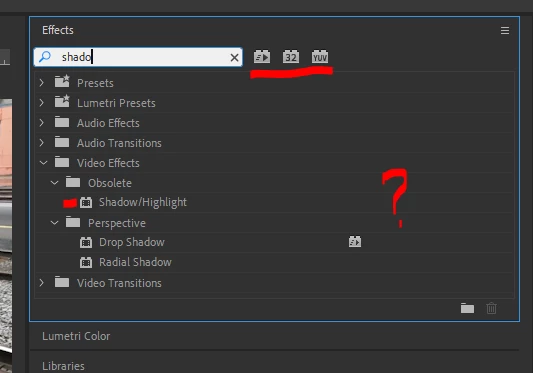
The "Obsolete" effects are old ones that frequently use old code or do not have proper color coding in them. This is definitely one of those. See this image ... not the three "lego blocks" at the top ... they are for GPU accelerated, 32-bit float, and YUV color space.


Now look at the line of the Shadow/Highligt effect ... it has no lego blocks at all:


So it is an old code 8-bit effect. You don't want to use that as it drops any corrections down to 8 bits. The Lumetri color panel, using the Color workspace, is where you really should do color and tonal corrections in Premiere these days. It is entirely 32-bit float front to back.


Neil

1 reply

R Neil Haugen
R Neil HaugenCorrect answer
Legend
November 9, 2019

The "Obsolete" effects are old ones that frequently use old code or do not have proper color coding in them. This is definitely one of those. See this image ... not the three "lego blocks" at the top ... they are for GPU accelerated, 32-bit float, and YUV color space.


Now look at the line of the Shadow/Highligt effect ... it has no lego blocks at all:


So it is an old code 8-bit effect. You don't want to use that as it drops any corrections down to 8 bits. The Lumetri color panel, using the Color workspace, is where you really should do color and tonal corrections in Premiere these days. It is entirely 32-bit float front to back.


Neil

Everyone's mileage always varies ...
cre8vimpAuthor
Legend
November 9, 2019

Thanks so much! That is very helpful.