
Participant
July 26, 2024
Question

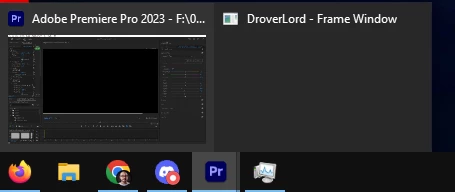
What is DroverLord - Frame Window?

  • July 26, 2024
  • 2 replies
  • 1863 views

Hey everyone,

I was just working on a project in Premiere Pro 2023 (on a PC running Windows 10 64 bit), when I noticed that the Premiere Pro icon on the taskbar shows two windows stacked on top of each other. When hovering over it I see a transparent window called "DroverLord - Frame Window". Based on the minimal info there is regarding this I gather that it's related to some sort of error reporting for Premiere Pro. I haven't had any issues all night while editing so I'm wondering why I'm seeing this. Can anyone shed some light as to what this is about?


Thanks!
2 replies

Participating Frequently
August 4, 2025

My issue is that my project crash and when I opened it, my timeline stopped populating. When I close the sequence this DroverLord - Frame Window appears.


caroline_edits
Community Manager
Community Manager
August 8, 2025

Hey there,

Sorry for the crash issue. I'll ask around about the specifics of what "DroverLord" indicates, but I think it indicates a section of our base code.


Did you ever resolve the issue with your timeline? Did you try resetting the app? This thread is pretty old, feel free to create a new one in the Premiere community board.


Caroline

Participating Frequently
August 18, 2025

Had the same issue, the way I could recover my project was by exporting de project to Final Cut XML format and open the XML in a new project!
I couldn't find any other topic in the community, hope this help!

Nick Lear
Inspiring
November 11, 2024

Also wondering this today!

Nick Lear
Inspiring
November 11, 2024

Remembered it's part of the code base to do with windows. eg https://www.autohotkey.com/boards/viewtopic.php?t=127754