
mike.d.cook23
Participant
July 9, 2021
Beantwortet

What is the difference between these two icons for nested sequences?

  • July 9, 2021
  • 7 Antworten
  • 5150 Ansichten

Hi there, I make nested sequences a lot for multicam edits. However, sometimes my nested sequences will not open as the others regularly do, and I can't figure out how to do so when I need to color correct the nested video tracks. This always happens when there's a different looking icon then the normal looking sequence icon. Here are the two icons with the top one being the one that won't open with a sequence as the others normally do:
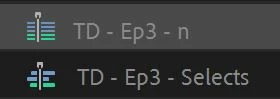
Can' someone please explain the difference? And if it's possible for me to make the top one like the bottom one? Thank you.

Beste Antwort von kyles60831817

Ok just figured it out. When you right click in the project panel there's an option for "Open in source Monitor" or "Open in timeline" and open in timeline fixed the problem. Still a confusing feature that just lost me an hour troubleshooting while I'm on a deadline. This should be looked at, still no idea how I toggled the symbol to change and still haven't figured out how to change it back, but at least I was able to access the timeline again.

7 Antworten

movinpics
Participant
May 12, 2025

I am still stuck with this problem.... Open source shows in the monitor, but I still don't see the sequence in the timeline where I need to edit color on original clips. Very frustated! Delivery to client delayed. (I have been using Premiere for 14 years... not like I am a beginner)

MyerPj
Community Expert
Community Expert
May 12, 2025

Right-click multi-cam source sequence and Open in Timeline, does not work for you?

MyerPj
Community Expert
Community Expert
February 2, 2025

This thread is mind-boggling!

🙂

Participant
February 1, 2025

Daaaamn, both me and whole my crew got crazy coz of it, but mentioned solutions worked.


Participant
September 20, 2022

This was frustrating me like crazy until i realized why it switched. Did you ever "match frame" on the multicam clip? The icon appeared like it usually does, then the moment I hit "F" for match frame in my sequence, the multicam nest then switched icons. Now I can't switch it back. 

Participating Frequently
December 29, 2022

Yes! I use a logitech gamepad for hot keys and had accidentally added an "F" instead of what I needed, so it took me a long time to realise I had inadvertently use 'match frame' then it all went up the creek for me with this bloody icon.
If anyone works out how to change the icon back PLEASE let us know here! I am not one to complain too much, but it's bloody annoying to be paying through the nose every month to trouble shoot things like this!!

Participant
August 3, 2022

I'm with you. That icon made me mad. I have done nothing special for that sequence but it somehow appeared like that. Kind of troublesome to right click and open in timeline.

Participant
April 10, 2022

It appears the problem was identified here but not solved. I'm having the same issue, somehow my source sequence for my multicam sequence icon changed as pictured above, but I can't figure out how to change it back. When I double click I just see the multicam monitor but no timeline. I use the timeline to apply effects to the source clips and I can't access it now. How do you toggle it back and forth? 

Participant
April 10, 2022

Ok just figured it out. When you right click in the project panel there's an option for "Open in source Monitor" or "Open in timeline" and open in timeline fixed the problem. Still a confusing feature that just lost me an hour troubleshooting while I'm on a deadline. This should be looked at, still no idea how I toggled the symbol to change and still haven't figured out how to change it back, but at least I was able to access the timeline again.

Participant
February 9, 2024

This drove me crazy, nonetheless i found a solution. You need to select the media on the timeline and create a sub-sequence, this doesn't solve the whole problem because when i toggle multi cam i see a duplicate of my video, and I can't seem to flatten the timeline, the option is not existing.


Ann Bens
Community Expert
Community Expert
July 9, 2021

1 = multicam source sequence, 2 = regular sequence.

mike.d.cook23
Participant
July 9, 2021

Thank you!