
Inspiring
April 25, 2021
Answered

When dragging clip within timeline, no outline shows, only time-stamp

  • April 25, 2021
  • 1 reply
  • 1152 views

When I click on and drag a clip within the timeline, normally it shows an outline of the clip, allowing me to see where the clip will end up. Now, when I click and drag, there is no outline, it only shows a timecode increasing or decreasing as a drag left or right.
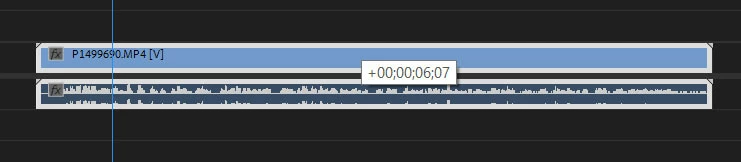
 

(Pictured is me dragging the clip with no 'ghost' clip overlay to indicate where the clip is going)

Have I hit a short-cut key by accident, or is this a bug in 15.1? I've reinstalled 15.0 and the problem goes away. All drivers are up to date.

I have tried searching for a solution but all results are regarding dragging a clip INTO the timeline. My problem is dragging once in the timeline.

In addition to this, none of the sub-menus display in my Tools panel, and when I click a top-menu item for the drop-down, none of the sub-menus appear when rolling over a menu item. I have to click the menu item for the sub-menu to appear.

TIA

This topic has been closed for replies.
Correct answer enricoluzi

I reverted back from 15.1 to 15.0, issue solved. So just do it and wait till Adobe fixes this bug. I'll file a bug report.

1 reply

enricoluzi
Participating Frequently
May 3, 2021

I came here trying to find a definitive solution for this because the same suddenly started happening to me. I discovered if you click on the Wrench icon on the timeline, and disable Audio Waveforms, everything goes back to normal, which is incredibly bizarre.


I can't edit without the audio waveforms when editing talking head videos, so desperately need a solution. Following this topic. 

enricoluzi
enricoluziCorrect answer
Participating Frequently
May 3, 2021

I reverted back from 15.1 to 15.0, issue solved. So just do it and wait till Adobe fixes this bug. I'll file a bug report.

enricoluzi
Participating Frequently
May 4, 2021

Have you

FAQ: How to reset (trash) preferences.

or

FAQ: Deleting Media Cache files

before assuming this is a bug?


screenshot 15.1.0 48


Hi Ann! Thanks for suggesting! I saw the solution of trashing preferences on another topic and tried it, but it didn't work. Deleting Media Cache files I hadn't seen before as a solution. I had done it tough after upgrading, and things were working normally. so I didn't consider to do it again.  I'll reopen 15.1 and try doing it and I'll post it back here!