
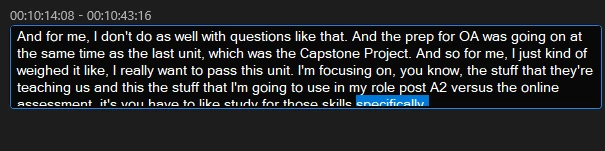
When editing Caption Transcript, the box is smaller than the text, so the last line is cut off
This is more of an annoyance than anything. However, I suspect that this would be a really easy fix on your end.
So go to Window -> Workspaces -> Captions and Graphics. Find the Text window, and the Transcript section of that window. If you don't have a transcript, generate one.
You can now double any word in the transcript to switch to editing mode and make changes to your captions. However, when you do this, the text (or the spacing) seems to get slightly larger, and as a consequence, the text in the editing field gets cut off at the bottom. If you then try to click on that area of text (for example, to add punctuation, or simply to find your cursor), if you click too low, you exit the editing mode and return to transcript mode. If you DON'T click too low, the box doesn't actually adjust, so you still can't see half the text on that line. The only way to view the text properly is to click somewhere on the line above and use the arrow key to navigate down to that line.
Please make the box expand larger by default to actually account for the larger text and spacing that exists in editing mode. Or make editing mode's text/spacing the same size as transcript mode. Either way, just make the text fit in the box! Thanks!
 AdChoices