
Participant
May 30, 2018
Answered

When importing AVCHD video files only appears as Audio

  • May 30, 2018
  • 1 reply
  • 351 views

I am running on Mac high Sierra, I have tried to import my video footage to PPro. the file imports and has video footage in is thumbnail however when trying to add the footage to the timeline it only transfers as an audio file. does anyone know how to fix this? I have put the same footage through iMovie and it works fine showing video and audio. also plays well in QuickTime player.
This topic has been closed for replies.
Correct answer R Neil Haugen

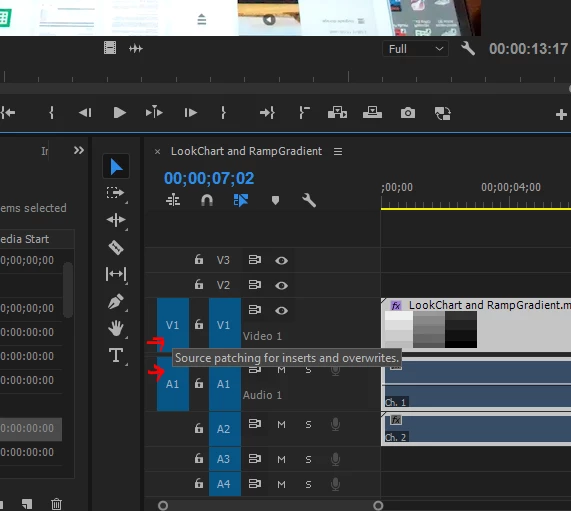
You probably are missing Source target (if going from Source monitor) or Track target (if going from project panel to timeline) for the video track, but the audio Source or Track targeting is 'on' (blue boxes).

Source targets are the left side, you can have one each of audio and video. Track targets are the right blue boxes, you can have multiples of each. Just click in a box to toggle it to on (blue) or off (background charcoal).

Neil

1 reply

R Neil Haugen
R Neil HaugenCorrect answer
Legend
May 30, 2018

You probably are missing Source target (if going from Source monitor) or Track target (if going from project panel to timeline) for the video track, but the audio Source or Track targeting is 'on' (blue boxes).

Source targets are the left side, you can have one each of audio and video. Track targets are the right blue boxes, you can have multiples of each. Just click in a box to toggle it to on (blue) or off (background charcoal).

Neil

Everyone's mileage always varies ...
Participant
May 31, 2018

Thank you so much saved me having to re-film everything

R Neil Haugen
Legend
May 31, 2018

Hey, happy to help. You wouldn't believe how often even experienced editors "hit" this ...

Neil

Everyone's mileage always varies ...