
Inspiring
August 8, 2020
Answered

Where are my transform handles?

  • August 8, 2020
  • 1 reply
  • 5218 views

Sometimes without even trying, transform handles appear in

my program window.  But whenever I want them, it's always

a battle to make them show up.  I just want to scale and drag

the anchor point, etc.,  like in photoshop.  I have the transform

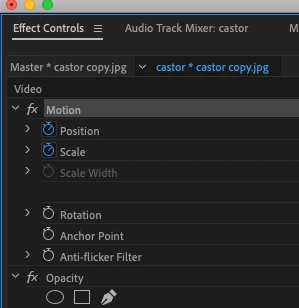
effect pasted onto my clip. but there are no handles, etc.
 

This topic has been closed for replies.
Correct answer Steve Zeeeee

When you click on the word Motion in the Effect Controls panel, with the clip selected on the timeline, you don't see the blue lines appear?

Then try resetting your workspace, menu Window > Workspaces > Reset to Saved Layout.


MtD


Thank you Ann

Yes blue lines appear around the panel.  But nothing

seems to make the transform handles show around the

clip anywhere to change the clip.  Also when I try to move

the anchor point around, I dont see any anchor point.

The picture just moves as if I'm changing the position of the picture.

Reset = no change

Still no spell check here

1 reply

Ann Bens
Community Expert
Community Expert
August 8, 2020

Highlight the clip in the Effect Controls

or

double click in the Project window.

Inspiring
August 8, 2020

no luck there

Inspiring
August 8, 2020

When you click on the word Motion in the Effect Controls panel, with the clip selected on the timeline, you don't see the blue lines appear?

Then try resetting your workspace, menu Window > Workspaces > Reset to Saved Layout.


MtD