
May 15, 2012
Answered

Where is ProRes Export Setting?

  • May 15, 2012
  • 2 replies
  • 95710 views

I own FCP 7 and do not see where i can set up a Prores sequence NOR export out to 10bit uncompressed (animation)....basically my deliverable is Prores....but do not find anywhere Prores settings.

Do I need to import them from some place within my FCP app?

Below are snapshots of my available sequence settings....
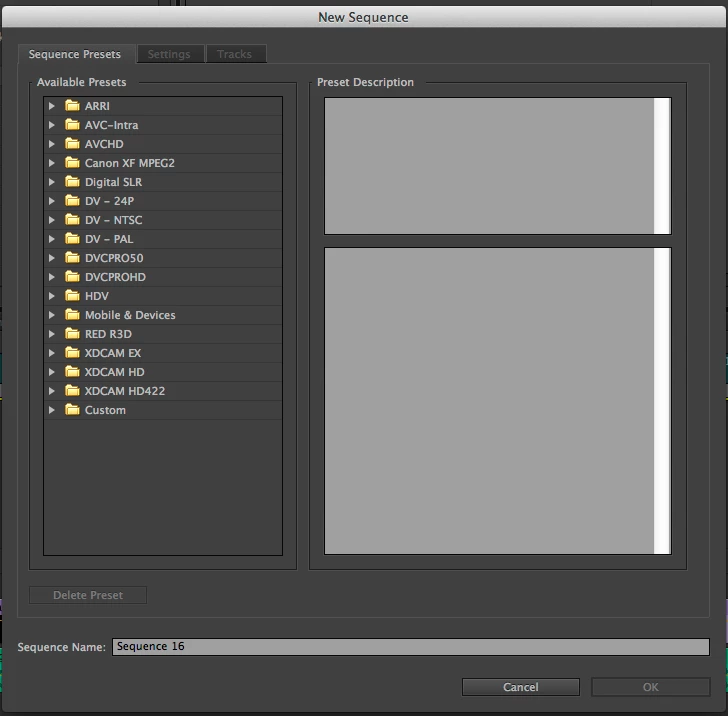
This topic has been closed for replies.
Correct answer ExactImage

Select Quicktime in the export dialog.   Ignore the preset.  Now go to the Video Codec in the Video Tab and choose Animation, Prores, etc.... it's all there.

2 replies

Participant
November 27, 2017

Hi. I am also having trouble in finding these settings. Is there something that i can do to export it in Apple ProRess 4444 or 422 HQ in 4K?

Ann Bens
Community Expert
Community Expert
November 27, 2017

You cannot export to Prores on a windows machine. Has to be a Mac.

Participant
November 27, 2017

Thank you Ann

ExactImageCorrect answer
Participating Frequently
May 15, 2012

Select Quicktime in the export dialog.   Ignore the preset.  Now go to the Video Codec in the Video Tab and choose Animation, Prores, etc.... it's all there.

May 15, 2012

Here are my setting options within Sequence:

JoshWeiss
Known Participant
May 16, 2012

So to clarify, you trancode out to prores. Lets say from redcinex,

correct? Then open that prores file side by side with what?

I have yet to lay off a red native job directly to tape from PP, as FCP7

is still the main system at my company.


Also, may I suggest trying my steps and letting me know how that works.  Just out of curiosity to see if that works for you at all.  If not, I'm at a loss.... but maybe others here can help.