
Participant
August 5, 2021
Question

White Screen whenever video effect is applied in Prem Pro 15.4

  • August 5, 2021
  • 3 replies
  • 4993 views

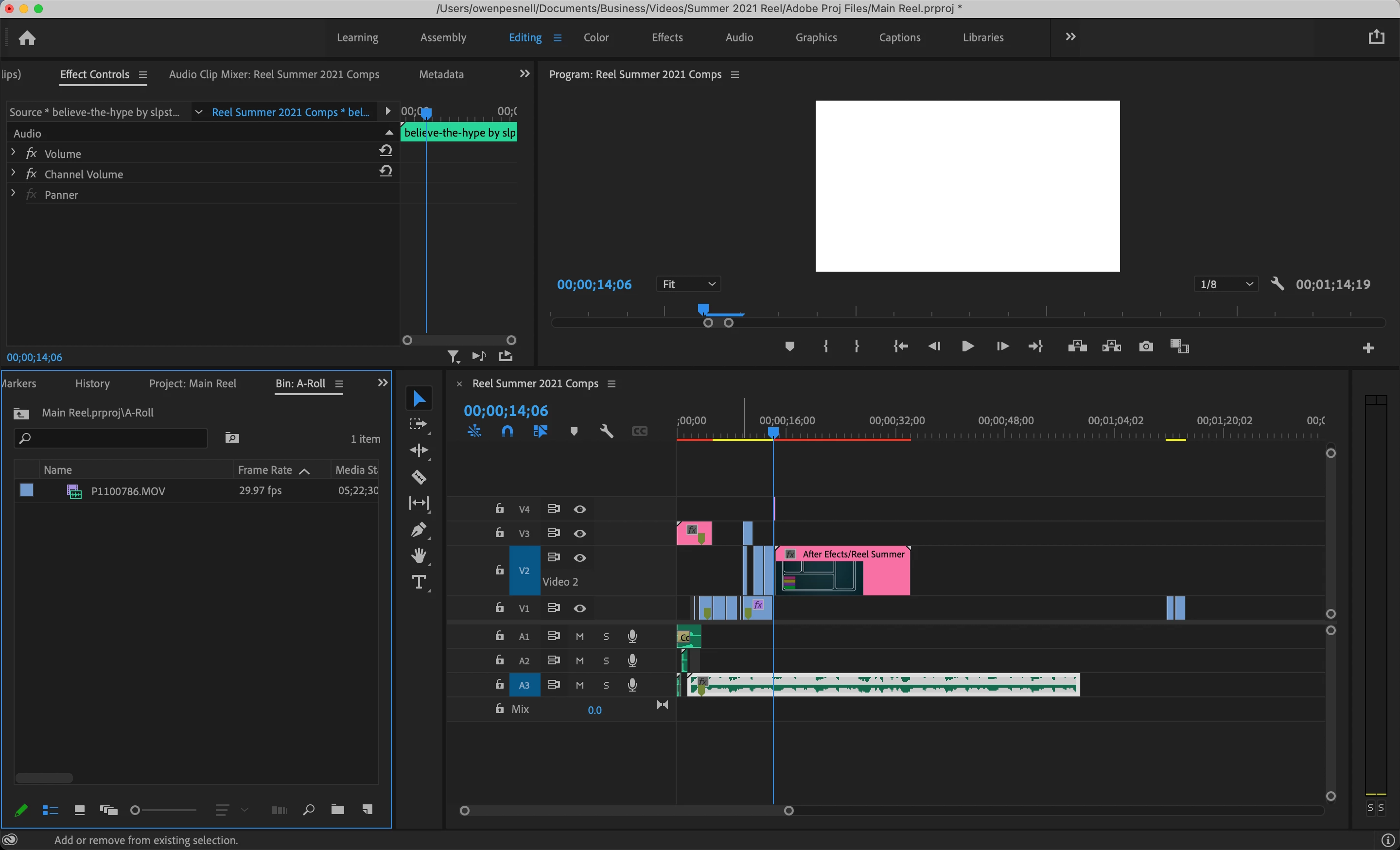
I'm on Premiere Pro 15.4 and whenever I apply a video effect (e.g. Replicate or Warp Stabilizer,) the screen goes white. This isn't just the program monitor, upon exporting the video is white as well during the duration of the effect. Turning off the FX fixes the issue. 


I am working off of an M1 Macbook Pro.
This topic has been closed for replies.

3 replies

Dark Horse Agency
Participating Frequently
August 24, 2022

Pinging this one again because I just experienced the exact same bug. When applying a stock Adode Wipe or Iris transition between two of my clips, the program window becomes fully white for the duration of the transition. Turning off the Lumetri Color effect on the two clips being transitioned between fixes the problem and makes the transition work as it should, albeit without coloration.

Using an adjustment layer above the footage to apply the lumetri color effect is the workaround for now.


I am also on a Macbook Pro 14", 2021. M1 Pro, 16GB. macOS Monterey Version 12.5.1.

Dark Horse Agency
Participating Frequently
August 24, 2022

You can't edit your posts? I should also have said my footage is 3840 x 2160 Quicktime Movie, 24fps. If that also helps.

Participating Frequently
November 17, 2022

Its now November 2022, My organisation also experiencing this continous problem. Can anyone help and comeup with the solution? my team using version 23.0.0 on Mac OS Monterey and  M1 pro bigSUR both 16GB

Participant
June 20, 2022

Hi, I'm having the same problem. Video rendering and playback options are greyed out like Owen's. I just upgraded from a 2013 trash can and was working off the same version of Premiere with no issues. Any progress on a solution? 


Premiere 15.4.5

Mac Studio M1 Max

32GB RAM

Monterey 12.4

Kevin-Monahan
Community Manager
Community Manager
August 5, 2021

Sorry, Owen! 8 or 16 GB RAM? What kind of footage?


Thanks,
Kevin

Kevin Monahan - Sr. Community and Engagement Strategist – Adobe Pro Video and Audio
Tom Roberts Media
Participant
January 9, 2022

Just received my new M1 Max 64GB ram 16inch and this is also happening to me. However the same bug happens when transistions are applied above a clip with lumetri. The only solution is to apply lumetri effects to an adjustment layer (not the clip), and have the transitions on another adjustment layer below. This needs to be fixed.

Community Expert
February 28, 2022

Oh, that's right. We don't have a Software Only category. Well, we didn't hear back from Owen, but we have Serghios and Tom here. I have an M1 to test with here in my home office too. 


How were you able to replicate this problem? What kind of footage? What are the sequence settings? Which effects are you using? Is it all to do with Lumetri only? Hope to file a bug or at least add our findings to an existing issue.


If a transition is mucking up the mix, it may have to do with graphics processing order, which can usually be tricked in a normal machine (M1 is different it seems when it comes to the render order pipeline). You can try nesting one item or the other to have the order switched, thereby making it process correctly. Like, nest the clip with the Lumetri effect or other GPU accelerated effect, then add the transition element on top of the nest. Can you try that?


Thanks,
Kevin


A follow up to this post that didn't seem to get resolved. I'm also on an M1 Macbook 14" 32GB RAM. It doesn't happen super consistently but ocasionally when I add my preset transitions on to my footage, especially direction pan transitions using Mirror, Replicate, & Transform effects, the footage will display as pure white. I have the same transition effects applied to other clips in the timeline all using the same camera, settings, and framerate but it just doesn't work on these specific clips. Any help would be appreciated.


Footage: Canon R5, C-log3, FPS: 30 & 60. 

OS: macOS Monterey 12.2.1

Premiere Pro: v22.2