
Participant
August 15, 2013
Answered

White triangles on top corners

  • August 15, 2013
  • 1 reply
  • 35757 views

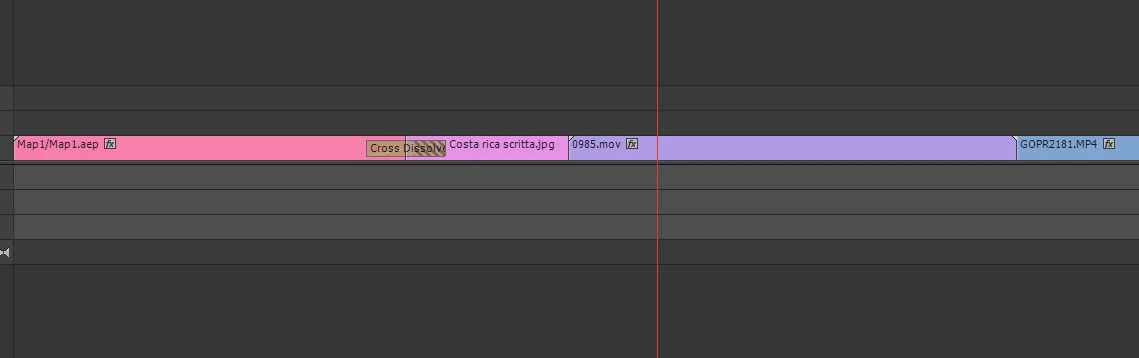
Hi there I'm new to Premiere so maybe this is an easy answer but i cannot figure out, i create a timelapse (.mov the purple clip) and when i add that to the timeline with other .mov clips from my gopro have this little white triangles like the left corner of the first clip in the timeline. With those triangles i cannot add transictions.

What did i do wrong?

Thanks
    This topic has been closed for replies.
    Correct answer shooternz

    They indicate the limit or end of your clip.

    Therefore ...there are no frames to make a transition from.

    1 reply

    shooternz
    shooternzCorrect answer
    Legend
    August 15, 2013

    They indicate the limit or end of your clip.

    Therefore ...there are no frames to make a transition from.

    kiko2929Author
    Participant
    August 15, 2013

    Hi shooternz, how can i change that? make a longher clip and cut it before to put it in the timeline?

    R Neil Haugen
    Legend
    November 6, 2020

    I understand your point Neil but if you strip out the emotion, he has a point.  I work at a smallish company now, so when we need video, I get to do it even though I haven't edited video in 15 years and never did it as a full-time gig.  The same thing is happeneing to me with Animate.  I was pretty good at AS3 but now have to learn javascript.  I made the grave sin of calling it java in a question and the "expert's" response ignored the meat of the question and said something to the effect of, "you don't need to learn java."

    Sometimes when questions are asked and people respond with one-word or two word answers without context, the person posing the question gets nothing but frustrated while all of the folks who KNOW how it works, say "How concise!"

    That doesn't mean I don't appreciate honest effort, it's just that some of the respondents' terse answers can sometimes be interpreted as snark when you're starting from a position of ignorance (as I am anytime I come here).

    I opened this post because I'm trying to add a freeze frame at the end of a clip.  When I do it using the frame hold option, I get the little triangle at the top right of the clip so I can't apply a transition effect.  This make zero sense to me.  A freeze frame has no "end."  I should be able to drag it for hours and then be able to apply a transition at the end.

    Of course, somebody will say that's the way it is, or has always been, or some other profound insight that doesn't address the question.  So it appears the only way to create a freeze frame and then create a transition is to snapshot the last frame, save it, and then place it in the time line.  You are then free to transisiton to your hearts content.  It certainly would be nice if the designers could provide a less cumbersome method.

    You seem like a good guy.  As you can tell I get a little wordy too.  How about helping out a newbie and suggesting places where I might go to become better at this?


    Thanks for your post Neil! 


    It's very clear once you understand it, you know? Ha. A young friend was studying C++ years ago in a college class. The instructor LOVED the textbook he'd selected. Which explained everything in the book in terms of something else, elsewhere in the book. Which then explained that by something else, elsewhere in the book ...


    Totally circular reasoning. And if you didn't understand something, there was no way whatever to get it solved by reading the book. The instructor thought the book was the clearest, most informative book every written on coding. I read through a couple chapters, and thought students that paid $85USD for that book should be allowed to um ... think up something nasty. Ahem.


    Yea, the reason you're getting the little triangle on a frame-hold is it is telling you there are no frames for the transition to apply to. Because, when you get past the cut, there needs to be some more unused frames of the first clip past the cut. That's how transitions work ... they use the media past the cut on the lead-in clip, and before the in-point on the second clip.


    If you have two uncut clips next together, there are no extra frames for the transition. The first clip has no 'handle' on the end, after the cut, for use as the transition fades out. The second clip has no 'handles', no frames prior to the cut, for the transition to blend in through.


    When you set a frame-hold, you've done exactly the same thing. There is only the one frame, there are no frames that would be considered "handles" for use in the transition.


    I understand your frustration as when I started out, I had naturally the exact same problem with transitions. It's after you understand how transitions work, that it seems blindingly obvious. And was totally opaque before.


    For 25 years or so, we had a full color lab in our portrait studio doing high-end pro printing, both 'package' and custom, all to a very tight standard for contrast, density, and skin tones. Much color printing knowledge was actually very different than what you would have expected, and most new employees thought my instructions oft made no sense. Well, how it actually worked hadn't made sense to me when I started doing it either, no shock there.


    I learned that when starting out new employees, I needed to tell them NOT to think, simply do as instructed for at least two weeks. No questions would be answered, as any answer I could give would be simply incomprensible. Completely out of "sensible" nature. When they finally hit the point where they came to me and said ... none of this makes any sense whatever ... after completely giving up trying to puzzle it on their own ... I could teach them how to think this stuff through.


    I found the transition to NLE work sadly to be very much like learning color printing in a wet lab. Much of this makes no sense at first. Most of what you know or think should work is simply bogus, often nearly opposite of what really happens.


    I do totally get the frustrations of anyone dealing with all this. But understand, after you get enough of a handle on all this to move along farther ... the learning curve gets steeper.


    Oh ... joy.


    Neil

    Everyone's mileage always varies ...