
Participant
August 15, 2013
Answered

White triangles on top corners

  • August 15, 2013
  • 1 reply
  • 35757 views

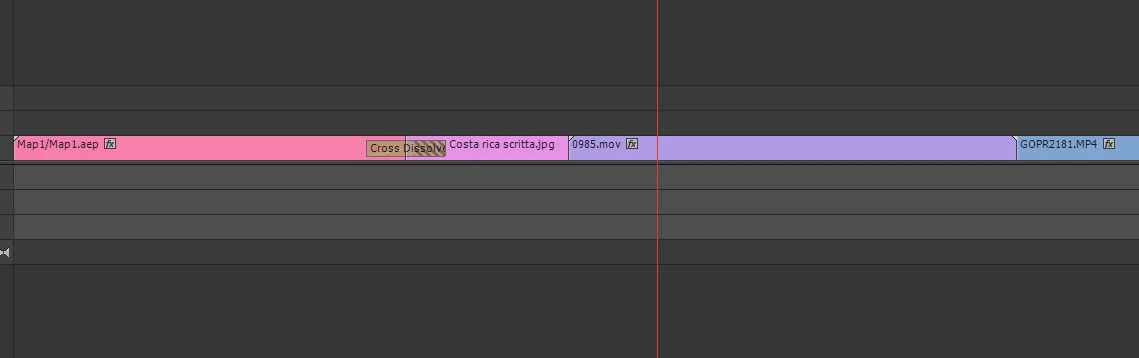
Hi there I'm new to Premiere so maybe this is an easy answer but i cannot figure out, i create a timelapse (.mov the purple clip) and when i add that to the timeline with other .mov clips from my gopro have this little white triangles like the left corner of the first clip in the timeline. With those triangles i cannot add transictions.

What did i do wrong?

Thanks
    This topic has been closed for replies.
    Correct answer shooternz

    They indicate the limit or end of your clip.

    Therefore ...there are no frames to make a transition from.

    1 reply

    shooternz
    shooternzCorrect answer
    Legend
    August 15, 2013

    They indicate the limit or end of your clip.

    Therefore ...there are no frames to make a transition from.

    kiko2929Author
    Participant
    August 15, 2013

    Hi shooternz, how can i change that? make a longher clip and cut it before to put it in the timeline?

    R Neil Haugen
    Legend
    November 9, 2020

    I get it.  The more you know, the more you realize how little you know.

    And while your answer and explanation make sense, it still seems to be an anchor to the old world when a new world exists. 


    When I learned how to sail, I couldn't understand why a rope wasn't called a rope.  After many years of sailing, I still don't.  Seems to me it's a way to create jargon as a tool of exclusion.


    If I was still cutting film, the cross dissolve would require I had frames on which to perform the transition.  Now that we're in a new paradigm, (the royal) we CAN create a more streamlined process for making an expandable still frame.  Placing the handle there was a choice by the programmer who was probably influenced by somebody whose feet were firmly planted in the old world.  After all, if I place a still image from Photoshop on the timeline, I can expand it to my hearts content.  Same but different.


    Computers are about increasing productivity.  Sometimes you have to forget about the old world to obtain that efficiency.  Especially when the efficiency improvement makes sense.


    Treating stills as they are was done for consistency of operation, pure and simple. Neither to be old world or cantankerous, simply to be consistent.


    One can always, and easily, make an argument based on whether consistency is useful in X application. But one should also understand that other users will have an equally strong reaction for consistency of operation. As where the app is inconsisten, and there are places, those cause their own headaches.


    And the reason for many choices is not what is oft thought to be The Reason.


    Neil

    Everyone's mileage always varies ...