
Participant
August 15, 2013
Answered

White triangles on top corners

  • August 15, 2013
  • 1 reply
  • 35757 views

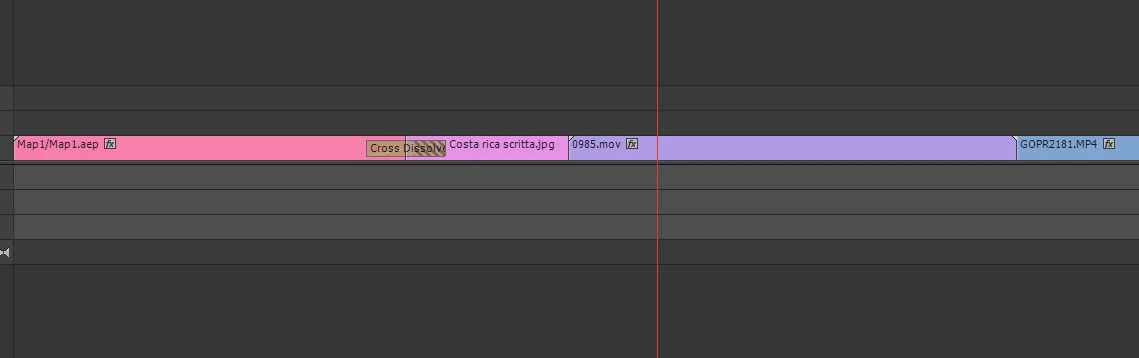
Hi there I'm new to Premiere so maybe this is an easy answer but i cannot figure out, i create a timelapse (.mov the purple clip) and when i add that to the timeline with other .mov clips from my gopro have this little white triangles like the left corner of the first clip in the timeline. With those triangles i cannot add transictions.

What did i do wrong?

Thanks
    This topic has been closed for replies.
    Correct answer shooternz

    They indicate the limit or end of your clip.

    Therefore ...there are no frames to make a transition from.

    1 reply

    shooternz
    shooternzCorrect answer
    Legend
    August 15, 2013

    They indicate the limit or end of your clip.

    Therefore ...there are no frames to make a transition from.

    kiko2929Author
    Participant
    August 15, 2013

    Hi shooternz, how can i change that? make a longher clip and cut it before to put it in the timeline?

    Participant
    May 9, 2024

    Pulling up a five-year old thread to insult someone for volunteering help seems a bit ... terse, perhaps? ... to me.

    Shooternz was one of the best helpers around here for many years. I've not seen a post from him for a year or two now. He was always short in his responses, but always direct and useful. This is a pro level program, so even newbies are expected to recognize that most people helping here aren't sitting in their home, but maybe taking a couple minute break while working to help others out. So responses tend to the short crisp side.

    I tend to write longer, more detailed responses, the length of which ticks some people off. Shooternz and a couple others tend to use as few words as possible, which ticks some people off.

    Both styles of response can contain all needed to get going.

    And if ... while he was still 'active' here ... you needed significant help with a project problem, you wanted Shooternz involved. He was simply that knowledgeable, that ... useful.

    Neil


    It wasn't about the length of his words. It was the sarcasm in his tone.