
Participant
February 9, 2021
Question

Why are my folders showing empty when I try to relink media

  • February 9, 2021
  • 3 replies
  • 1283 views

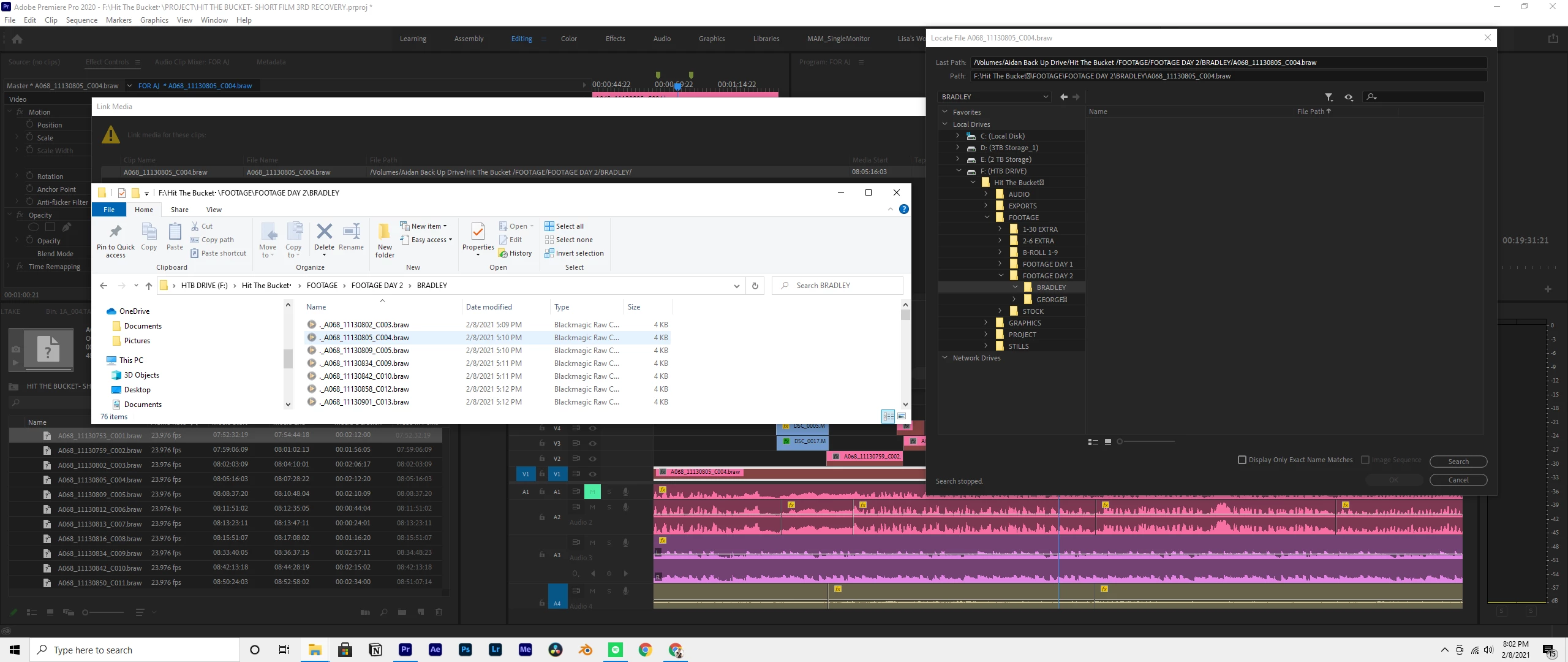
I'm trying to relink media to my project but when I navigate to the correct folder, no video files are showing. I have even unchecked "only display exact matches" I running a PC on Windows 10. In the screenshoot my mouse is hoover over the file I want to relink. In the file locate box you can see I've navigated to that exact folder which is showing zero files
This topic has been closed for replies.

3 replies

Mike Dziennik
Community Expert
Community Expert
February 9, 2021

The ._ files are not the BRAW media files - they are hidden extended attributes files created because this project and drive is being transferred from a Mac system to a PC. Hence only being 4KB in size. Hopefully the actual BRAW files are in the same directory, otherwise you don't have them.

Averdahl
Community Expert
Community Expert
February 10, 2021

The ._ files are not the BRAW media files - they are hidden extended attributes files created because this project and drive is being transferred from a Mac system to a PC. Hence only being 4KB in size. Hopefully the actual BRAW files are in the same directory, otherwise you don't have them.


By @Mike Dziennik

Oops, i never even noticed the file size. Thanks for the info! 🙂

Averdahl
Community Expert
Community Expert
February 9, 2021

I'm trying to relink media to my project but when I navigate to the correct folder, no video files are showing.

By @Aj5E99


Probably because the files in the folder starts with a period . and that do probably throw the Link Media dialog off.


According to the screen shot one of the files were originally named A068_11130802_C003.braw while the files in the folder is named ._A068_11130802_C003.braw  Note the ._ in the start of the filename. File names that starts with a period do often cause problems.


So, what happens if you rename the file ._A068_11130802_C003.braw to A068_11130802_C003.braw

Mike Dziennik
Community Expert
Community Expert
February 9, 2021

Remove the trailing space after 'Hit the Bucket ' in your directory path. That's probably the issue.