Participating Frequently
January 12, 2021
Question

Why are my youtube videos still coming out fuzzy?

  • January 12, 2021
  • 6 replies
  • 512 views

I have followed the best steps for exporting and rendering my videos for youtube and when I upload them to youtube they are still coming out unclear and fuzzy. 
This topic has been closed for replies.

6 replies

Participating Frequently
January 12, 2021

So when I'm viewing them on my actual camera it looks clean and clear but it's when I upload them to my computer they lose quality so I'm assuming my camera just isn't the best camera for taking videos? Thank you for the help!!

MyerPj
Community Expert
Community Expert
January 12, 2021

Even with all those small details it looks OK. Is that from the ProRes? You might want to look at it after some time goes by as it's a wonder what YouTube does with it, trying to compress it as much as they can. The shot of the dog may have been a good indicator but it wasn't quite in focus. Do you shots of people's faces, that may be a better indicator. You might search to forum for you camera, see what others here are saying about it.

Participating Frequently
January 12, 2021

Oh sorry, than you for the tip. 


https://youtu.be/pJETPktmFs8

MyerPj
Community Expert
Community Expert
January 12, 2021

As a side point, we try to use the big blue REPLY button on the top of the thread, which keeps the posts in chronological order.

Do you have a YT link to your fuzzy output?

MyerPj
Community Expert
Community Expert
January 12, 2021

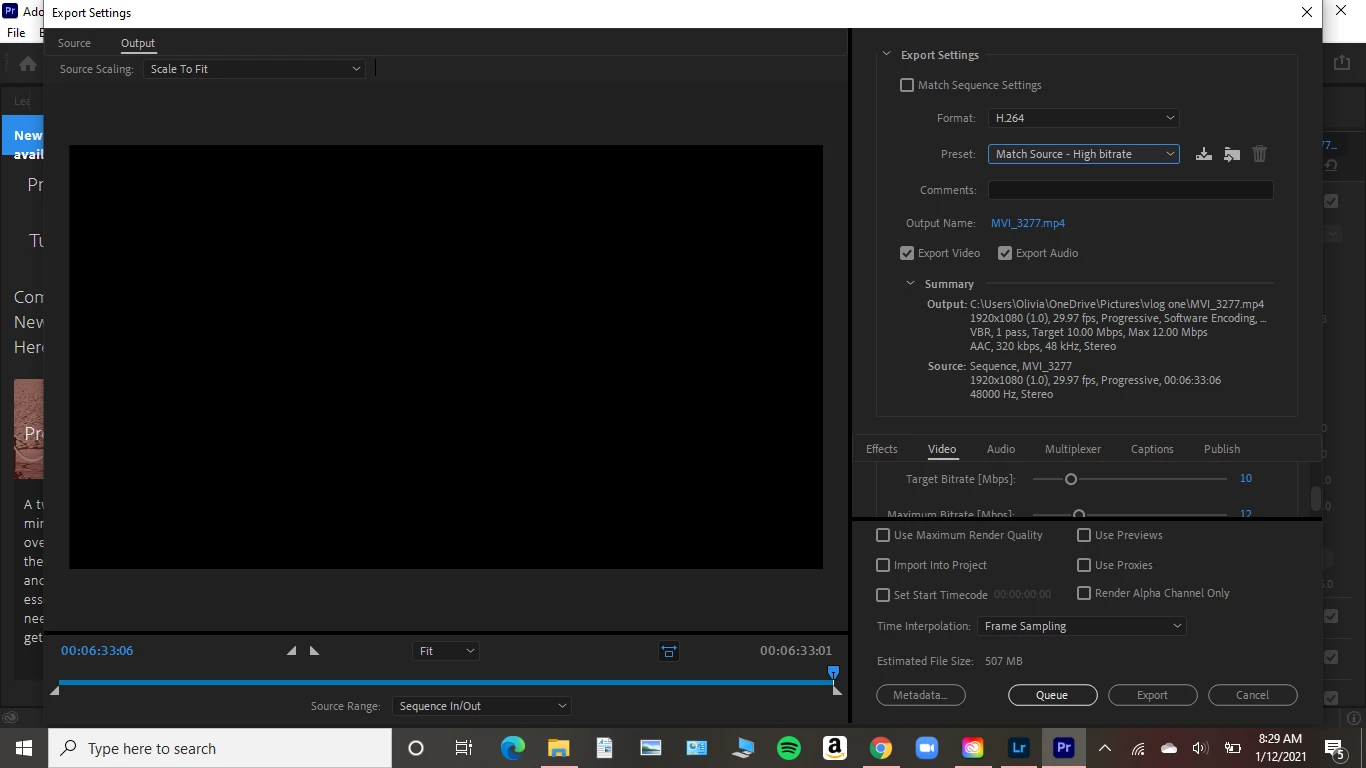
Right now you are exporting to h.264 as seen on our screenshot. That's an intermedite between your Premiere timeline and YouTube.

So, export to ProRes, it's a different format. Try a portion of your timeline (in/out points) to get the hang of it. You could even send it to YT with a hidden link just to see how it goes.


In your Export - FORMAT and PRESET select these two...

You can use the 422 HQ also, for my stuff the LT works fine.


Participating Frequently
January 12, 2021

That didn't seem to change anything. It still came out fuzzy and unclear. Does that mean it's a camera problem? To transfer them onto the computer I just insert the SD card in my computer of course and upload them to my desktop files. The icons on my camera show AFLive, AWB, 1920-30 29:59 and a few more that are picture icons and honestly I'm still learning what those mean..

Participating Frequently
January 12, 2021

It's a canon rebel T3i

MyerPj
Community Expert
Community Expert
January 12, 2021

You can try Exporting the intermediate in ProRes and upload that. Rumor has it, it is treated better than h.264. You can also use the ProRes to make the h.264 if you want to put it on your phone, or a USB for someone, etc.

Participating Frequently
January 12, 2021

Thank you! But what does it mean to export the intermediate in ProRes?
