
Participant
August 8, 2024
Answered

Why can I only import audio into the timeline?

  • August 8, 2024
  • 3 replies
  • 756 views

Hi,

I'm editing a podcast episode and I get to the end, and I imported the outro into Premiere. When I grab it to put it in the timeline, it only allows me to import the audio and not the video. I've seen a few articles on source patching but I have no idea what that means and I don't know what changed, I'm pretty sure I didn't click anything or do anything different. Does anyone know how to fix it? The outro is in mp4 format, and I've used it before. 
This topic has been closed for replies.
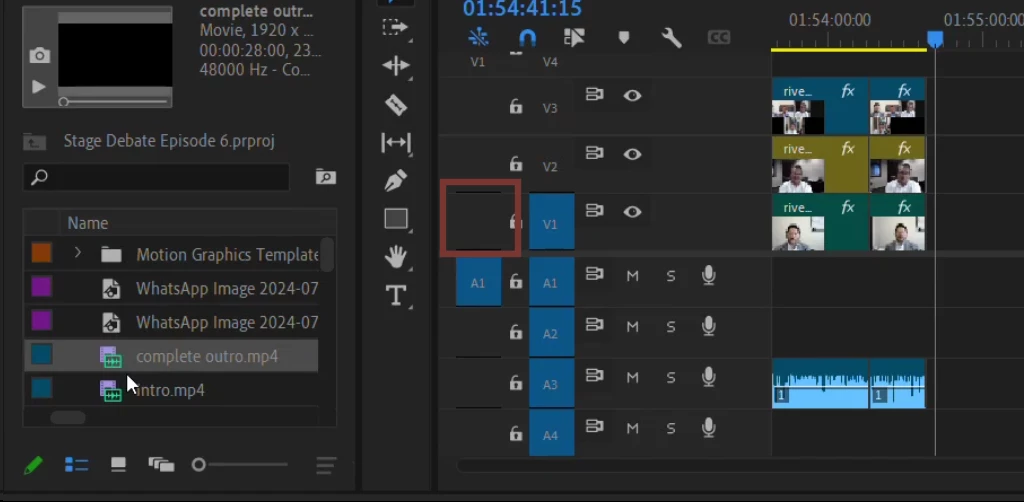
Correct answer Ali Jaber

Turn on Source patching for track 1:


3 replies

Kevin J. Monahan Jr.
Community Manager
Community Manager
August 9, 2024

Thank you for your post. In the future, you may want to use proper editing terminology so that the community can understand you, @Shevi613.


@Shevi613 wrote:

When I grab it to put it in the timeline, it only allows me to import the audio and not the video. I've seen a few articles on source patching but I have no idea what that means and I don't know what changed


  • Importing brings raw media files from Finder/Explorer into the product panel, where they become "clips." To import files, choose FIle > Import or drag files into the Project panel. Once imported, these files are now clips you can edit with.
  • Editing is placing a clip into the timeline; if it is an audio/video clip, both audio and video need to have source patching connected to a video and audio track, typically V1 and A1. Then, click the Insert or Overwrite buttons or "drag" the clip into the sequence (timeline).


This distinction is essential when working with others in a pro-studio environment.


Another crucial distinction: please also be aware of the difference betwen an Overwrite and an Insert edit. Many newer editors only drag to edit (dragging is an overwrite edit, by default) and are completely unaware of an insert edit. Let the community know if you have questions about that.


I hope you find this helpful information. Take care.


Thanks,
Kevin

Kevin Monahan - Sr. Community and Engagement Strategist – Adobe Pro Video and Audio
Peru Bob
Community Expert
Community Expert
August 9, 2024
Ali JaberCommunity ExpertCorrect answer
Community Expert
August 8, 2024

Turn on Source patching for track 1: