
LeoKac
Participating Frequently
December 10, 2023
Answered

Why different fps settings shows different duration?

  • December 10, 2023
  • 3 replies
  • 996 views

Super strange behavior. Any ideas why editors work like this? At first, I thought it was a bug of Premiere Pro, but then I tested it in other editors (Vegas Pro, Davinci Resolve) and it seems like other editors behave the same way.

Steps:

  • I opened Premiere Pro 2022 - Version 22.3.1 (Build 2).
  • I created a new empty project.
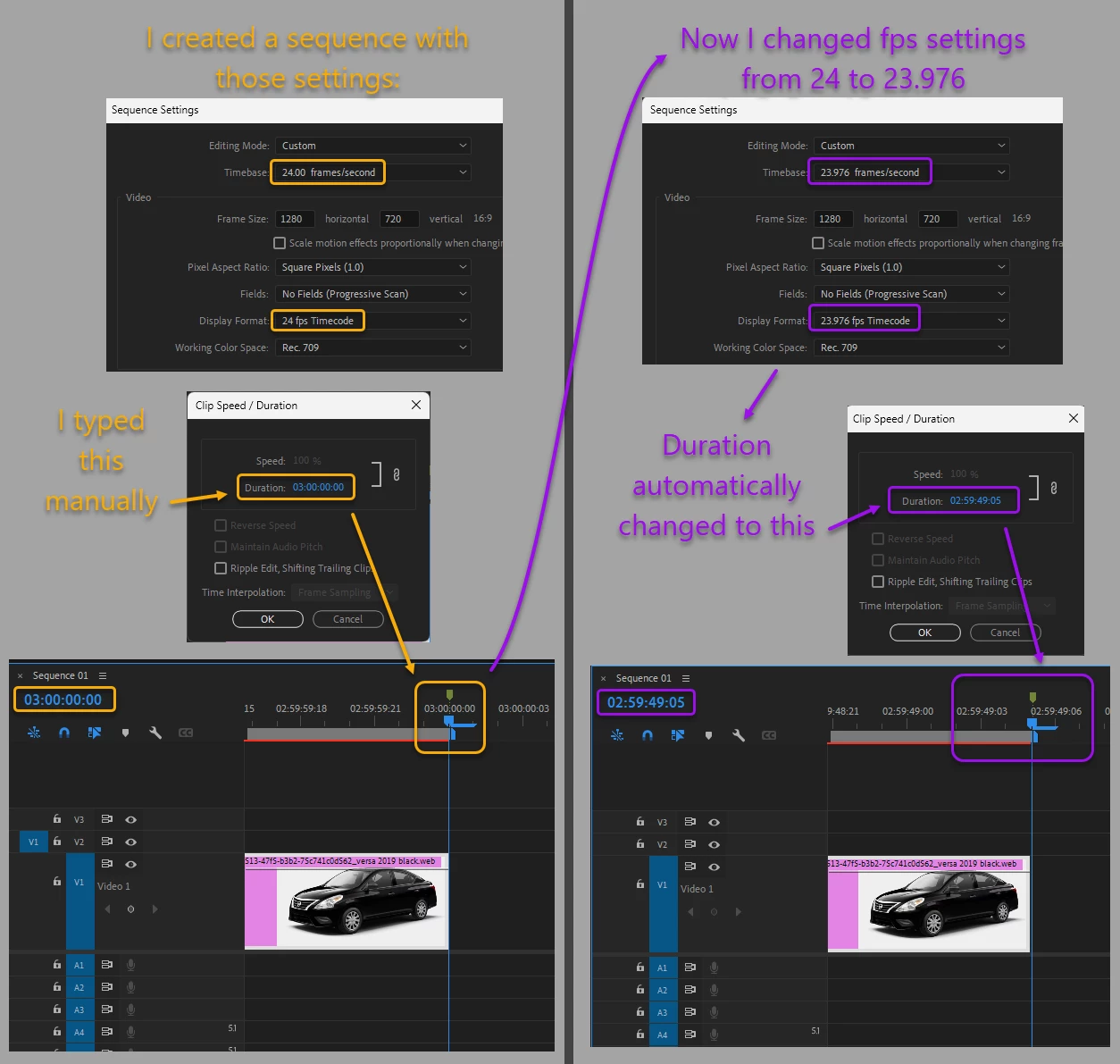
  • I created a new sequence with those settings - Timebase: 24 fps, Display Format: 24 fps.
  • In this sequence, I inserted just a simple image (not video, not audio, just an image, but anyway, video and audio also have the same behavior)
  • I right-clicked on the image, then clicked "Speed/Duration..." and manually typed "03:00:00:00" (exactly 3 hours) and OK. So now the image duration is exactly 3 hours, that's fine, good.
  • Now I changed the sequence settings: from 24 fps to 23.976 fps, both Timebase and Display Format. And now, I see that it automatically changed the duration from "03:00:00:00" to "02:59:49:05".


The difference is approximately 10 seconds, well, I understand the math here: the 10 second difference is calculated by the difference of 24 and 23.976 fps with 3 hour time length. Yeah, I understand the math here, but I guess it's not correct behavior for functionality. I mean, however the user changes fps numbers, the final duration should be always the same duration, right? Well, I understand that computers and software have some trouble with calculating numbers with super high precision, and so some software sacrifices precision for optimization (performance), but I guess 3 hours is not a big deal for most computers today, yeah, for 3 hours, 10 second difference seems like too much difference.


One more thing:
When I export this video (with "02:59:49:05" duration and 23.976 fps settings), it exports as exactly "03:00:00:00" duration video. So I guess, when I change the fps settings in sequence settings window, the editor does not actually change the video duration, but maybe it just shows wrong duration ("02:59:49:05") and the actual real duration seems to be staying the same ("03:00:00:00").

This topic has been closed for replies.
Correct answer R Neil Haugen

You are discovering one of the Absolut Joys of Editing ... in this case, dropframe versus non-dropframe.


Look up dropframe online for a full discussion. It has to do with getting 'frames' to match when displayed for broadcast purposes, and is a rather complicated total process to understand. Including 3:2 pulldown and other delightful Joys.


LIke properly fitting a 23.976 video into a broadcast spec form of 29.97 ... sheesh. Probably not too big a hassle, but in the "wrong" QC (quality control) machine check, maybe it is a total mess ... 

3 replies

R Neil Haugen
R Neil HaugenCorrect answer
Legend
December 11, 2023

You are discovering one of the Absolut Joys of Editing ... in this case, dropframe versus non-dropframe.


Look up dropframe online for a full discussion. It has to do with getting 'frames' to match when displayed for broadcast purposes, and is a rather complicated total process to understand. Including 3:2 pulldown and other delightful Joys.


LIke properly fitting a 23.976 video into a broadcast spec form of 29.97 ... sheesh. Probably not too big a hassle, but in the "wrong" QC (quality control) machine check, maybe it is a total mess ... 

Everyone's mileage always varies ...
LeoKac
LeoKacAuthor
Participating Frequently
December 11, 2023

Important note:
If I change fps from 24 to 10 (or 12 or 25 or 30 or 50 or 60), the result duration if fine, it is the same, but if I change fps from 24 to 23.976 (or 12.5 or 15), it changes the duration strangely.

LeoKac
LeoKacAuthor
Participating Frequently
December 11, 2023

As I see now, Premiere seems to change the definition (length) of 1 second for certain settings. I mean, for example, if I set Timebase to 15 fps (and it automatically sets Display Format to 30 fps, you cannot set Display Format to 15) then if you just press play (triangle) button, the time code takes 2 seconds (not 1 second) to increment one second indicator.

See the GIF:
https://i.ibb.co/PM4g0KF/time-code-strange.gif

So, I guess, for 23.976 fps, Premiere probably changes the definition of 1 second to slightly more than 1 "SI" second, so the actual duration is still 3 "SI" hours, and it just shows the time indicator as 10 seconds less duration. And this theory seems true, because when I export this 10 second shorter timeline into the actual MP4 video, it exports with correct duration (exactly 3 hours, not 10 second shorter).

Community Expert
December 11, 2023

What duration do you get if you set the timecode to audio time units?

Community Expert
December 10, 2023

Can you change the timecode to drop frame?

LeoKac
LeoKacAuthor
Participating Frequently
December 10, 2023

Mm... I don't think there is an option like that. There is "Non-Drop-Frame" option, but I don't see "Drop-Frame".


LeoKac
LeoKacAuthor
Participating Frequently
December 11, 2023

Important note:
If I change fps from 24 to 10 (or 12 or 25 or 30 or 50 or 60), the result duration if fine, it is the same, but if I change fps from 24 to 23.976 (or 12.5 or 15), it changes the duration strangely.