
Why does my triangle disappear when I stretch my video clip?
This just started happening, I was able to get this to work in the past without the triangle at the end of the clip disappearing. I'm rate stretching a clip to fill a gap in my sequence. As a result I cannot put a transition across the adjoining clips. In order to make my sequence work I will have to create a new PP slide the exact length of the hole in my sequence, save it to video, and carefully insert it into my sequence. For some strange reason, the rate stretch tool is no longer an option for me. If both triangles aren't present on adjoining clip, PR will not allow me to straddle the adjoining clips with a transition.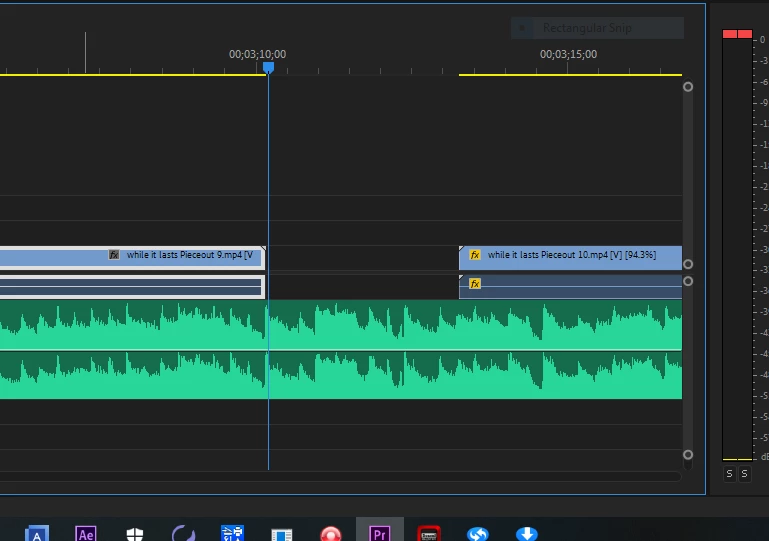
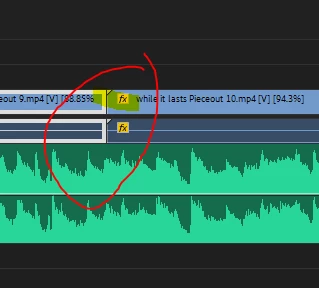
At one time I was able to rate stretch and preserve the triangles. What can I do to get this behavior back? Thanks!
For right now I'll act if the rate stretch tool does not exist and just create a patch video clip to fill this gap in my presentation and hopefully sometime in the not too distant future I can find out what happened here with this program.
 AdChoices