Participant
May 2, 2020
Answered

Why does White Balance have Temperature and Tint?

  • May 2, 2020
  • 4 replies
  • 3596 views

Why does White Balance have Temperature and Tint? What theory is this based on?
 

Correct answer R Neil Haugen

That is a standard utilization of the White Balance concept.


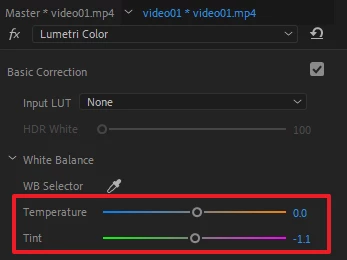
"Temp" moves the Red and Blue channel white points against each other. You can easily see this by watching the RGB Parade scope (Lumetri scopes panel).


"Tint" moves the combined R/B channels white points against the Green channel.


It is directly equivalent to working with the white points of the RGB Curves tool. Except the WB tool moves two or three color channels simultaneously.


White Balance controls necessarily have their most effect on the upper values, as they have no effect on the black points. So this tool is most useful for color casts in the upper mids and whites.


Neil

4 replies

Inspiring
May 6, 2020

NLE is (N)on destructive (L)inear (E) editing. it means the original source material is NOT changed during editing process. Only what you see in the editor are the changes you make ( your edit ) via programming... the original stuff is not changed.


White Balance and Tint:

Sunlight is 56000 degrees KELVIN.

Tungsten ( normal light bulbs ) are around 27000 degrees KELVIN 

BUT 'movie lights' have specific temperatures and the quart halogen ( tungsten) are 32000 degrees KELVIN.


That's your white balance.. match the camera setting of WB to the light you are shooting.... and it will look white.


32K ( shortened for convenience from 32000 KELVIN ) is 'warmer' ( or more red / orange ) COMPARED to sunlight ( 56K ), which is more blue.... hence the blue red thing.


The fact is that some lights are weird. A flourescent bulb may give off a greenish or magenta color outside the realm of red / blue ... it's an anomoly re: the gas in lamp and color it gives off....


In the pro film world this is corrected at the source ( they change the bulbs ).  The color gels used to fix it at the bulb ( wrap the bulb in the gel and put back into the light housing ) .... is called MINUS GREEN AND PLUS GREEN.


That is your TINT.


🙂


Inspiring
May 6, 2020

whoops..  I put in an extra zero to those numbers. 32000 is really 3200 , etc.

MyerPj
Community Expert
Community Expert
May 6, 2020

You put them in so many times I was starting to believe you! 🙂


BTW: Under "... More" is an edit button, and you can change it, then people will wonder what we are talking about. (The handy "delete" button from the Jive forum is nowhere to be found.)

chrisw44157881
Inspiring
May 3, 2020

i'd rather use RGB curves. temp/tint can't give you full control of w/b over black point, mid point, white point, and may interfere with composite modes or color gamuts. it's not standardized over NLE's and comes from a personal flavour approach to making sliders and given things names. it's like using a 'shadow' slider and expecting good results.(your mileage may vary on what 'good' is.)

R Neil Haugen
Legend
May 4, 2020

The Lumetri white balance 'tool' is exactly the same action that was in SpeedGrade, and in several other pro color apps. It's not like the WB tool I've seen in a number of prosumer video apps. Nor at all like a white balance setting on most tv's say.


Again, it is exactly the same action and only the same action as manually adjusting the white points of the RGB curves.


  • Temp is Red vs. Blue: slide to the left, the Red channel white-point drops as the Blue channel white point rises; slide to the right, the Red channel white point rises as the Blue channel white point drops.
  • Tint is Green vs. ganged Red and Blue: slide to the left, the Green channel white point rises while the Red and Blue channel white points drop; slide to the right, the Green channel white point drops while the Red and Blue channel white points rise.


You are quite correct that it gives no control over the mids, shadows, and black point, as it is totally a white-point change. All other values are changed only to the extent that moving the white point necessarily moves other points in a Curves tool. Mid point would move half as much as the white point, and the black point not at all. So nearly all visible effect is from about the 40% value and up.


Neil

Everyone's mileage always varies ...
Participant
November 27, 2023

@R Neil Haugen first of all thank you! I've been scouring the web to find a good description for how temperature/tint works and yours is the closest I've come to grasping its mechanics 🙂


The one thing I'm not entirely sure of is what do yo mean by "the Blue channel white point rises". Given an arbitrary image (or white point color), its blue channe curve might look something like this. I get how the white point can drop, but how can it rise (given that it's already at its max value at the top right). I think I'm misunderstanding something.


Also - is there a standard algorithm for figuring out the temp/tint values given an arbitrary white point color?
Where does the range of -300 to 300 come from? I'm used to ~0-255 🙂

MyerPj
Community Expert
Community Expert
May 2, 2020

It's based on the 'I want to set it myself' theory.

R Neil Haugen
R Neil HaugenCorrect answer
Legend
May 2, 2020

That is a standard utilization of the White Balance concept.


"Temp" moves the Red and Blue channel white points against each other. You can easily see this by watching the RGB Parade scope (Lumetri scopes panel).


"Tint" moves the combined R/B channels white points against the Green channel.


It is directly equivalent to working with the white points of the RGB Curves tool. Except the WB tool moves two or three color channels simultaneously.


White Balance controls necessarily have their most effect on the upper values, as they have no effect on the black points. So this tool is most useful for color casts in the upper mids and whites.


Neil

Everyone's mileage always varies ...
