
Participant
July 8, 2021
Answered

WHY IS CHANNEL BLUR OBSOLETE

  • July 8, 2021
  • 4 replies
  • 22979 views

i used to use channel blur a few years ago, but i notced that it has now been moved to the obsolete folder. i am assuming it has moved because there is a new and better way of applying this effext to clips, but i am not sure how to. any ideas?
Correct answer julianlll

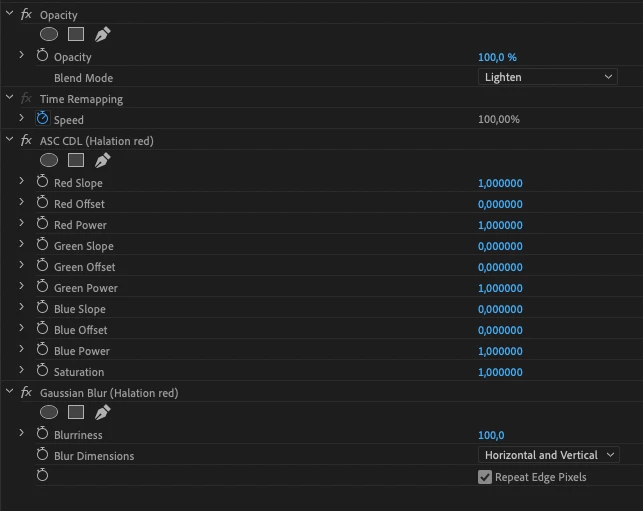
Found a way to replicate the effect and the performance is way better than channel blur. I use it for a halation effect.

Just set the slope to 0 for all channels expect the one you want to show. All other parameters are unchanged for me.


4 replies

Peru Bob
Community Expert
Community Expert
August 24, 2024
quote

WHY IS CHANNEL BLUR OBSOLETE?


By @kristenf12051508


quote

 These effects are responsible for significant project slowdowns and performance bottlenecks. In addition to all the modern options to the obsolete effects and transitions within Premiere Pro, you can also use  third-party effects, transitions, and filters.


from here:

https://community.adobe.com/t5/premiere-pro-discussions/welcome-to-premiere-pro-24-6/td-p/14816772

julianlllCorrect answer
Participating Frequently
January 2, 2023

Found a way to replicate the effect and the performance is way better than channel blur. I use it for a halation effect.

Just set the slope to 0 for all channels expect the one you want to show. All other parameters are unchanged for me.


Participant
August 24, 2024

Hey mate, this is really cool. What is the effect from lumteri you apply?

Participant
August 24, 2024

DW found! TY thanks mate

Mike Dziennik
Community Expert
Community Expert
July 9, 2021

Not sure why it's obsolete since I can't see any obvious replacement. Since it's not GPU accelerated (and therefore slow) and not used commonly enough, it's likely it was deemed not critical to update.

Peru Bob
Community Expert
Community Expert
July 8, 2021

You might be able to do that in the Lumetri Color Panel.