
Participating Frequently
December 30, 2024
Answered

Why is this duplication happening?

  • December 30, 2024
  • 3 replies
  • 499 views

I'm taking the LinkedIn Premiere Pro class (Premiere Pro 2025 Essential Training) and when I load a clip into the timeline, this happens. At first there is only one clip. When I drag it into the timeline, it comes across as a single long clip, which is not what is shown in the video. It creates a second clip and when I drag that into the timeline window, I does indeed look like what is shown in the lesson. Any ideas?

Thanks

Marek
 

Correct answer Averdahl

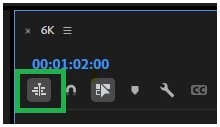
It´s not a clip you use, it´s a timeline/sequence you are dragging. Anything you drag into a "Timeline (no sequence)" will create a brand new timeline. This is called Nesting in Premiere Pro. Next time you drag the timeline named "Tracks" into the now newly created timeline all clips within that timeline will be placed in your timeline since the button "Insert and overwrite sequences as nests or individual clips" is disabled.


If you click and enable the "Insert and overwrite sequences as nests or individual clips" button on the new timeline this will not happen. But, since you already have the timeline named "Tracks" there is no appearent need to drag it and create a new timeline. If you want to open "Tracks", just double click it´s icon in the Project panel.


quote

At first there is only one clip.


By @marekw80645926


3 replies

R Neil Haugen
Legend
December 31, 2024

Look at your project panel/bin. Make sure you're in List view.


You have clips, which have one icon for them in List view. You drag a clip to the Timeline panel, you have now created a Sequence. Sequences can of course have many clips on them.


And your just created Sequence is now showing in the Project panel. Which has  a different icon in List view than a clip.


ALL project assets of media such as video and/or audio clips, plus still images, some graphics items, will be shown in the Project panel.

Everyone's mileage always varies ...
Averdahl
Community Expert
AverdahlCommunity ExpertCorrect answer
Community Expert
December 31, 2024

It´s not a clip you use, it´s a timeline/sequence you are dragging. Anything you drag into a "Timeline (no sequence)" will create a brand new timeline. This is called Nesting in Premiere Pro. Next time you drag the timeline named "Tracks" into the now newly created timeline all clips within that timeline will be placed in your timeline since the button "Insert and overwrite sequences as nests or individual clips" is disabled.


If you click and enable the "Insert and overwrite sequences as nests or individual clips" button on the new timeline this will not happen. But, since you already have the timeline named "Tracks" there is no appearent need to drag it and create a new timeline. If you want to open "Tracks", just double click it´s icon in the Project panel.


quote

At first there is only one clip.


By @marekw80645926


Ishan Y
Inspiring
December 30, 2024

Hi there,

Welcome to the community! It looks like both of these sequences have the same but different content. You can see that both of them have different durations. Drag-dropping a sequence into another sequence will produce the results you're seeing. Sorry if I couldn't understand your question. Please share more details if that's so.


Thanks,

Ishan

Please tag me (@) in your replies so that it notifies me and helps me respond promptly.
Participating Frequently
December 31, 2024

Thanks! What I was asking is this. When I open the source folder, there is only one clip. When I drag it into the timeline, is is "green" coloured and one clip. When you look at the video again, another clip has formed in the source folder. When I drag that into the timeline, it is a series of clips. Whyy does that happen?