Inspiring
September 18, 2021
Answered

Why source patching button not appear?

  • September 18, 2021
  • 2 replies
  • 994 views

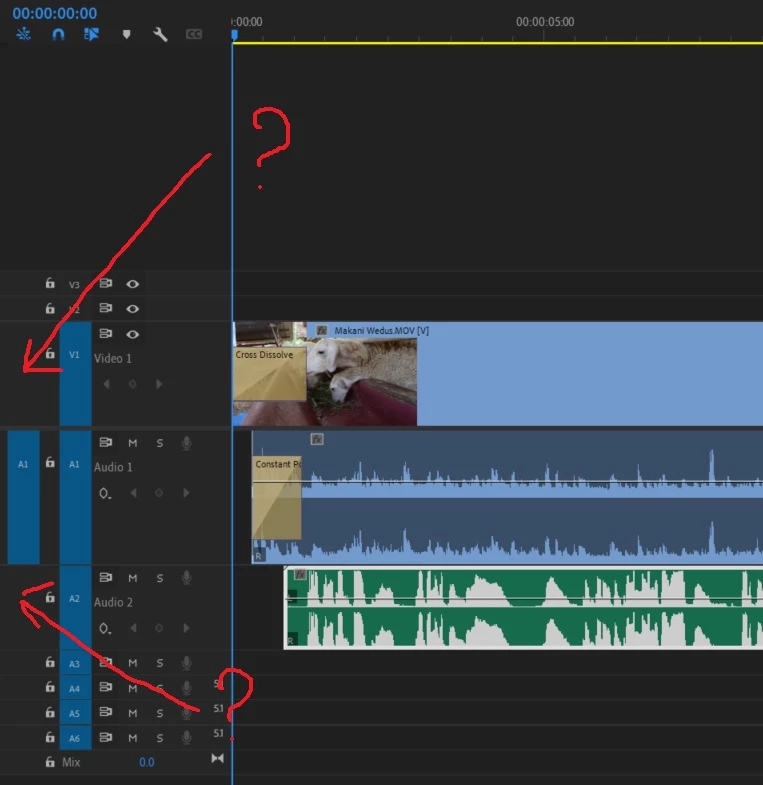
Please see the picture below.

The button of source patching insert overwrite never appear when i drag and drop clip directly from windows explorer to timeline.
Everything just fine when i drag and drop clip to the project panel first, then open in source monitor, then drag to timeline.

Anyone help why this happend? thanks

This topic has been closed for replies.
Correct answer Ann Bens

Open clip in Source monitor first.

2 replies

R Neil Haugen
Legend
September 18, 2021

Those are Source patching, right? From the Source monitor ... as Ann alludes to. It was designed to work from that monitor using the insert and overwrite options.


Neil

Everyone's mileage always varies ...
Inspiring
September 18, 2021

Thanks,

######Raizen 7, 40Gb Ram, RTX 3060, Win 11 -- All of Software in the world are just tools. Buy it if it works for you :)
Ann Bens
Community Expert
Ann BensCommunity ExpertCorrect answer
Community Expert
September 18, 2021

Open clip in Source monitor first.