With Nvidia driver version 381.89 I still have the problem, that I have no CUDA after a reboot. Reinstalling the Nvidia driver and CUDA wirks for now, reboot OpenGL and CUDA Acceleration for Nvidia gone. I tried deinstalling the driver, also trough device manager with deleting the driver, and also with IObit uninstaller (remove everything first, than reboot, than install nvidia driver again), nothing helped
Tested driver versions:
376.67 (from Lenovo)
378.92 (from Nvidia)
381.65 (from Nvidia)
381.78 (from Nvidia, hotfix for notebook-chips)
381.89 (from Nvidia)
Further tests:
1. Geekbench behaves exactly like Premiere: Works after reinstall, but the nvidia card is not available for choosing after a reboot.
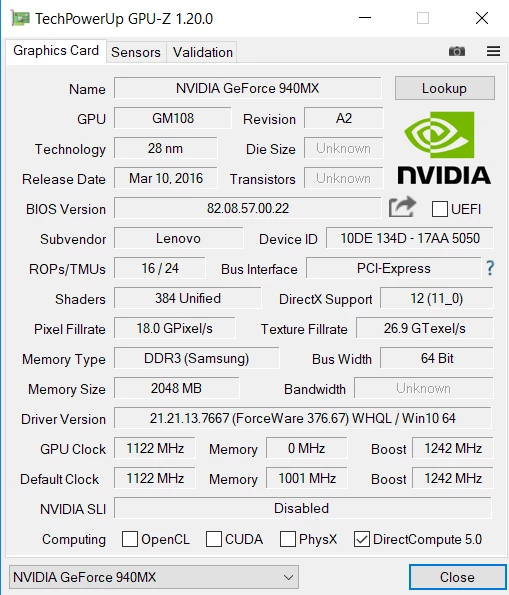
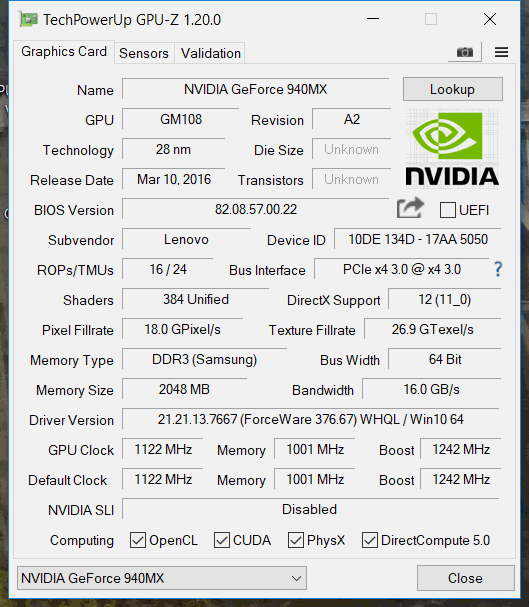
2. In GPU-Z the Nvidia Card is present, but OpenGL, CUDA and PhysiX are disabled, see screenshot. Reinstall the same Nvidia driver and the three functions are active, reboot disabled again.
So in conclusion: This seems to be not a problem from Adobe (only for Adobe-Users  ), instead from NVIDIA/Microsoft. I hope it's OK to discuss it here further anyway, cause our userbase are affected, probably with more Win 10 Users (right now most professionals will still be on Win7, I assume) and more people installing Win 10-1703 update, more and more users will be affected.
My advice is:
1. If you can avoid, don't do the Windows-Update now. Hopefully the issue is fixed in future releases. As we'll see those updates 2x a year ("windows as a service"), don't do them directly after release! Deactivate the function in Windows-Updates.
2. If you already installed the upgrade to 1703 and you also have this issue: Don't waste time with reinstalling Premiere, use external uninstallers (I tried to remove Nvidia & Intel stuff with IObit uninstaller).
Here is a workaround: Reinstall Nvidia driver before using Adobe Premiere. Use GPUSniffer to see, if Adobe recognize the Nvidia card or not:
C:\Windows\System32\cmd.exe /k "C:\Program Files\Adobe\Adobe Premiere Pro CC 2017\GPUSniffer.exe"
Also you can use GPU-Z (see screenshots below) to test if you currently have CUDA or not.
3. User mediumrare reported that driver version 178.X works for him, he had similar problems, so try staying at that version.
Adobe.. .Please make a Linux-Version!!! DaVinci Resolve and Lightworks already have one... both seems to catch up to Premiere, if problems with Win10 goes on like this , I think users will look for alternatives, and installing Linux might be a cheaper way than buying a complete new Apple, which is valid for videocutting.

 AdChoices