Hi mzampitelli,
Sony a7 III uses XAVC S / AVCHD format to record videos. I believe by XAVCD you meant the XAVC S format (in case you are using AVCHD format then you may switch to XAVC S). The optimal sequence settings would be based on the media that you are using. Based on your camera if you are shooting in 3840 x 2160, you may set your sequence at that resolution. To do so, you may follow either of these two steps:
- Right-click on the media file in the Project panel and select New Sequence From Clip.
This will create a sequence using the frame rate and resolution of your media file. This is usually the easiest way of creating a sequence based on media properties. - You may create your own custom sequence preset to be used with a particular media type.
Go to File > New > Sequence
Go to the Settings tab and set Editing Mode to Custom. Then you may set the desired frame rate (based on the frame rate of your media files) and the desired frame size (3840 x 2160, if you are shooting 4K)
Set the Pixel Aspect Ratio to Square Pixels(1.0) and Fields to No Fields (Progressive Scan)
Once done, you may give this sequence a name and click OK (you may also save this as a preset if required by clicking save preset)
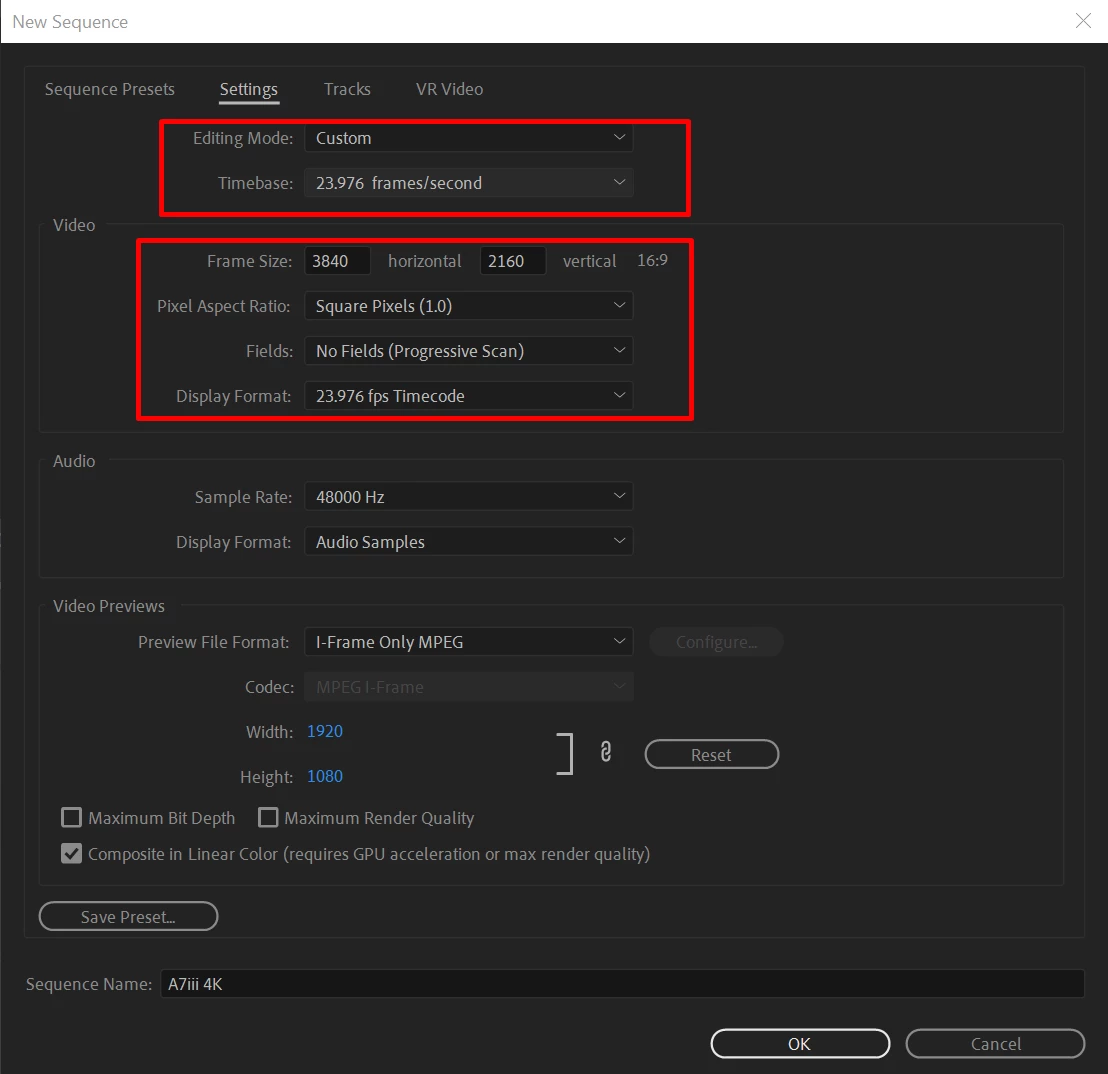
Hope it helps,
Thanks,
Sumeet


 AdChoices