


- Home
- Premiere Pro
- Discussions
- Re: Working with 25fps timeline and adding videos ...
- Re: Working with 25fps timeline and adding videos ...
Working with 25fps timeline and adding videos to timeline with mixed frame rates and dimensions

Copy link to clipboard
Copied
Hey guys
Just curious we are in the middle of a lockdown in Australia at the moment and I am creating a video collaboration for my organisation that involves having 1080p 25fps video footage but it will also involve others handing in some of their own recorded videos either from zoom, or their own mobile phones which I will overlay over the 1080 footage similar to the photo i attached in the post.(not my image btw)
If set my timeline to 25fps to match my video footage and I want to add these mixed frame rates, like the zoom and mobile phone video uploads will this be problematic, or is there nothing wrong with this and something everyone can just do normally.
The issue i see here is if someone sends me a something from their phone that is 60fps or 30fps my understanding is that this would cause a slow motion effect or choppy, but i could be wrong? If they send me material that is lower then 25fps then this of course wont be an issue, just want to double check if what i am saying here has any merit.
Sorry for the noob questions too...


 22
Replies
22
22
Replies
22




Copy link to clipboard
Copied
Hey there. Premiere is pretty good at interpolating different framerates so you can definitely mix them. I would set your sequence to be the framerate of your primary media or to your required delivery specs, which it sounds like you've done. Other framerates added directly to the sequence will not be sped up or slowed down, only that they would have frames added (duplicated) or removed depending on the framerate of the clips compared to the sequence, for example:
If you add a 60fps clip to a 30 fps sequence it will simply remove every other frame from the 60 fps media. Inversely, if you add a 30fps clip to a 60 fps sequence it will duplicate every single frame. So your sequence would be playing at 60fps but the media would still look 30fps.
Now, just because the clips get interpolated doesn't necessarily mean they will all look great. There are certain conversions that can be choppier than others, like a 24fps clip in a 30fps sequence will have 1 frame duplicated every 6 frames, which can add a little bit of a jitter. In some of those cases you can try changing the Frame Interpolation to something else, like Optical Flow, to see if it looks any better (or just cope with it).
Edit: I wanted to add that working with phone media can be a challenge for different reasons than just mixing framerates. You may be getting media that's in an HEVC codec, which can be difficult to work with, and the media will also likely be Variable Framerate, which can cause a lot of issues (audio going out of sync, render errors, playback issues). To learn more about VFR you can read some of this, which includes some transcoding solutions: https://www.reddit.com/r/VideoEditing/wiki/faq/vfr
Ideally you will be able to advise the various people shooting this stuff to shoot in a specific framerate (though the VFR notes will still apply. Nothing you can do about that.) But also it's best to have the phones set to Compatibility mode and not High Efficiency, and where possible to turn off HDR settings. At least on the Apple side those things are just going to give you headaches.

Copy link to clipboard
Copied
Just adding onto this - I've been doing lots similar work throughout the pandemic. My biggest recommendation would be to convert everything to the same framerate as the first step in your workflow (since you're based in Australia I'd think 25fps is the right answer). Ideally you'd create ProRes/Cineform clips, but since the quality is so low on the source anyway I tend to create reasonably high-quality h.264 files to work with to save on storage space.
This is definitely just my opinion though, and depending on your project & the type of footage not necessarily the right answer. By converting first you do lose the ability to play with optical flow, not to mention the obvious time-sink of converting big batches of files.
I had a project go south in the 11th hour because of VFR clips & rendering errors... so, in my opinion, even with the drawbacks I think its always worth converting.
Copy link to clipboard
Copied
Hopefully not breaking ToS by double-posting, but realizing I forgot one thing-
For whatever reason (I haven't tracked down a good answer), Media Encoder sometimes just doesn't play well with files created in Quicktime X or on an iPhone. I've had good luck converting those with Handbrake, instead - https://handbrake.fr/
I just use the Fast 1080 preset, and then dial in the settings I need (framerate, bitrate, frame size) on the next panel.

Copy link to clipboard
Copied
You can use AME as long as you dont use the audio.
AME will pick the wrong framerate for video but will not alter the audio. Hence OOS.
So Handbrake is your friend.
Copy link to clipboard
Copied
Amazing information here, thanks so much for taking the time to message me. 🙂
Copy link to clipboard
Copied
Amazing information mate, thanks so much for taking the time to respond to me, i also like the tip about the phones too. 🙂
Copy link to clipboard
Copied
@Phillip Harvey Thanks mate your information is absolutely helpful. I just figured out how to repsond to people by using the @ thing so yeah sorry if i have doubled my thanks replies lol

Copy link to clipboard
Copied
I mix frames rates all the time using Premiere Pro with no issues. I think all NLEs will do that and have done it for over 10 years.

Copy link to clipboard
Copied
In the same lockdown 🙂
All very good advice from everyone. Here's my take.
On a broadcast production using multiple frame framerates we would convert any non-25fps material to 25fps.
On a non-broadcast job (if the final program is not too long) I'd leave all material 'as is' and drop everything into your 25fps timeline.
Most of the time 60 & 30 fps material will look OK at 25fps. The worst is dropping 24fps into a 25 sequence. That, to me, always looks the worst.
Preview render your finished edit before export and watch for any 'judder'. If you are working with 'talking head' footage you are unlikely to see much wrong. Anything with camera movement might look bad. On any problem shots, right click the clip in your sequence, select 'speed/duration' and then from the 'time interpolation' drop down menu choose 'optical flow'. Preview render again and see if it looks better.
Good luck.
Copy link to clipboard
Copied
@Steve Griffiths Cheers mate good tips mate
Copy link to clipboard
Copied
Steve
Terrestrial Broadcast in the USA is 1080i or 720P. I admit ATSC 3.0 is starting to change that to 4K P. Premiere Pro can play any video codec, frame rate and resolution that is dropped into a 1080i sequence just fine to broadcast compliant hardware. Premiere Pro can do it on the fly with ease. Monitoring broadcast work on a computer monitor is not wise. What you see at 1080i on your computer screen and what the audience will see on a TV will be very different. On a side note at 24P and 30P fast motion graphic and fast camera pans will always look jitter. That jitter goes away at 60P or you can use 1080i with 3rd party hardware and have silky smooth playback. That being said what device are using for local broadcast work if they require 1080i?
Copy link to clipboard
Copied
Andy,
Terrestrial Broadcast in Australia is also 1080i and we master all programs out at 1080/25 interlaced.
But many broadcast shows (and graphics) are shot/rendered at 25 progressive. If any material comes in at non-25fps it's sometimes (but not always) converted to 25 progressive if they want to maintain the 'progressive' look for a particular production*. Even though, ultimately the production will end up in an interlaced Premiere Pro sequence for mastering.
Here we have the luxury of a separate grade workflow (Colour Graders get to fix everything!) and broadcast monitors in the suites to find any issues. All suites have AJA cards to feed the monitors. I think the grade suite has a Blackmagic Design card.
I used the term 'judder' to describe motion artifacts from using different frame rates in a sequence. As you point out you also get judder from fast motion progressive material - just a different type of judder 🙂
* I have a dislike for any interlaced motion appearing in a predominantly progressive based program. Seems visually jarring to me.
Copy link to clipboard
Copied
Why not have the graphics rendered at 50P? It will look much smoother dropped in a 50i sequence. The only reason I like Premiere Pro over the competition is the simple fact that Premeire Pro works better than any other NLE with broadcast equipment. The functionality is better as well as the quality. I am sure you could probably output to the switcher in realtime using Premiere Pro and AJA or BMD hardware and no one would notice it played back from the timeline. Premiere Pro's realtime is just incredible. I admit Edius also looks really good but Resolve and FCPX not so much. I have not tested Avid Media Composer First yet.
Copy link to clipboard
Copied
We can use Premiere Pro 'direct to air' from the online suites but only as a last resort. The on-air 'live' playback system (EVS) is very reliable and has a lot of on-air/live playback benefits over any NLE.
As to 50p (or 25i) for graphic renders - yes they will look smoother but they won't match the look of a show that was shot 25p. So here it's generally 25fps interlaced graphics for a studio show (studio cameras here are interlaced) and 25p graphics for a show that's shot 25p. Then everything has the same 'motion perception' within a program.
Goes back to my previous point - a program shot 25p (but now in a 1080i sequence for mastering) with some interlaced graphics (50p or 25i) just looks weird.
Copy link to clipboard
Copied
I like to use 50i and 60i in refrence to fields vs 25i or 30i (29.97) for frames. Have you played back unrender sequences for broadcast using Premiere Pro or where they rendered? That is awesome if they are unrendered. I am sure at full resolution with high quality playback selected it looks great unrended if you have a decent computer. I would not trust FCPX or Resolve to do realtime playback for braodcast over the air waves using AJA or BMD products. That being said I would trust Edius for realtime playback for broadcast if tweaked out correctly.
Copy link to clipboard
Copied
Hi Andy, no I have never personally had to air a show directly out of Premiere Pro. I've no doubt it could work but would always be a riskier option over a dedicated playback system that also has redundant backups in case of failure. Fast turnaround shows are hard enough without worrying about being responsible with transmission as well 🙂
regards, Steve
Copy link to clipboard
Copied
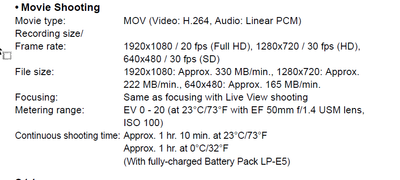
@Steve Griffiths A client is looking at using a canon 500D, during this lockdown thats all she has in terms of a dslr camera. The issue with it is I want to record using 1080p but it only has 20fps which is odd. Will this give me a problem, should i avoid it alltogether if I am using Premier pro. My initial thoughts would be to just match the fps to the sequence?
Copy link to clipboard
Copied
All no standard framerate will produce some sort of issue.
20 fps does not sound right.

Copy link to clipboard
Copied
A friend had an issue with format choices recenlty. So this got me curious.
Wikipedia re the Cannon 500D (which is a 2009 camera): "It is the third digital single-lens reflex camera to feature a movie mode and the second to feature full 1080p video recording, albeit at the rate of 20 frames/sec."
How odd!
Stan
Copy link to clipboard
Copied
I'm with Ann Bens, I'd avoid 20fps.
Stan - had to check myself too. 20fps is just weird on a camera. Guess that's all they could manage in 2009 🙂
@aspire029 - if you have to/want to use that camera I'd suggest shooting at at 720p - which does allow a higher frame rate (30fps).
Shooting at 20fps is below the threshold for smooth motion perception. Avoid if you can.
Copy link to clipboard
Copied
I just went through the manual, and it does say 20 frames per second for 1920x1080.
When reading this, I would not use the camera at all.
Copy link to clipboard
Copied
@Steve Griffiths @Ann Bens Cheers for the information guys. Yeah I wont use it then.


Find more inspiration, events, and resources on the new Adobe Community
Explore Now
 AdChoices
