
Inspiring
September 21, 2023
Question

Writing over files creates a ton of error retrieving frame notifications for replaced files

  • September 21, 2023
  • 3 replies
  • 506 views

Steps:


  1. Render comp from After Effects
  2. Bring .mov file into Premiere Pro... leave Premiere open
  3. Make a change to comp in AE and re-render over file 
  4. Tab back to Premiere Pro and it refuses to play the file back and spits out hundreds of frame retrieval errors: 
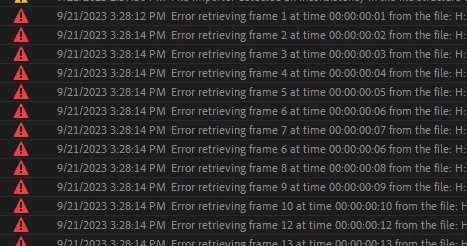


I don't remeber when this change happened but I feel like Premeire Pro used to be able to refresh or reload changed files without having a heart attack in versions past. 


Workaround: unlink and relink the file or close and reopen premiere.


Wish: Give us a "refresh file command" or maybe have some sort of file system notification system that so that Premiere can re-load the files without shooting out a bunch of silly irrelevant error codes. For example, In After Effects if you save over an .AI file in Illustrator and tab back to AE, it will usually scan the layers for changes and apply. 


3 replies

caseyv.com.au
Known Participant
May 22, 2025

This issue kills me, as it's only on a Windows PC that it's a problem. Works flawlessly on a mac.

Participating Frequently
September 22, 2023

Moving it to Discussions

Ryan Fritzsche
Inspiring
September 22, 2023

This isn't exactly a solution to the issue, but here is what I have found. I frequently overwrite files from AE just like you describe.  I find that if the playhead in the Premiere sequence is not on or before the file I'm about to overwrite before I start the render, and I don't switch back to Premiere until the AE render is complete, then there's no issue.  If the playhead is on the file, however, the Premiere gets lost and nothing will fix it.  In some of those cases, even if I quit and restart Premiere, the issue holds.  What I find often resolves it is to quit Premiere, then delete the .ims or other database and media cache files for the given file, and then open Premiere back up.  I'm trying to remember, but I think there may have been some times where that didn't resolve it, but I'm pretty sure it does most of the time.  Anyway, without fail, if I don't have the playhead before or on the file, then I don't have any issues.  I don't know for certain of course, but my surmisal is that Premiere is constantly loading upcoming frames into memory, and if the frames from that file are loaded in memory while it's being overwritten, something gets broken in the project and/or database / cache file(s) for it that can't be repaired.  But if it's not in memory, then Premiere doesn't notice when it changes.


I agree that a "refresh file" command a la what's in After Effects, that can reconcile the database/cache files too, would be welcome.