
Wrong aspect ratio and cropped video
I have a project that I created in Adobe Premier Pro 13. It consists of many family videos from different sources e.g. mobile phones, cameras etc. Videos are mainly low resolution.
When I open this project in Premiere 14 or 15, many of the videos now have wrong aspect ratio and are somehow cropped.
The properties of this issue are:
* Sequence always shows wrong aspect/cropped on these clips
* When I double click clip from timeline, source editor shows wrong aspect and cropped video
* When I double click clip in library, source editor shows correct format
* When I drag clip from library to timeline, the format is wrong again
* If I use "New sequence from clip", the clip in the sequence is correct and is also displayed correct when I nest sequence in main sequence
* If I create a new sequence with high resolution - e.g. ProRes 4K, then the clips are ok when I drag them from the library
* The same issue is also happens on new projects in Premiere 14 - not just this old project
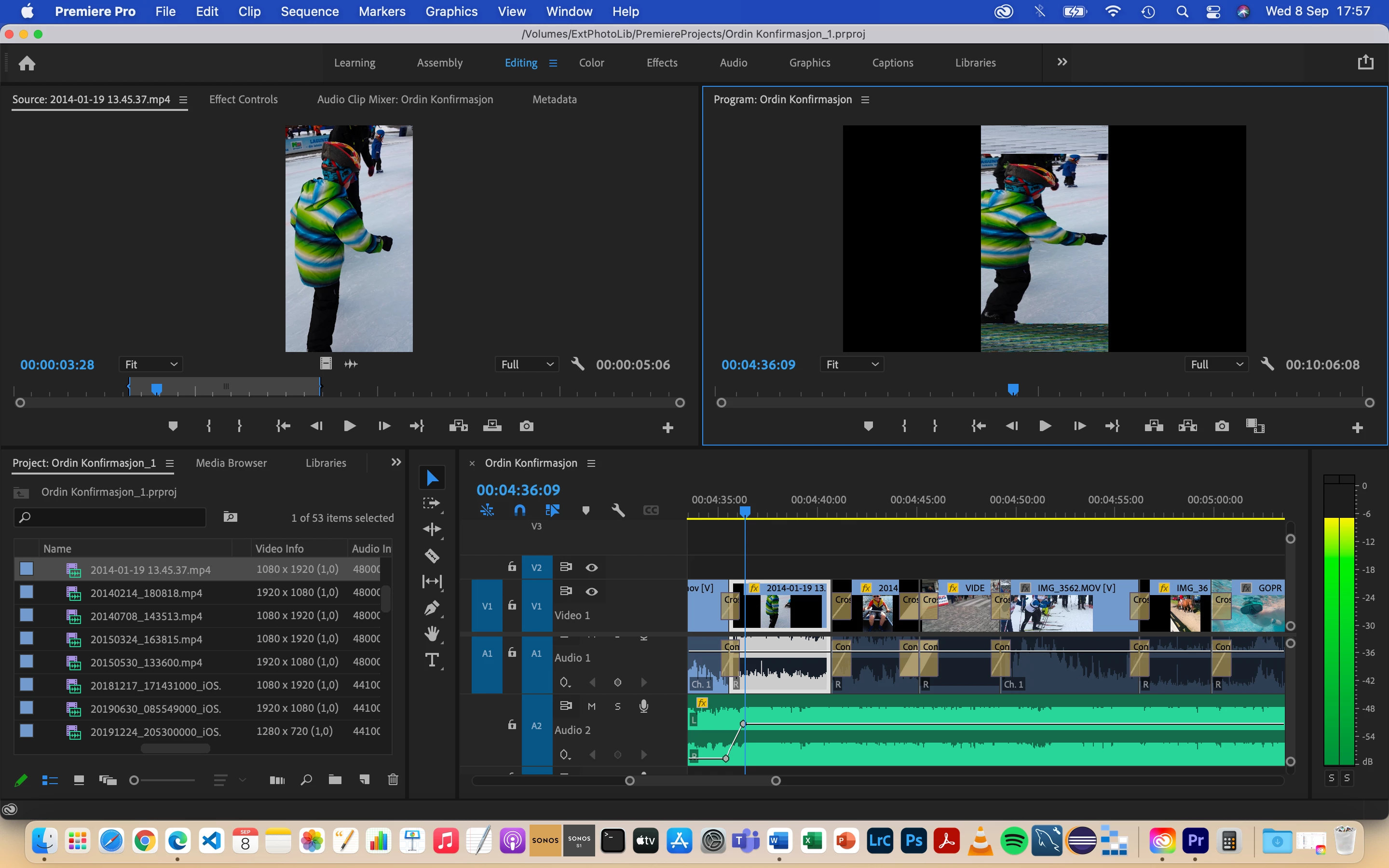
This below screenshot below shows the issue in a HDV 1080p sequence. Source editor (left) shows clip from library, while right side is from the sequence.
So somehow Premiere 14/15 has issues when placing some movies in a sequence. It might seem to be related to when Premiere Pro needs to scale them. Premiere 13 worked fine.
A workaround is of course to create separate sequences for all the clips that has these issues ("New sequence from clip"), but this will be a lot of work. I have a lot of cross dissolves as well, and this is a nightmare on sequences.
These are the properties from the example video shown in the screenshot:
File Path: /Volumes/ExtPhotoLib/Mobilvideoer/2014-01-19 13.45.37.mp4
Type: MPEG Movie
File Size: 37,47 MB
Image Size: 1920 x 1080
Frame Rate: 30,02
Source Audio Format: 48000 Hz - Compressed - Stereo
Project Audio Format: 48000 Hz - 32 bit floating point - Stereo
Total Duration: 00:00:18:09
Pixel Aspect Ratio: 1,0
Alpha: None
Video Codec Type: MP4/MOV H.264 4:2:0
Variable Frame Rate Detected
Here is a screenshot that shows the error. Please observe that both aspect is wrong and also cropping has happened.
 AdChoices