
Participating Frequently
January 2, 2017
Question

Youtube uploading - duration getting cut short

  • January 2, 2017
  • 7 replies
  • 17854 views

I've also posted in Youtube forums, but a search over there seems to yield not much help from experts. The people here seem alot more experienced and friendly, hence turning to you guys for help

The common suggestion was the upload an MPEG4 file. I'm still having a 26 minute video cut short to a 14 minute video despite rendering in Premiere Pro as MP4.

Here are the things I've done to try to rectify:

1. MPEG

2. Authenticate account to extend max video length from 15mins to indefinite

3. Render in Premiere Pro with preset of Youtube 1080 HD - becomes a 3GB 26 min file that gets cut short by youtube to 14 min

4. Render in Premiere Pro with preset of match course high bitrate, becomes a 1GB 26 min file that gets cut short by youtube to 12 mins

This is the Mediainfo tree:
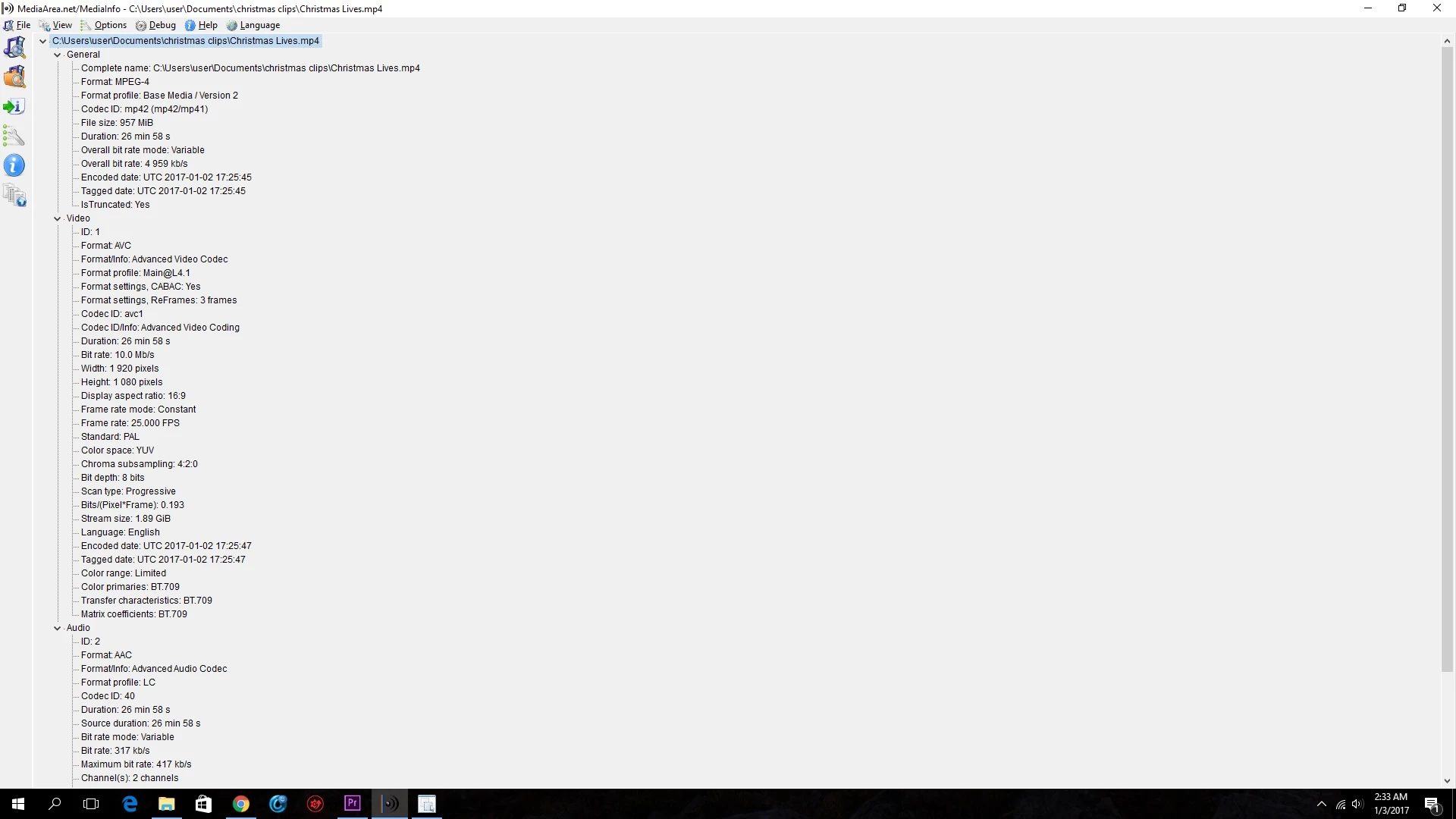
Hope someone can help me rectify, thanks!

7 replies

Participant
June 12, 2022

2022 [Solved] - My clip is 1 hr but became 16mins after uploading on youtube. I realized the is on the video not youtube (my video for 15mins and more enabled). 
I managed to fix this issue by doing so in my adobe premiere pro: Open up premiere pro without any working files > edit > preferences > media cache > delete > Delete all media cache files from the system > ok. 
Afterwards, I open up my working file and export it again and upload the new file to youtube. I had the full 1 hr clip uploaded before which was only 16mins. 

Participating Frequently
January 21, 2018

Just curious if ypu've resolved this issue?
I'm a youtuber as well and I normally create videos <10mins so never encountered the problem.

You should also ask in
https://www.youtube-creatorcommunity.com/t5/Home/ct-p/EN_CreatorCommunity

Participant
January 14, 2018

I'm having the same issue and I've been verified for a year.

Never had this problem before.

Trying to upload a 20 min Mp4 file and its getting shortened to 10 ish mins.

Very frustrating

Participating Frequently
January 15, 2018

Any chance this could be down to the number of subscribers? Some of YouTubes levels of unlocking certain things tend to be quite arbitrary and they always seem to change their mind which makes it even more confusing!

What happens if you encode it at 720 and try upload? Maybe it could be something to do with the bit rate?

Rameez_Khan
Legend
February 17, 2017

Hi lenn,

Did you solve this issue?

Please also let us know if you need more assistance.

Best,

Rameez

Participant
January 2, 2017

servitor si bloqueos original buen ser odor

Legend
January 2, 2017

2. Authenticate account to extend max video length from 15mins to indefinite

When was this done?  Is it possible your account just hasn't been updated yet?

Participating Frequently
January 3, 2017

Did it a week ago, and when I check account status, the 'upload longer videos' is 'enabled'.

Going to try publishing straight from PP but wonder if it'll work.

In the MediaInfo screenshot, you'll see in the tree - 'is truncated: yes'. What does that mean?

Any other ideas appreciated!

Legend
January 3, 2017

You might be needing support from YouTube on this.

jasontcox
Inspiring
January 2, 2017

What method are you uploading to Youtube? Are you exporting to a drive first and then manually uploading to YouTube after? Or are you using the built-in direct YT upload under the Publish tab? This SHOULDN'T make a difference one way or the other, just trying to narrow the problem down and rule out variables...