
Participant
October 28, 2022
Answered

YouTube Video Downloads

  • October 28, 2022
  • 1 reply
  • 922 views

I have downloaded YouTube videos using a youtube to mp4, and for some reason (after I put it in the bin, to use it) it's only letting me grab the audio and placing it into the timeline? But I want the video as well!

The video and audio play when you double click the video in the bin and it opens up in that extra section in Premier Pro, however the video just doesn't want to be inserted into the timeline.

I've done the delete media cache thing, but nothing has changed. 

Help please. 
This topic has been closed for replies.
Correct answer R Neil Haugen

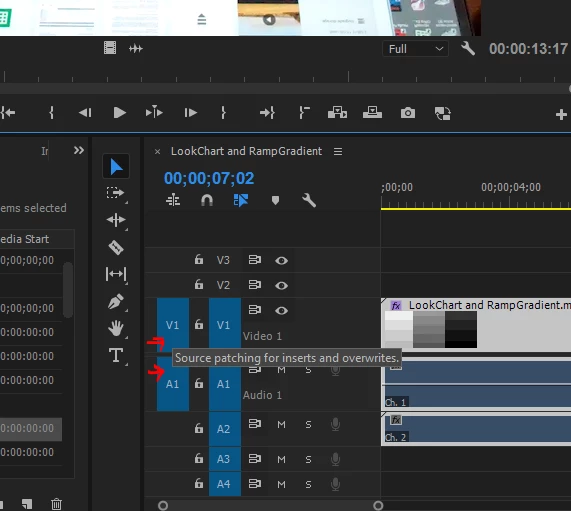
This is typically because there isn't a Source target set in the timeline panel control header block ... but you do have a Source target set for audio. A blue box for whichever audio track it is 'landing' in.


You need a Source target for video too ...


Neil


1 reply

R Neil Haugen
R Neil HaugenCorrect answer
Legend
October 28, 2022

This is typically because there isn't a Source target set in the timeline panel control header block ... but you do have a Source target set for audio. A blue box for whichever audio track it is 'landing' in.


You need a Source target for video too ...


Neil


Everyone's mileage always varies ...