
Known Participant
January 2, 2019
Question

zoom in overlay video

  • January 2, 2019
  • 3 replies
  • 3659 views

Hello,

How can i zoom in a video in a overlay video?

It is not possible through scale. Then the image is larger and that should not be.

It must be a small screen in the corner. It revolves around the main image.

Is there any other way to zoom the overlay video?
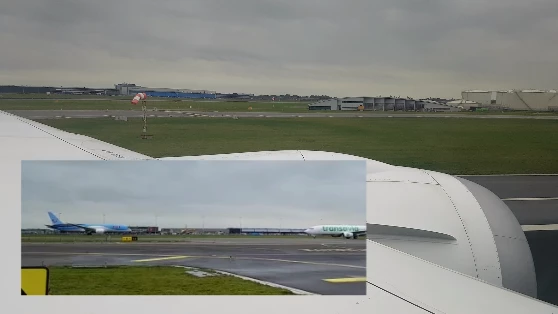
The little screen need to be zoom in the airplane.

This topic has been closed for replies.

3 replies

MikeJoowAuthor
Known Participant
January 4, 2019

To make it clear I have but made a video. Maybe you guys then understand what is not going well.

To my knowledge I am doing what you guys are saying in the forum.

Peru Bob
Community Expert
Community Expert
January 4, 2019

You are adjusting the scale in the main sequence.  You need to open the nested sequence and adjust the scale there.

Double click the clip in the main sequence and it will open the nested sequence.

MikeJoowAuthor
Known Participant
January 5, 2019

It do not work what you say.

See the video below.

Via scale increases that the screen and not the object. Really not the object must be greater the screen.

kirk9944
Inspiring
January 2, 2019

Use Transform and Crop. With Crop being below the transform. Or use a Alpha key to block out the other parts.

Peru Bob
Community Expert
Community Expert
January 2, 2019

Nest the overlay video (right click > nest) and adjust the scale in the nested sequence.

MikeJoowAuthor
Known Participant
January 3, 2019

This is not what I mean, I zoom now but the whole picture becomes larger.

I have an overlay video that as in above image small links at the bottom. There must be hemmed on the plane without the image.

Peru Bob
Community Expert
Community Expert
January 3, 2019

You need to zoom in the nested sequence (the new sequence), not the main sequence.