


Legend
November 17, 2024
Open for Voting

Add keyboard shortcuts for Overlay, Insert Before, Insert After and Append

  • November 17, 2024
  • 6 replies
  • 1194 views

Quoting from the Adobe Premiere Pro Classroom in a Book:


The Overlay, Insert Before, and Insert After edits are available only when dragging a clip onto the appropriate drop zone in the Program Monitor. There are no buttons or single-key shortcuts that achieve the same results.
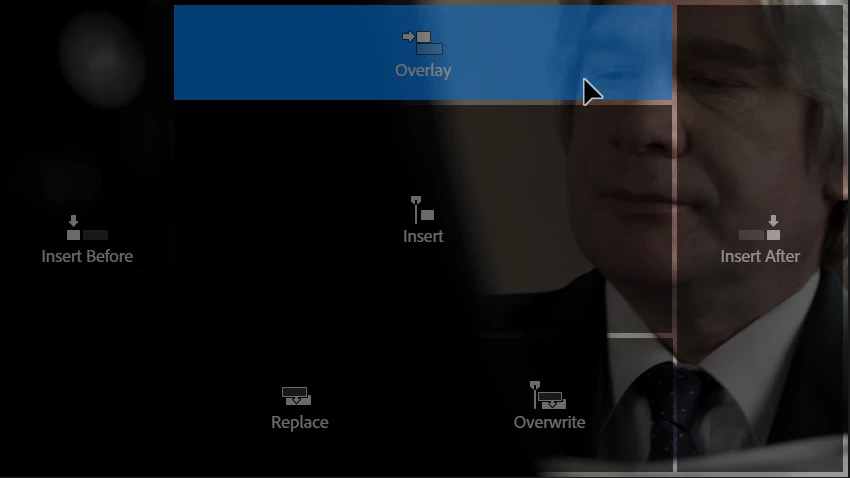


Why? This must be the easiest fix in the world. The features are already in place. The only things lacking are the keyboard shortcuts. Why?


Please add them! Plus one for Append (add after last clip in timeline). We needed them in CS5 and before, and we still need them.

6 replies

Known Participant
February 10, 2025

Advantage over dragging to timeline is that you a. don't have to take hands off keyborad and b. can then script it. 

R Neil Haugen
Legend
November 17, 2024

"+1"


Oh Hades yes ...

Everyone's mileage always varies ...
Kyle Koch True North APPE
Community Expert
Community Expert
November 17, 2024

Thank you for posting this. Not being able to use keyboard shortcuts for basic editing like this is like using an editing software from the 90s. 

This is one of the most impactful shortcuts to an editing software logistics time.

Participant
November 17, 2024

Some people work faster with keyboard shortcuts. 

Ann Bens
Community Expert
Community Expert
November 17, 2024

In all honesty, never use it.
Don't see any advantage over dragging to timeline.

Legend
November 17, 2024

About the Append keyboard shortcut, it would be great if pressing a modifier key could prevent the playhead from automatically moving to the end of the timeline.