
kapitan_
Participant
January 13, 2025
Open for Voting

Aspect ratio selector when creating a new sequence

  • January 13, 2025
  • 1 reply
  • 270 views

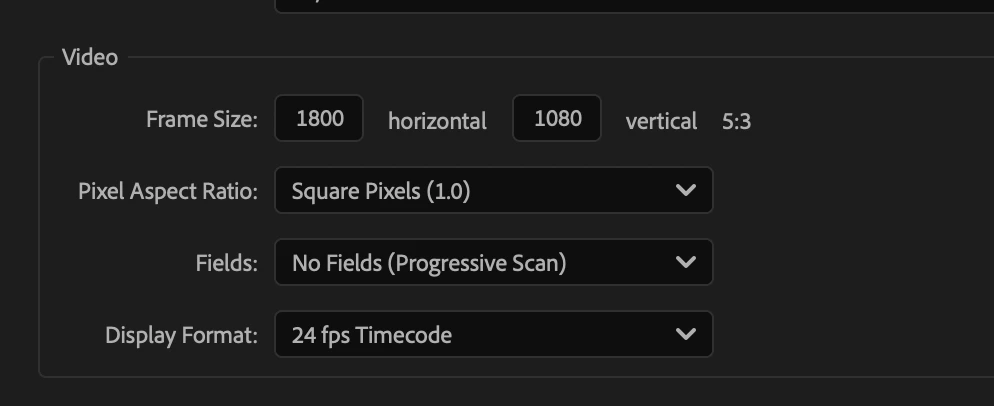
The crop tool in Adobe Photoshop has the option to set the aspect ratio of cropping. In Premiere Pro, however, no other aspect ratios outside 16:9 are not available. When creating a new sequence, the aspect ratio is actually calculated in the UI, but you can't create a new sequence based on aspect ratio. Most people end up using PNG mattes, but this is not optimal when using non-16:9 open gate material etc.


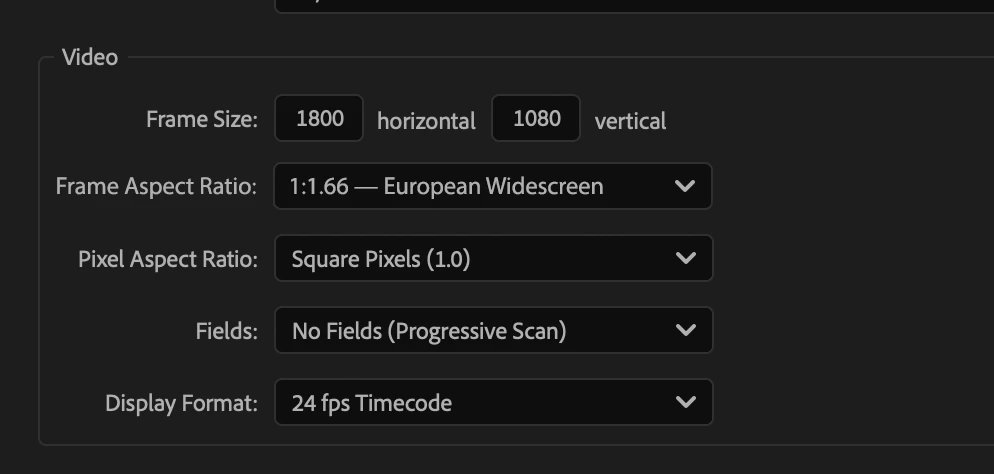
You could have an aspect ratio dropdown next to frame size fields, with the usual aspect ratios included, along with "Custom".


When you then manually enter a number to either of the frame size fields, the value for other field is calculated automatically. Yes, you can use a calculator, Google or memorize the frame sizes, but a dropdown would make it much more painless.


What you have now:
What would be optimal:
 

1 reply

Shebbe
Community Expert
Community Expert
January 13, 2025

I agree that this needs improvement. I personally think a simpler mechanism can be deployed. One that is already present in After Effects is locking the two dimensions so when one is changed the other changes proportionally.


With a frame aspect ratio dropdown menu you need to fill it's list with "industry standard" ratios that possibly need to be maintained and theoretically can become obsolete. It also doesn't provide a mechanism to use certain abitrary ratios with any resolution without precalculating it elsewhere, which the other method does.


note: technically you don't need a calculator or Google because Premiere's input fields are calculators too just like After Effect's. So if you know what ratio you want, like 5:3 with a width of 1800 you can input 1800/5*3 in the field for vertical resolution.