
Audio track appearance: display waveforms when an audio track is selected
Hi! I often do jobs when I'm manually lining up two clips from different cameras.
I'm doing the sync by eye, just looking at the waveform (and then I'll take a listen to confirm). So, I zoom in, click on a clip, and nudge it left and right till it looks about right.
One slightly annoying thing is that, when the volume of an audio track is low, the waveform is concealed by the "this clip is selected" line. Here's what I mean: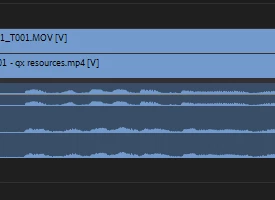
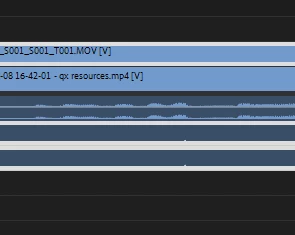
If I've inserted those images properly, the first image should show four tracks without a clip having been selected, and the second image should show what happens when you click on a clip: the waveform disappears, hidden by the highlighting, and therefore making it much more difficult to nudge into the right position so that the audio lines up.
I don't have a suggestion for the best alternative. I mean, I don't know an alternative way Premiere could indicate that a track is selected that wouldn't cause this issue (maybe change colour?).
Just hoping you guys can think of a better implementation!
 AdChoices