
Inspiring
December 21, 2023
Open for Voting

Delete Empty Tracks on Right Click

  • December 21, 2023
  • 10 replies
  • 2342 views

Make Delete Empty Tracks 


a) Available as a keyboard shortcut

b) Make it available on right click instead of a separate context window, this box could just as easiy be a couple of context menu commands instead of a separate dialog box...
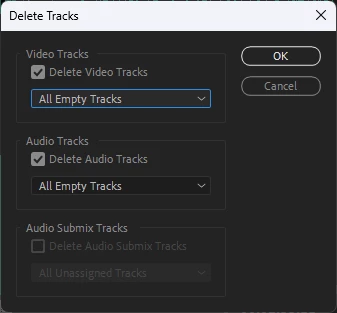
 

Add - > Delete Empty video tracks

Add - > Delete Empty Audio tracks

Add - > Delete all empty tracks  
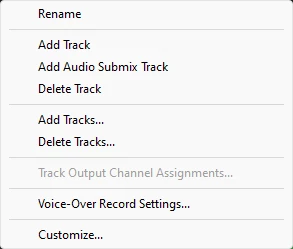
To this menu.


10 replies

Kes Akalaonu
Inspiring
December 22, 2023

Same. There's a lot of unmapped shortcuts in the keyboard shortcuts editor with names that read engineer wrote this that would greatly improve user experience.

Scott.C.Author
Inspiring
December 22, 2023

Oof. Not having my keyboard shortcuts would be brutal. Mine are a chaotic mix of FCP7, Premiere, and trying to fit as much as possible under my left hand! (Rocket Jump showed me the way on this years ago!) 


P.S. For those curious look here, an oldie but a goodie... https://www.rocketjump.com/blog/editing-at-the-speed-of-thought.


Zoom being tied to Z and Shift Z is so engrained I know immediately if my keyboard shortcuts aren't loaded.

Known Participant
December 22, 2023

I never thought of looking for a keyboard shortcut for deleting tracks. I should dig around more in keyboard settings.


Sequence presets are great too, but I hardly ever use them. I'm a freelancer and I might work on three different systems in the same week, with projects shot on different cameras, with different deliverables, different audio needs, etc. I don't use sequence presets or customize my keyboard much simply because it's not easy to share them across so many systems. I can't login to my own Creative Cloud profile or even plug in a USB on these Enterprise systems, some of which aren't even connected to the internet. It's like editing with handcuffs on.

Scott.C.Author
Inspiring
December 22, 2023

Swear that keyboard shortcut wasn't there 20 min ago. I still think the dialog box could be done away with since most of that functionality lives within a right click now.

Kes Akalaonu
Inspiring
December 22, 2023

I forgot to add that the Simplify Sequence command also removes empty tracks as well. But I'm with Ann on creating a sequence preset when you start a project or a project template that has pre-loaded sequences with the right amount of tracks you need when you initially edit. There are some variables to account for like if you are mixing mono, stereo and 5.1 audio in a timeline or require a video track to do a Track Matte Key. But I will agree that I'm not the biggest fan of seeing timelines where one track is there for the sake of very little but that's my own gripe.

Known Participant
December 22, 2023

@Ann BensIn my mind, an empty track is a useless track. I prefer a pretty tall track height, so a lot of times empty tracks are above or below the Timeline window and I find myself constantly scrolling up or down to make sure nothing undesired is happening out of view. I waste time looking in order to not waste time un-doing whatever trouble is caused later by stray clips, so maybe the problem is my own behavior!


There are several operations in Premiere that create empty tracks. I just think it is easier to add tracks than to delete uneeded ones.

Ann Bens
Community Expert
Community Expert
December 22, 2023

@Jeff Drake 

How is Premiere supposed to know which track is useful and which not.

Set up a custom sequence setting.


Stan Jones
Community Expert
Community Expert
December 22, 2023

It is also available as Sequence -> Delete tracks.

Known Participant
December 22, 2023

I like this idea. Even better, Premiere should stop creating useless tracks from the start!

Kes Akalaonu
Inspiring
December 22, 2023

 It's there in the keyboard shortcuts editor from what I see